

Displaying the Slow Moving Accounts
Last updated:
If you have inactive customers who haven’t purchased from you in a long time and wish to contact them for special offers or other reasons, you can identify their accounts by reviewing the slow-moving accounts from the sales report.
Displaying the Slow Moving Accounts
- Go to the Sales module.
- Open the “Sales Report” page.
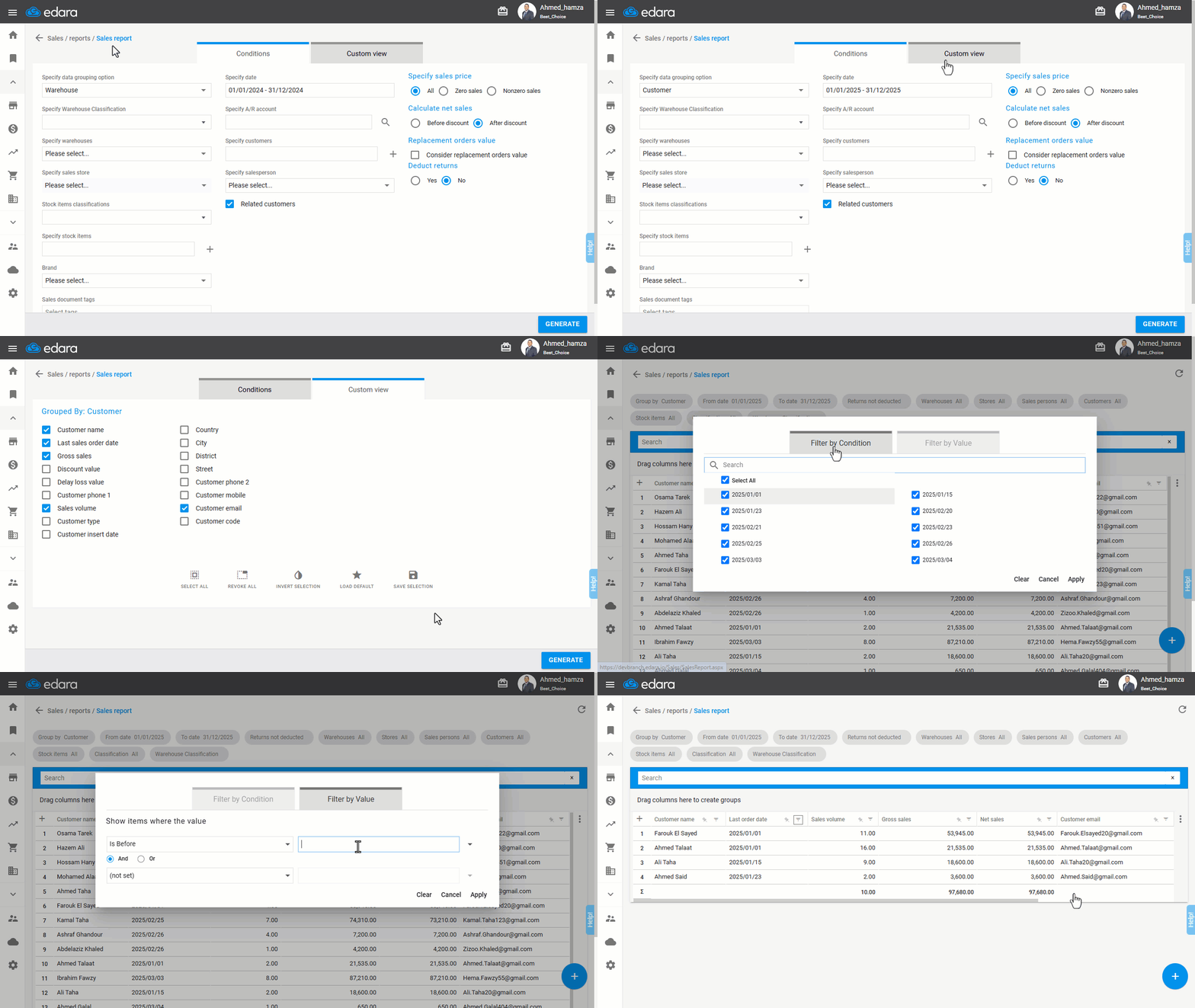
- Specify the data grouping option to: "Customer".
- Select the time period for which you want to view the report results.
- Go to "Custom View".
- Make sure to display the following columns: (Customer name - Last sales order date).
Note: You can also display the “Customer phone” and “Customer email” columns to easily identify customer contact details.
- Click on "Generate".
- Click on "
 " in the "Last order date" field.
 - Click on "Filter by condition".
- Choose the appropriate filter based on your needs (e.g., view accounts of customers who haven't purchased from you before a specific date).
If you encounter any challenges or have questions during these processes, you can contact our technical support team, who are ready to assist you at any time.
Did this answer your question?