

Viewing the Journal Entry Page from the Account Ledger Report
Last updated:
When reviewing accounts, you may need to track the details of a specific transaction within the account ledger and view the associated journal entry.
You can do this by following these steps.
Viewing the Journal Entry Page from the Account Ledger Report
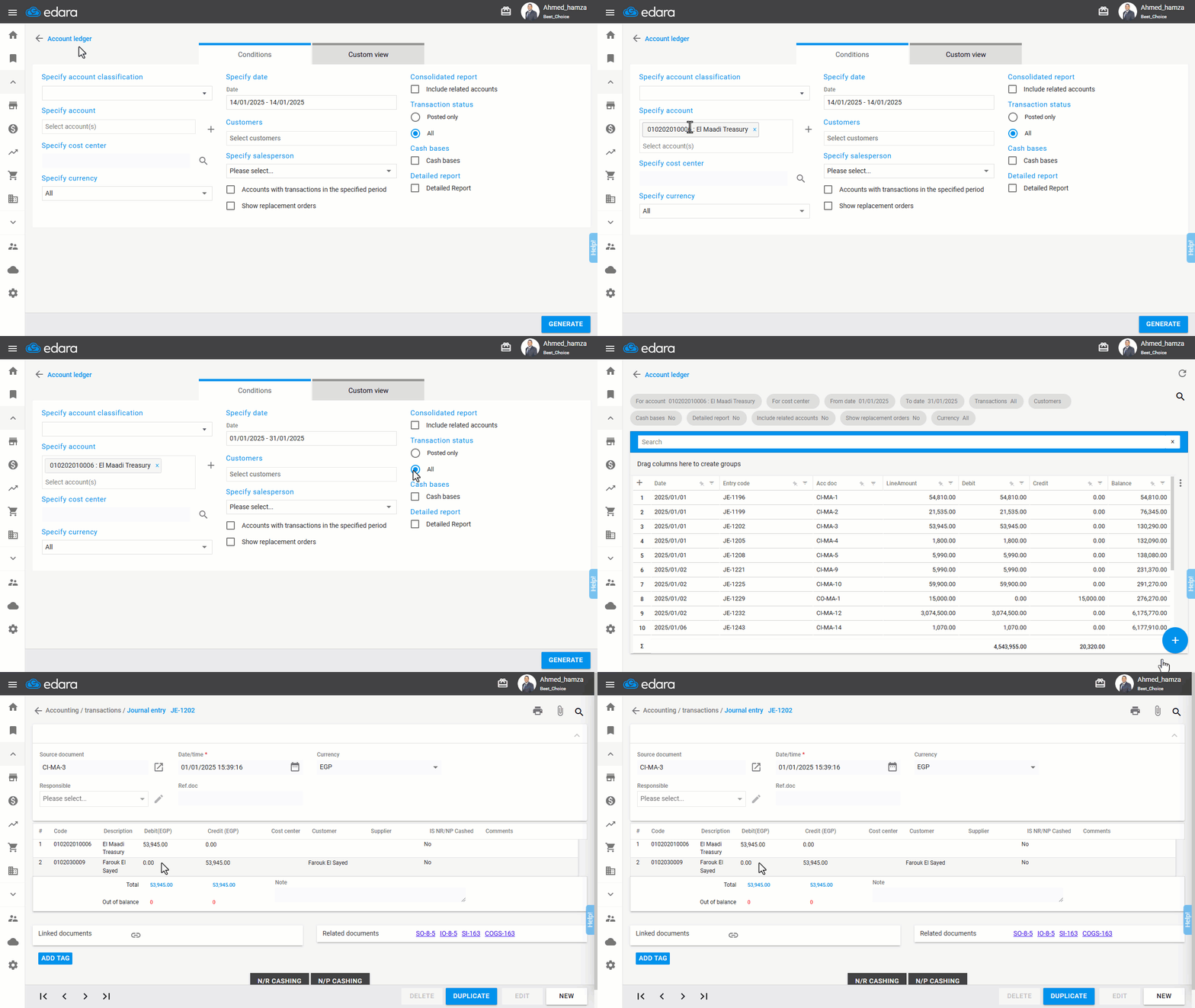
Ensure you have the required permissions for the Journal Entry page, then:
- Go to the Accounting Module.
- Select "Account Ledger Report".
- Specify the account.
- Set the period.
- Choose "All" under Transaction Status to display all movements.
- Ensure you enabled the “JE Code” from “Custom View”.
- Click "Generate."
- Double-click on the journal entry from the displayed results, and a new window will open to view it.
If you encounter any challenges or have questions during these processes, you can contact our technical support team, who are ready to assist you at any time.
Did this answer your question?