

Bulk Fulfilling of Sales Orders
Last updated:
Some businesses allow partial fulfillment in the sales order, with the remainder to be completed later when products become available. However, in some cases, the customer may request to decline the remaining items.
This requires marking the order as “Fulfilled” to ensure the remaining goods are not mistakenly delivered to the customer.
Bulk Fulfilling of Sales Orders
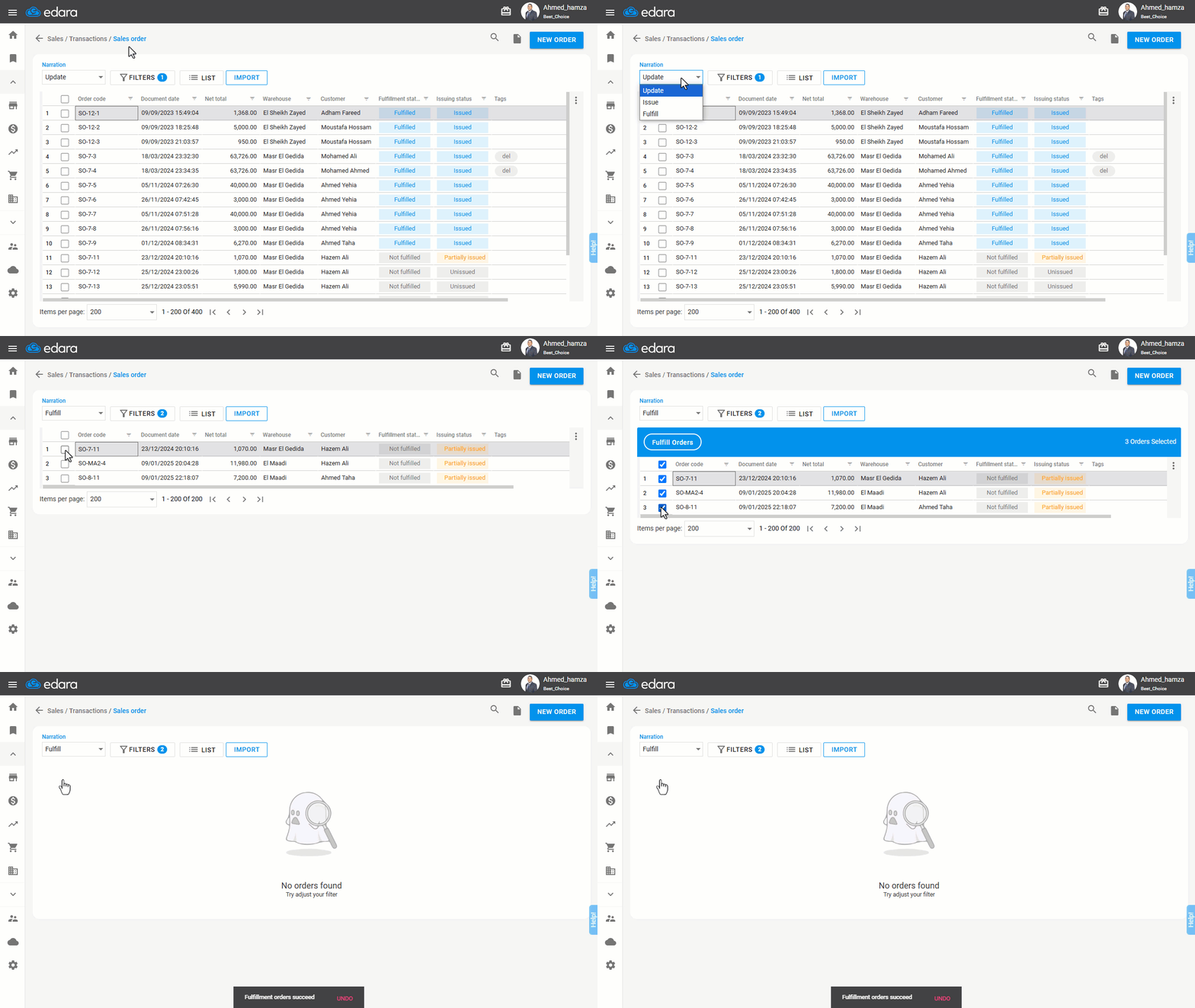
First, ensure you are displaying the Sales Order Listing Page, then:
- Choose "Fulfill" from the "Narration" menu.
Note: Sales orders with the status "Not Fulfilled" will be displayed.
- Select the orders you wish to mark as completed.
- Click "Fulfill Orders".
A confirmation message stating "Fulfillment orders succeed" will appear.
Frequently asked questions
Which orders appear when choosing “Fulfill”?
Sales orders with the status "Not Fulfilled" will be displayed.
If you encounter any challenges or have questions during these processes, you can contact our technical support team, who are ready to assist you at any time.