

Paying On Account Sales Order
Last updated:
When collecting payments from customers or third parties, such as shipping companies, a payment represents the total amount of one or more invoices within a specific period. Therefore, allocating this amount to the corresponding orders or invoices is crucial to ensure accurate payment status updates in the system.
Paying On Account Sales Order
You can record payments using one of the following three methods:
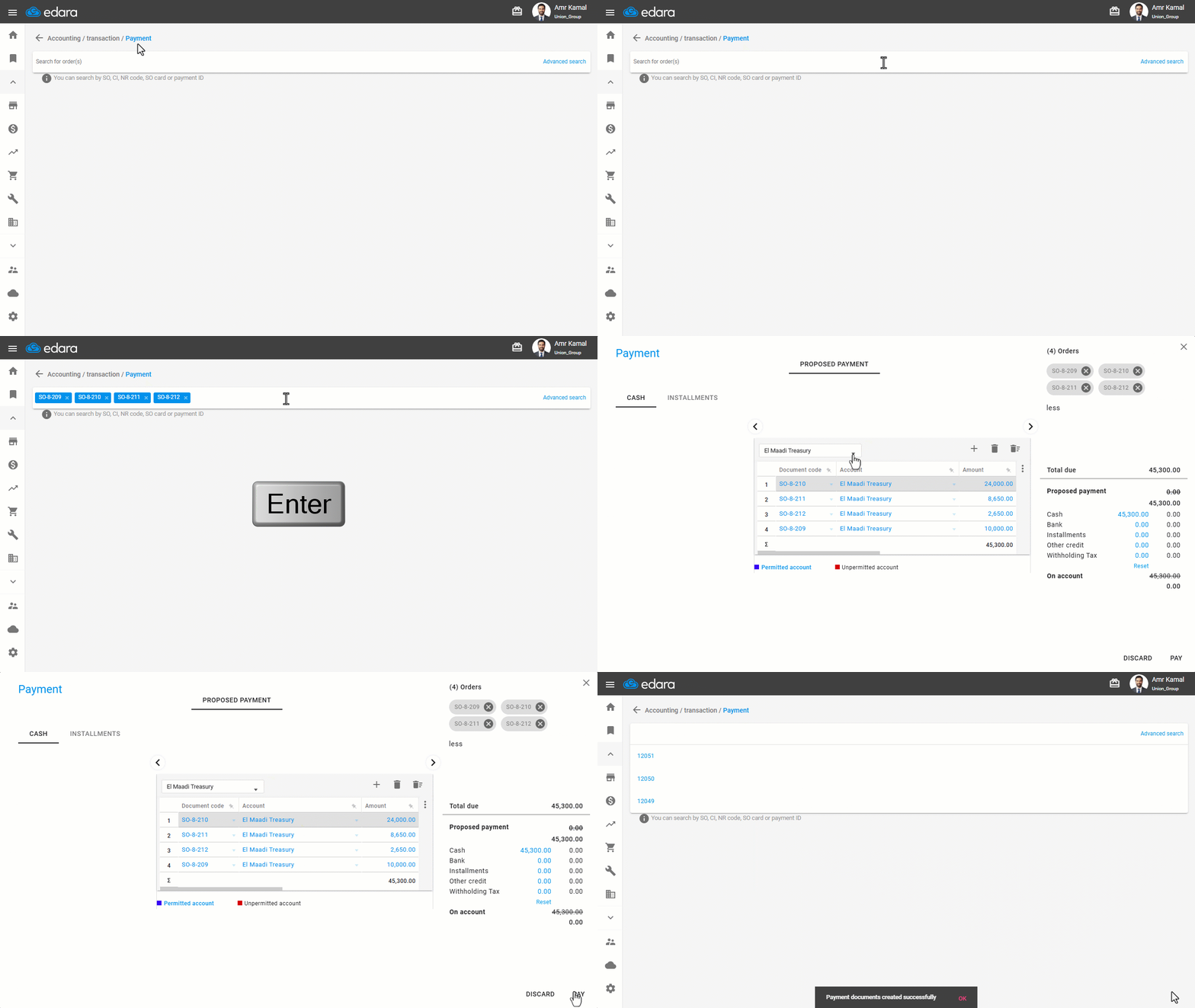
First: Paying Sales Orders by Searching with the Code
- Go to the "Accounting" Module.
- Open the "Payment" page.
- Search using the SO Code, Cash In, Notes Receivable, SO Card, or Payment ID, depending on your needs.
You can search for multiple Sales Orders at the same time by copying their codes and pasting them into the search bar.
- Press "Enter" on your keyboard.
- Select the cash/bank account for the payment, if you have the required permission.
- Enter the payment amount.
You can enter the fees amount, if applicable, and add a comment if needed.
- Click on "Pay".
Second: Paying Sales Orders Using Advanced Search
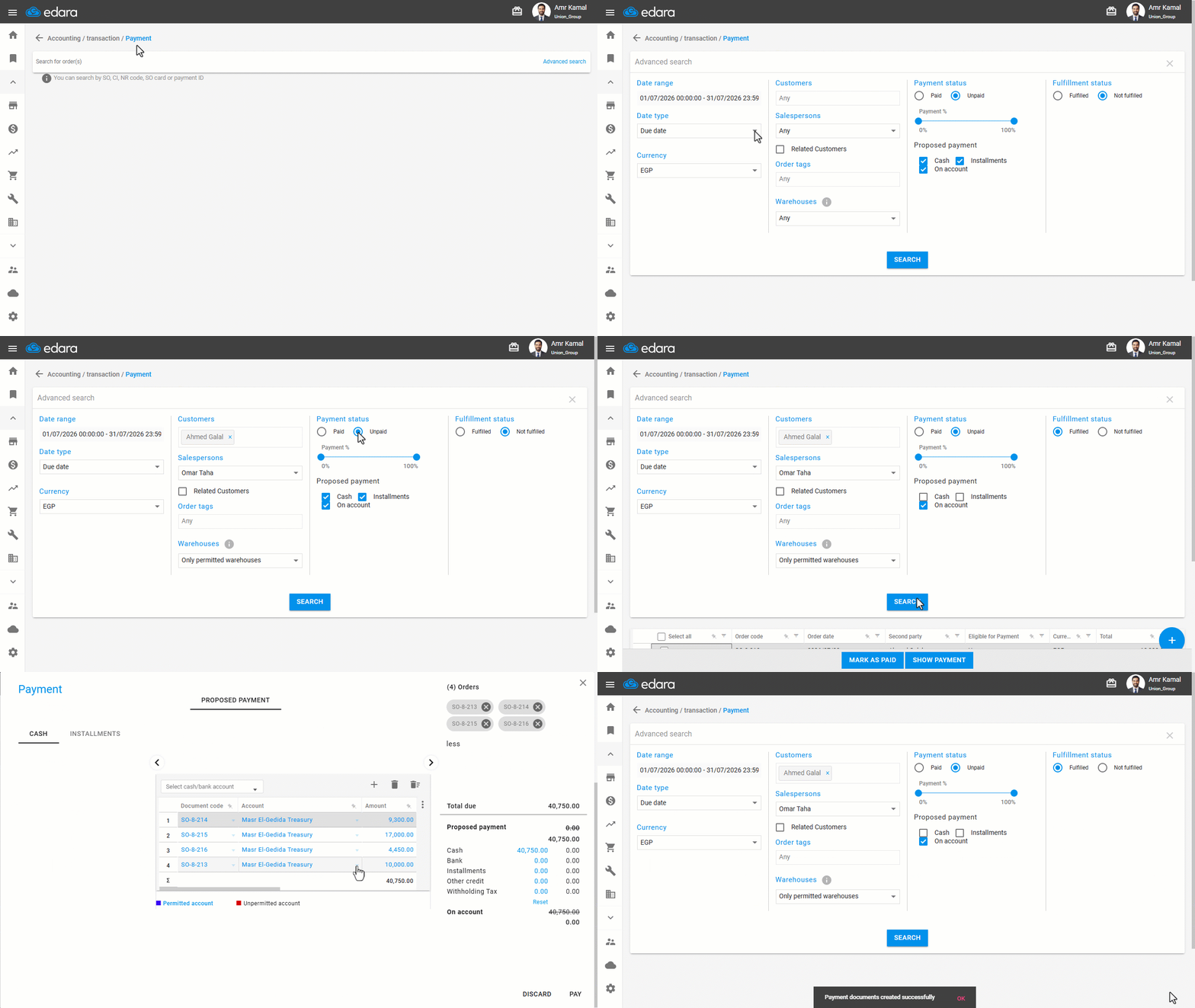
- Go to the "Accounting" Module.
- Open the "Payment" page.
- Click on "Advanced Search".
- Specify the date range ("From" - "To").
- Select the date type (Order Date - Due Date - Fulfillment date).
- Select the currency.
- Enter the customer name.
- Enter the salesperson(s), if applicable.
- Select only permitted warehouses.
- Select the payment status "Unpaid".
- Specify the payment percentage.
- Select the Proposed payment method in the Sales Order (Cash - Installments - On Account).
Note: If you select more than one payment method, only Sales Orders that include all the selected payment methods will be displayed. Sales Orders that include only one of the selected payment methods will not appear.
- Select the fulfillment status (Fulfilled - Not Fulfilled).
Note: The fulfillment status refers to Issue Offerings associated with the Sales Order. Select "Fulfilled" if all goods have been Fulfilled, or "Not Fulfilled" if the fulfillment is partial or has not been completed.
- Click on "Search".
- Select the Sales Orders you want to pay.
- Click on "Show Payment".
- Verify the account name. You can modify it if needed.
- Click on "Pay".
Note: You can change the payment date to an earlier date if you have the required permission.
Third: Paying Using a Journal Entry
You can fully or partially settle a Sales Order using a Journal Entry. This method is used when the payment is not collected directly through a cash register or bank account, such as when recording an accounting adjustment or granting an additional discount to the customer after the Sales Order has been completed.
Frequently asked questions
What does the fulfillment status mean?
The fulfillment status refers to Issue Offerings associated with the Sales Order. Select "Fulfilled" if all goods have been Fulfilled, or "Not Fulfilled" if the fulfillment is partial or has not been completed.
If you encounter any challenges or have questions during these processes, you can contact our technical support team, who are ready to assist you at any time.