

Bulk Paste Support in the Payment page
Last updated:
When paying a large number of Sales Orders with pre-known codes — such as shipping company payments — there is no longer a need to rely on advanced search filters and select each order individually.
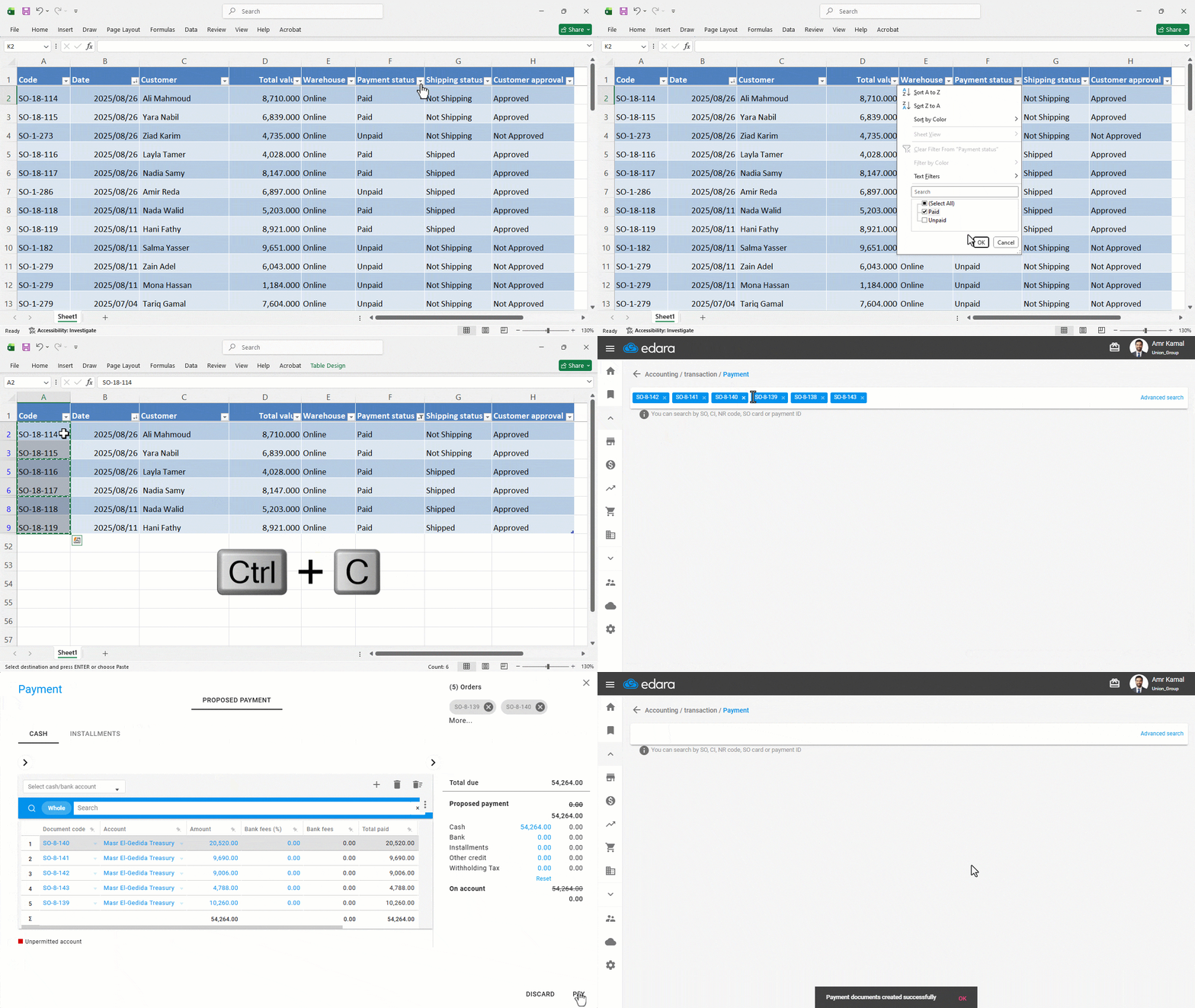
“Edara” now allows you to paste multiple document codes at once, automatically retrieving all related documents and preparing them for payment. This helps speed up payment processing and reduces manual effort.
Bulk Paste Support in the Payment page

- Copy the list of payment document codes from a file or report.
- Go to the “Accounting” module.
- Open the “Payment” page.
- Paste the copied payment document codes.
- Press “Enter” on the keyboard.
The payment documents associated with these codes will appear ready for settlement.
- Click on “Pay”.
Note: If you have permission to edit payment document dates, a message will appear to select the date.
Note: You can also enter multiple payment document codes at once from the Posting page or the Stock Item Bulk Edit page.
If you encounter any challenges or have questions during these processes, you can contact our technical support team, who are ready to assist you at any time.