

Adding Batch Number and Expiration Date for Raw Materials When Starting a Production Order
Last updated:
You can enter the batch number and expiration date for raw materials, and check their available balance before starting a production order to ensure the required quantities are available and production runs accurately.
Adding Batch Number and Expiration Date for Raw Materials When Starting a Production Order
- Go to the “Manufacturing” module.
- Open the “Production orders” page.
- Right-click on the production order you want to start.
- Click on “Start”.
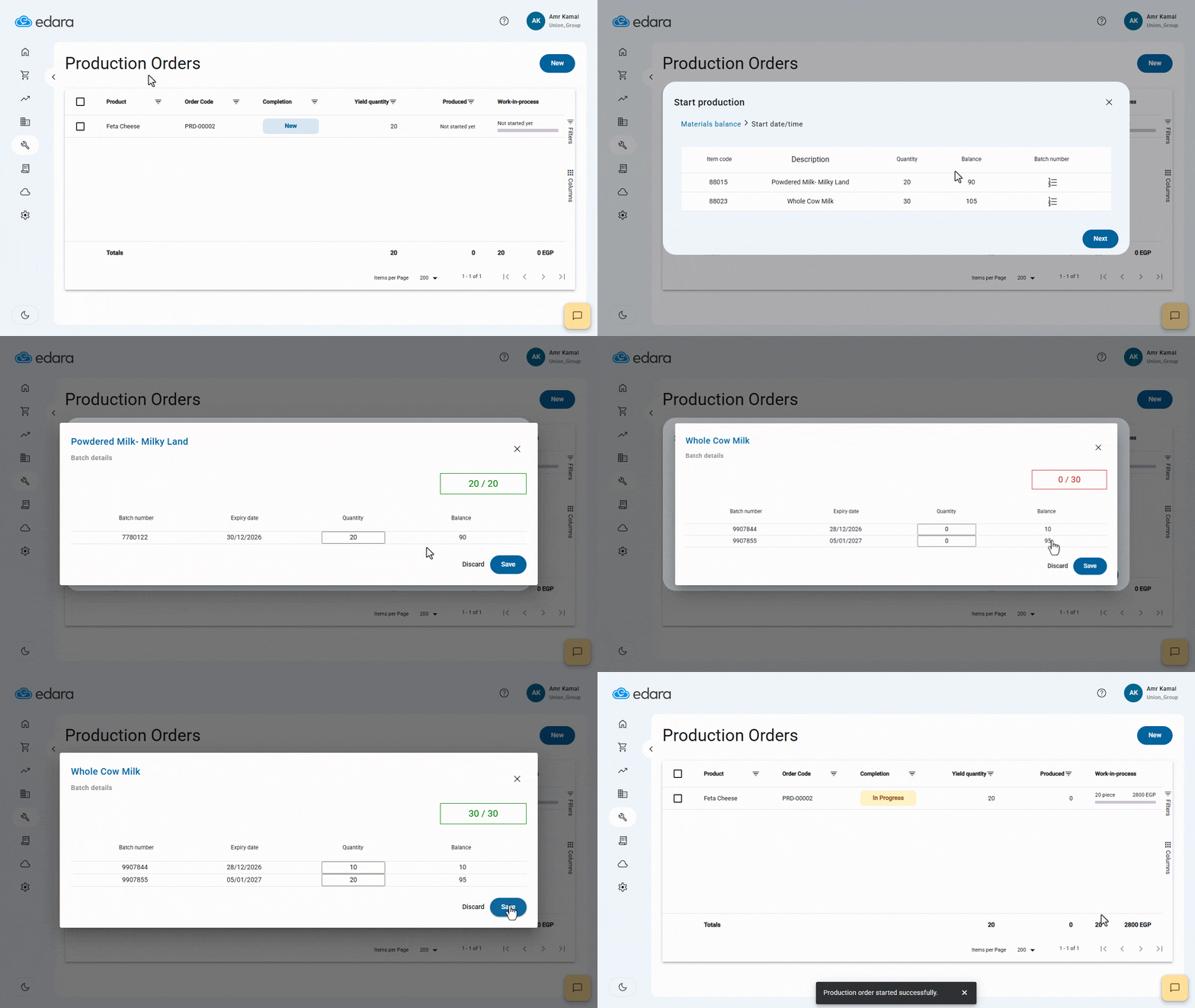
- Click on “
 ” to view the available batch balances for the raw material.
 - Enter the required quantity of the raw material to produce the product, based on the batch number, expiration date, and available quantity needed for production.
Note: A green alert appears in the top-left rectangle if the entered quantity is correct, and a red alert appears if the quantity is incorrect.
- Click on “Save”.
- Click on “Next”.
- Click on “Start” to start executing the production order.
If you encounter any challenges or have questions during these processes, you can contact our technical support team, who are ready to assist you at any time.
Did this answer your question?