

Starting and Completing a Production Order
Last updated:
After creating a production order, you need to start the order to issue the raw materials used in production, then complete it after production is finished to add the finished product to inventory. The related work orders are automatically recorded against the production order.
Starting and Completing a Production Order

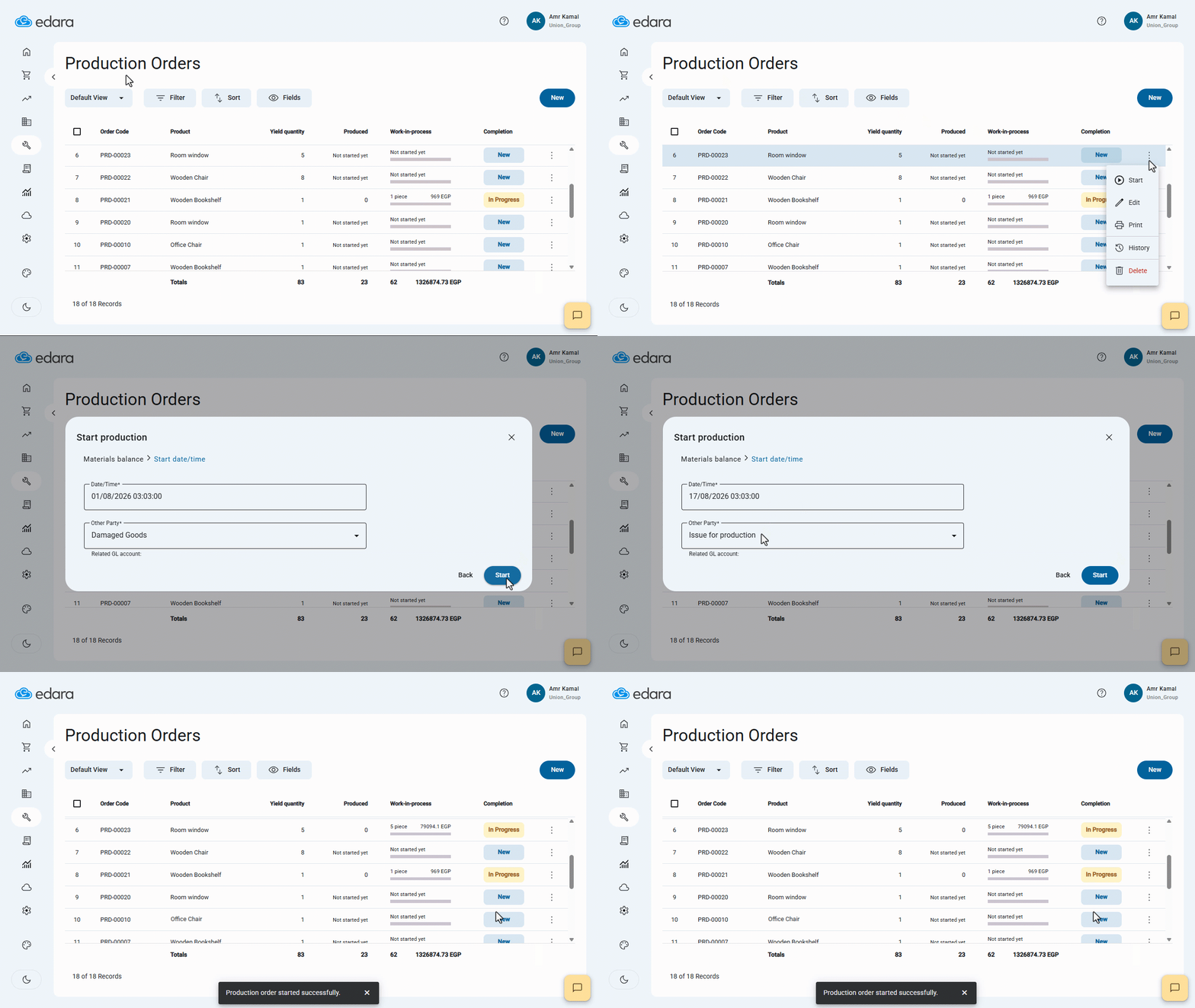
1. Starting a Production Order
- Go to the “Manufacturing” module.
- Open the “Production Orders” page.
- Click on “⋮” next to the required production order.
- Click on “Start”.
- Click on “Next”.
- Select the start date.
- Select the other party.
- Click on “Start”.
The system will automatically create an (IO) document for the raw materials used in the production order, issuing them from their designated warehouse. A message confirming that production has started successfully will then appear.
If any of the raw materials use batch numbers, a window will appear, allowing you to select the batch number to be issued from the quantities currently available in the warehouse.
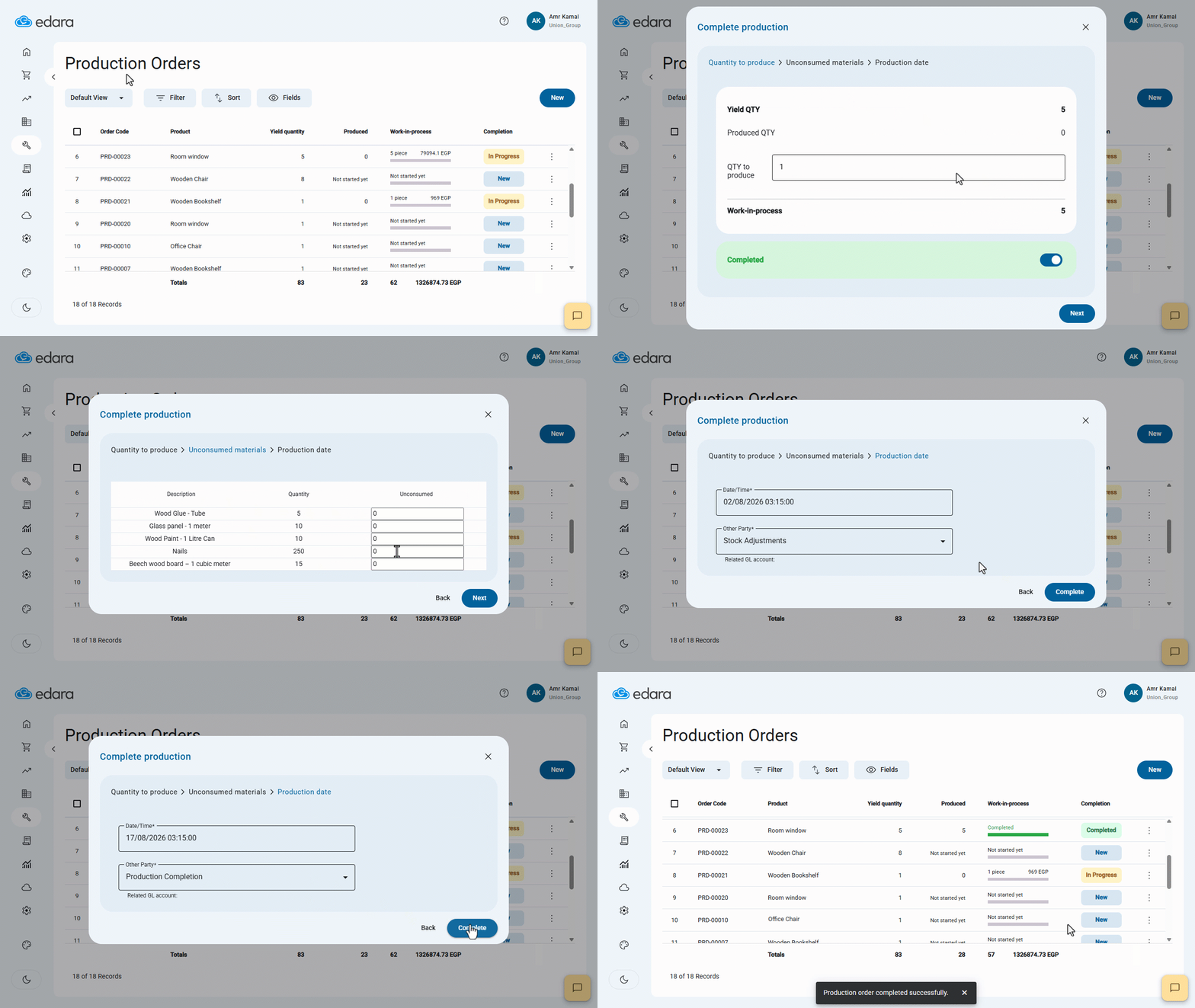
2. Completing a Production Order
- Click on “⋮” next to the production order you started.
- Click on “Complete”.
- Enter the production quantity (QTY to produce).
- Click on “Next”.
- Enter the unconsumed quantity.
- Click on “Next”.
- Select the production date and the other party.
- Click on “Complete”.
The system will automatically create an “RS” document for the finished product. The cost of the finished product is calculated based on the actual cost of the issued raw materials, in addition to any other costs associated with the production order.
If the finished product uses batch numbers, a window will appear for you to enter the batch number details for the finished product.
Notes:
- When a production order is started, the system creates an (IO) document for the raw materials using the actual item cost at the time of issuance.
- The cost displayed in the production order when the raw materials list is loaded is indicative and may differ from the actual raw material cost at the time of issuance.
- When completing a production order, the system creates an (RS) document for the finished product. The finished product cost is calculated based on the cost of the issued raw materials, in addition to any other costs associated with the production order.
- The system automatically links the IO and RS to the production order through the reference number. The link between the two documents is also displayed under "Related Documents", making it easier to review and track the transactions related to the production process.
- The other party specified when starting production and the other party specified when completing it must be linked to the same account.
- Bulk start or completion is not available for production orders that include raw materials or finished products using batch numbers, as each order requires selecting a batch number or entering its details separately.
- When reviewing the transactions related to a production order through the "Work Orders Report", select both the raw materials warehouse and the finished products warehouse to display the Issue and Receipt of Goods documents associated with the production order.
Frequently asked questions
Can I choose a different other party when completing?
The other party specified when starting production and the other party specified when completing it must be linked to the same account.
Why does the cost shown in the production order differ from the actual cost?
The cost displayed in the production order when the raw materials list is loaded is indicative and may differ from the actual raw material cost at the time of issuance.
If you encounter any challenges or have questions during these processes, you can contact our technical support team, who are ready to assist you at any time.