

Creating a Production Order
Last updated:
To manage the production process effectively in the system, you can create production orders to ensure tasks are carried out in an organized and accurate way.
Creating a Production Order
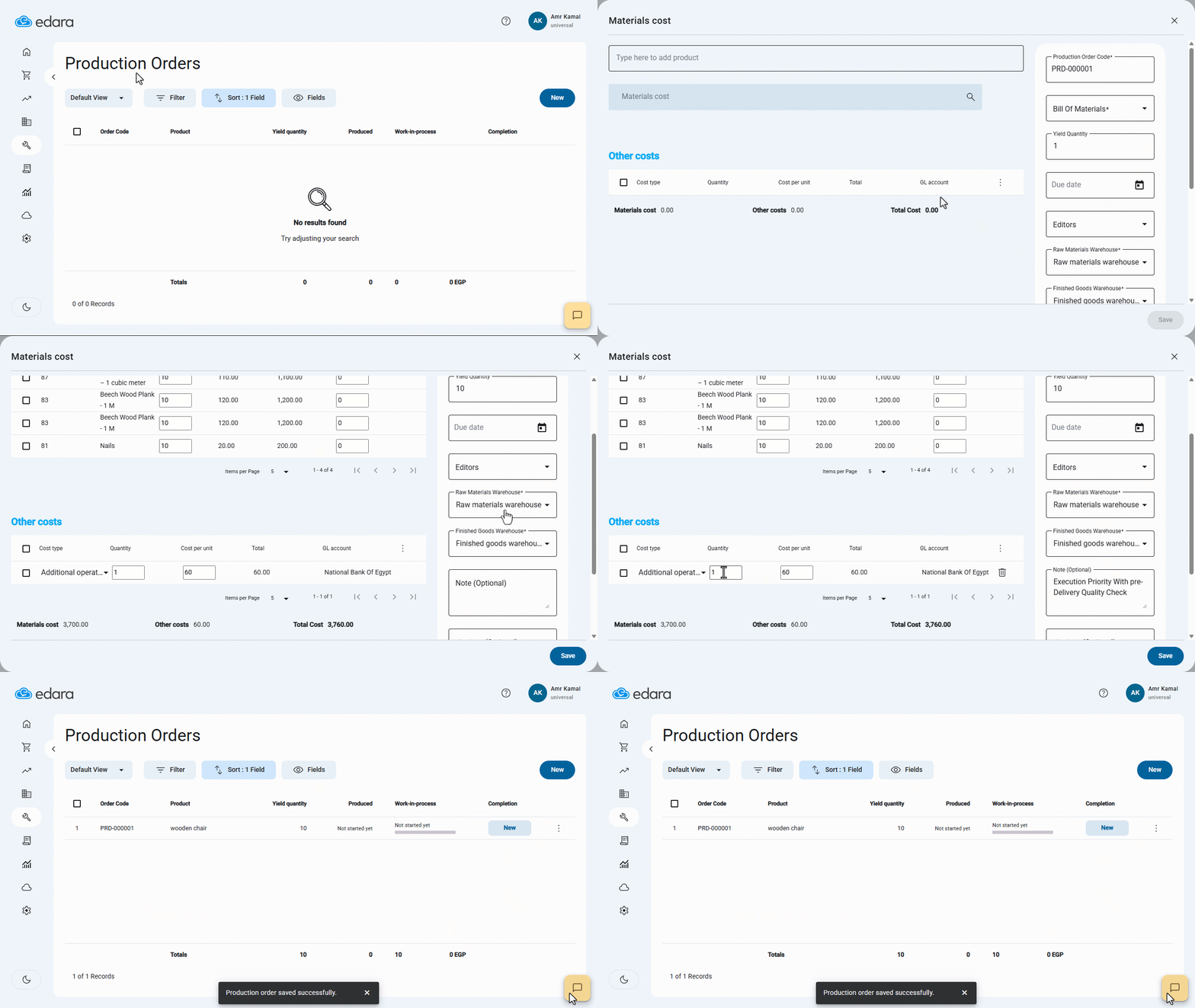
- Go to the “Manufacturing” module.
- Open the “Production Orders” page.
- Click on “New”.
- Click on “More Options”.
- Search for the Product by typing part of the name.
Note: The system automatically retrieves the default Bill of Materials (BOM) for the product, and you can choose a different one if needed.
- Enter the “Yield quantity,” which is the number of finished products required in the production order.
Note: The quantities of raw materials will automatically adjust when the product Yield quantity in the order is changed.
- Select the Raw Materials Warehouse and the Finished Goods Warehouse.
- Enter any notes or instructions you want to add in the “Note” field.
- Enter the quantity of the other costs.
- Enter the cost per unit value.
- Click on “Save”.
Frequently asked questions
Can I choose a Bill of Materials other than the default one?
The system automatically retrieves the default Bill of Materials (BOM) for the product, and you can choose a different one if needed.
If you encounter any challenges or have questions during these processes, you can contact our technical support team, who are ready to assist you at any time.
Did this answer your question?