

Undo Completing a Production Order
Last updated:
After raw materials are issued and production begins, the production order is typically marked as Completed once the required quantities have been fully manufactured. However, in some cases, the completion may be executed with incorrect details.
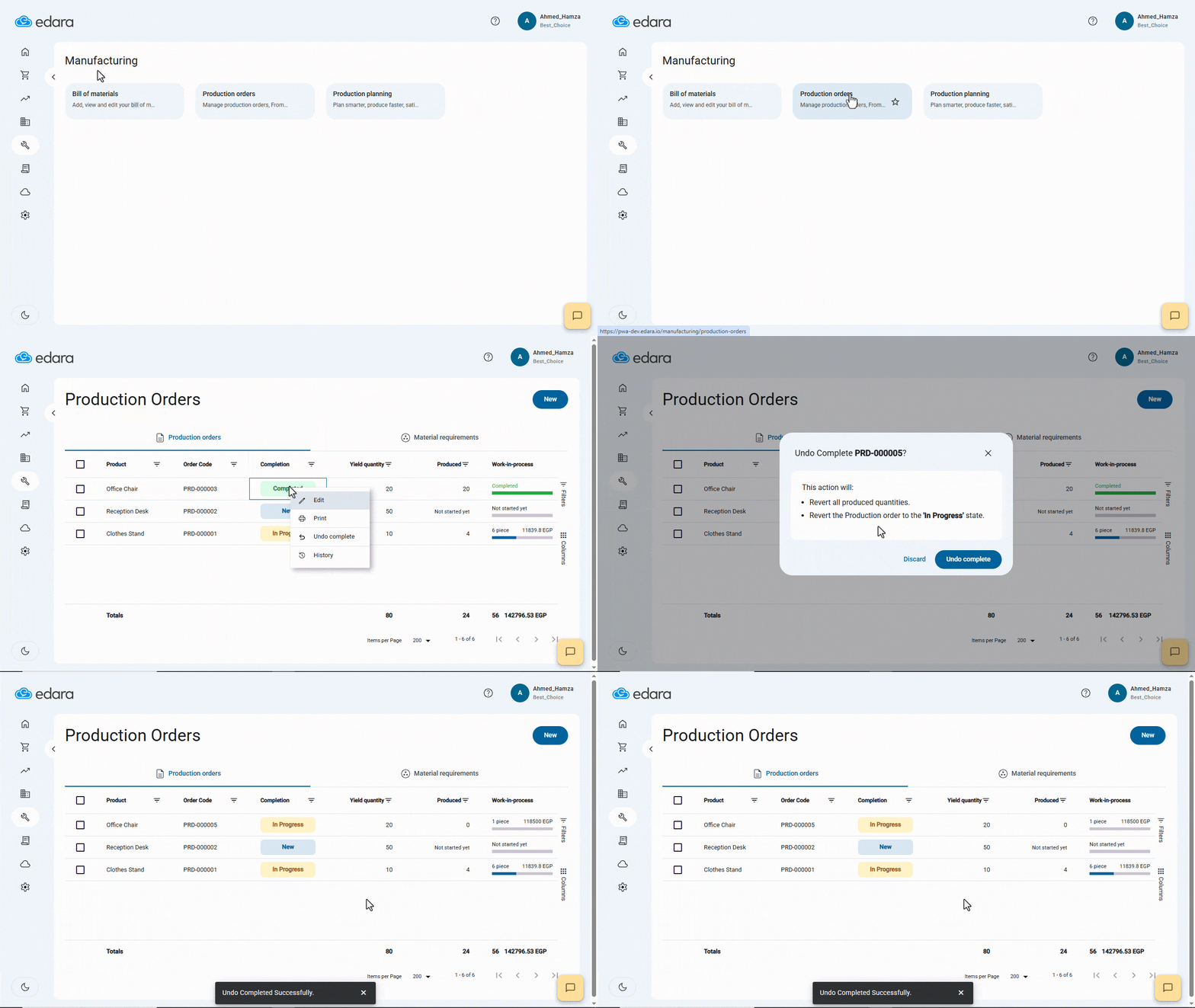
To avoid this, “Edara” provides the option to undo the completion of a production order, allowing you to cancel the completion, automatically delete the resulting document created in error, and revert the order back to its previous state—until the manufacturing process is truly finalized.
Undo Completing a Production Order
- Go to the Manufacturing module.
- Open the “Production Orders” page.
- Right-click on the production order you want to undo.
- Select “Undo Completion”.
- Confirm by clicking “Undo Completion” again.
If you encounter any challenges or have questions during these processes, you can contact our technical support team, who are ready to assist you at any time.
Did this answer your question?