

Creating a Responsible for Warehouse and Accounting Documents
Last updated:
When receiving cash from a collection agent, you can record the agent’s name as the “responsible” in the Cash-in document.
Similarly, if you work with multiple shipping companies, you can record the shipping company’s name as the responsible party in the Issue Offerings document when handing over supplies for delivery to the customer.
This helps distinguish between documents and makes them easier to locate when needed.
Creating a Responsible for Warehouse and Accounting Documents
You can create a new responsible using the quick add popup from any Work Order page or the Cash In/Out pages—whether you're creating a new document or editing an existing one—by following these steps:
- Ensure that no specific responsible is selected, and that the value in the "Responsible" field is set to "Please select".
- Click the "
 " icon next to the “Responsible” field.
 - Enter the name of the responsible you want to create.
- Click on “Save”.
Note: You can also select an existing responsible and click the " " icon to update or delete him.
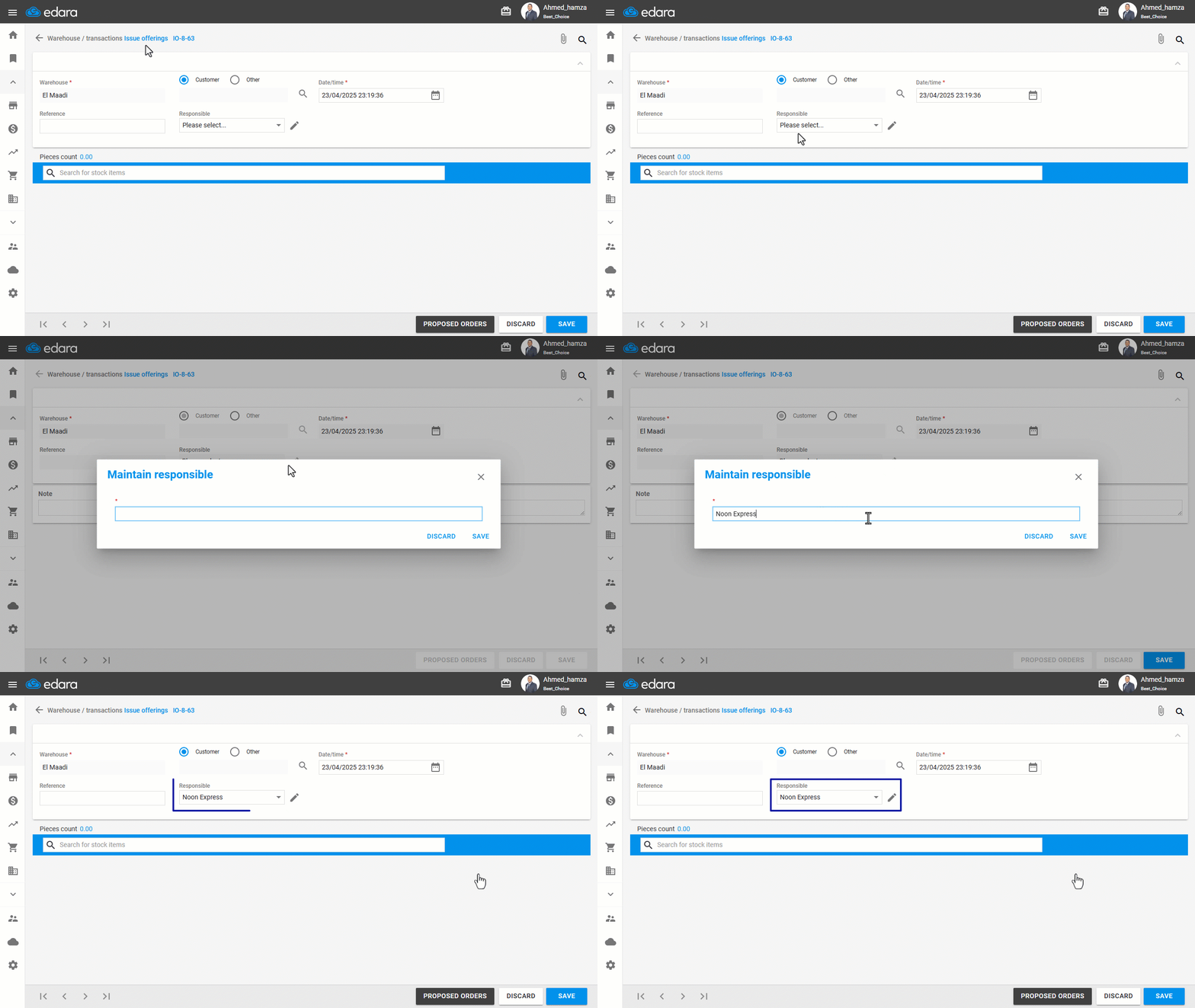
Note: When you open any of the documents mentioned above and follow the steps to add a new responsible, then save or update the document, the system will automatically link this newly added responsible to the document. However, saving the responsible in the dropdown list is not dependent on saving or updating the document itself.
If you encounter any challenges or have questions during these processes, you can contact our technical support team, who are ready to assist you at any time.