

Deleting a Document
Last updated:
If a document was created with wrong data, or if you want to delete a document for any reason, you can do so by following the steps below.
Deleting a Document
The following steps are an example of deleting a Receive Supplies document:
- Go to the Warehouse module.
- Open the "Receive Supplies" page
- Click 🔎 and type in the order code to search for it.
- Select the desired order.
- Click on "More Actions".
- Click on "Delete".
- Click "Yes" to confirm the deletion.
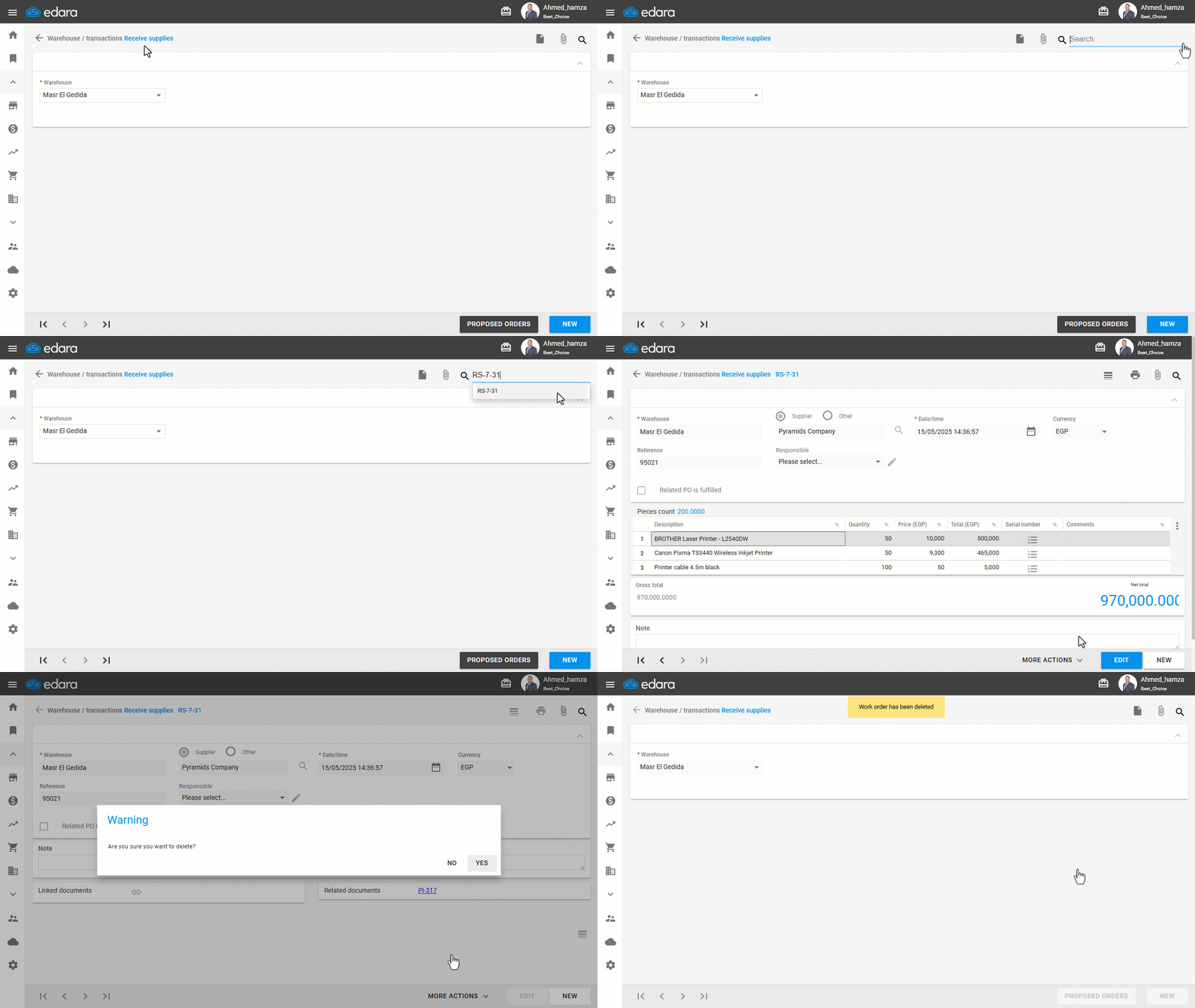
You can follow the same steps for any document you want to delete from the system.
Note: If the delete button does not appear, make sure you have the necessary permission.
Frequently asked questions
Why doesn’t the delete button appear?
If the delete button does not appear, make sure you have the necessary permission.
If you encounter any challenges or have questions during these processes, you can contact our technical support team, who are ready to assist you at any time.
Did this answer your question?