

Displaying Costs of Warehouse Documents
Last updated:
By displaying the costs of warehouse documents, you can effectively monitor and analyze the costs of warehouse transfers.
Displaying Costs of Warehouse Documents
Ensure the user has permission to view costs. Then:
- Go to the Warehouse module.
- Select “Work Orders” Report.
- Choose “Internal” work orders.
- Choose List By: “Document”.
- Check the box next to “Show total cost”.
- Specify the conditions and columns you wish to display.
- Click “Generate”.
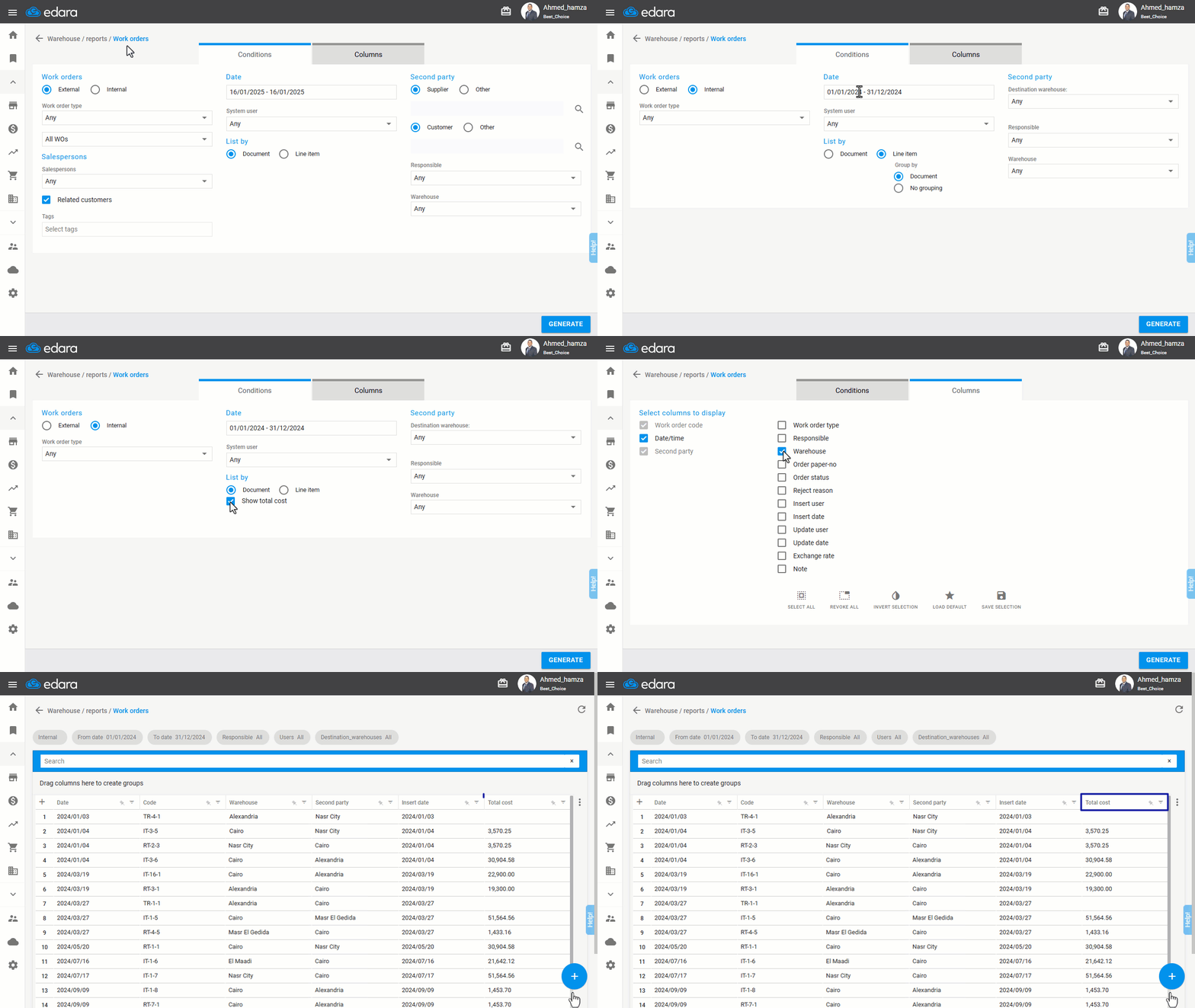
Note: This will only display the costs of warehouse transfer and warehouse receipt documents. Transfer request documents do not have associated costs.
Frequently asked questions
Are costs shown for transfer request documents?
This will only display the costs of warehouse transfer and warehouse receipt documents. Transfer request documents do not have associated costs.
If you encounter any challenges or have questions during these processes, you can contact our technical support team, who are ready to assist you at any time.
Did this answer your question?