

Viewing the Insert date and User for Stock Transfers
Last updated:
Knowing the “Insert date” and “Insert User” for each stock transfer helps identify and rectify errors quickly and efficiently.
Viewing the Insert date and User for Stock Transfers
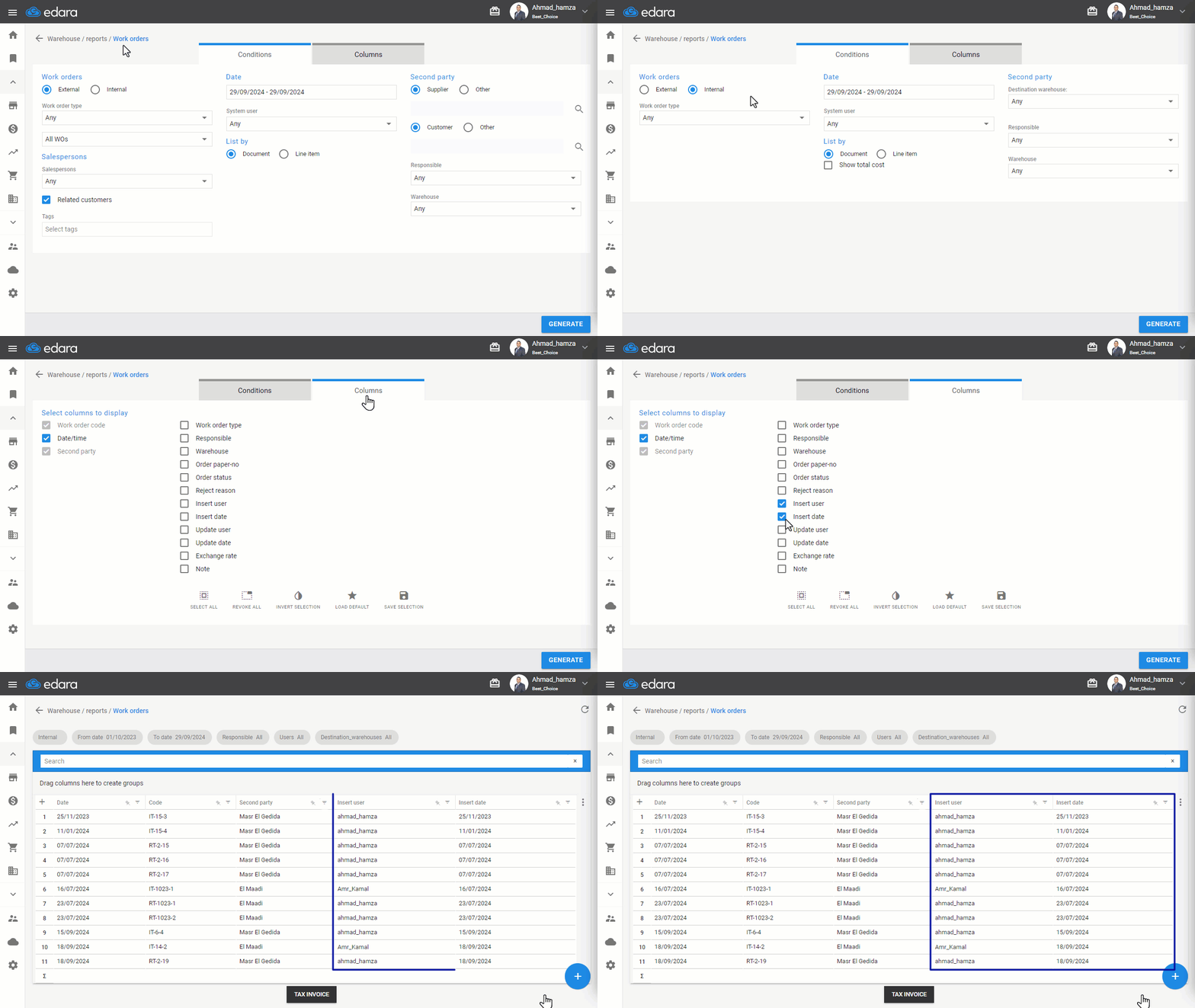
- Go to the Warehouse Module.
- Open the "Work Orders" Report.
- Select “Internal” Work Orders.
- Enter the document creation date.
- Display the "Insert User" and "Insert Date" columns by selecting them from the column settings.
- Click "Generate".
You will then see the “Insert User” and “Insert Date” for the Stock Transfer in the designated columns.
Note: It’s important to note that the "Insert Date" refers to the time the document was entered and cannot be controlled, while the "Document Date" is the date specified in the document and can be set either in the past or future.
Frequently asked questions
What is the difference between the insert date and the document date?
It’s important to note that the "Insert Date" refers to the time the document was entered and cannot be controlled, while the "Document Date" is the date specified in the document and can be set either in the past or future.
If you encounter any challenges or have questions during these processes, you can contact our technical support team, who are ready to assist you at any time.