

Viewing the Pending Balance
Last updated:
The "Warehouse Stocks Report" in Edara helps users identify the pending balance of specific stock items. This feature is particularly useful in scenarios where the system prevents selling an item due to a pending balance.
The report provides a detailed view of the exact nature of the pending balance, ensuring clarity and enabling better decision-making.
For instance, if a user attempts to sell an item but the program flags it as having a pending balance, this report will clarify the details, helping to resolve the issue efficiently.
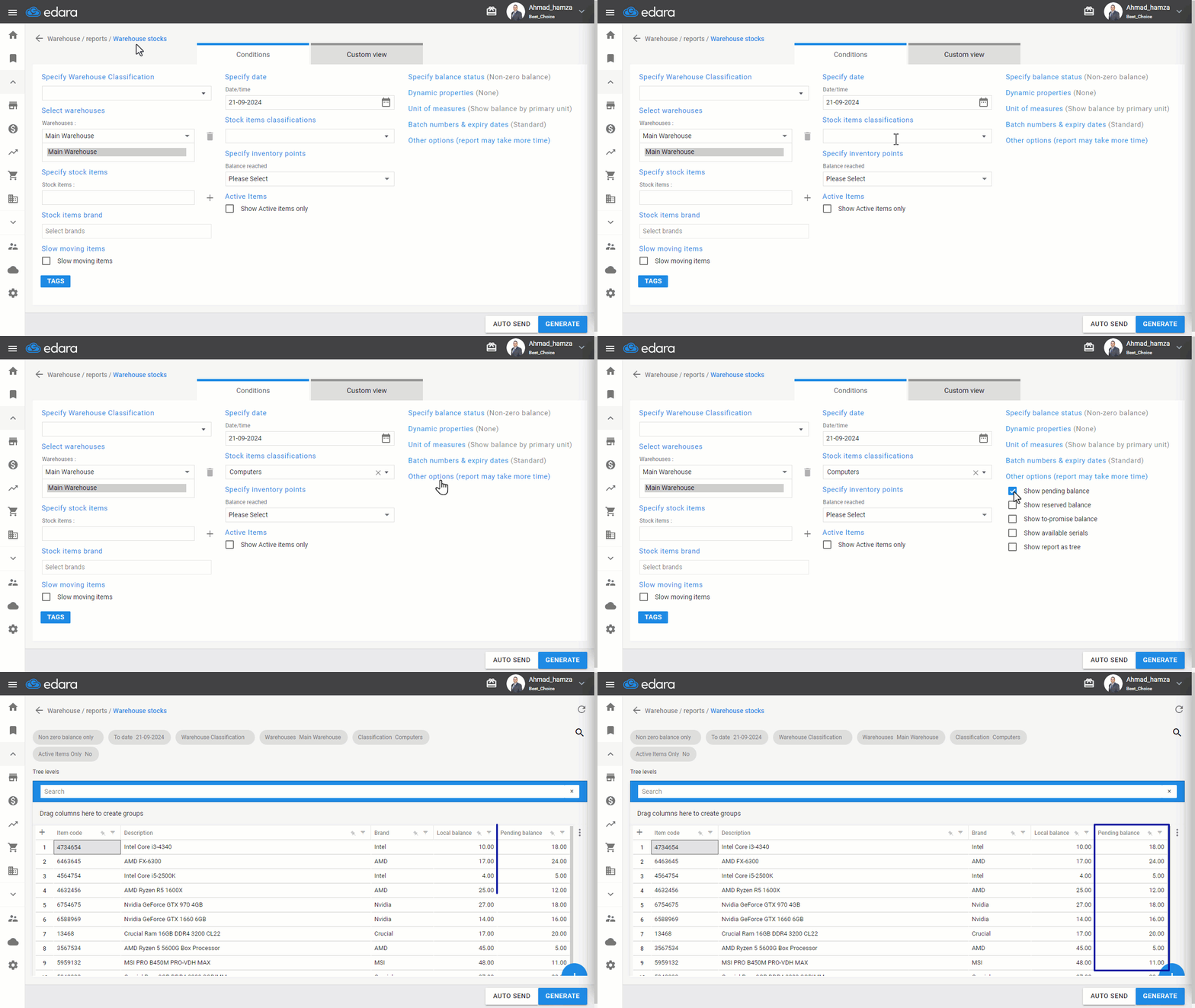
Viewing the Pending Balance
- Go to the Warehouse Module
- Select "Warehouse Stocks Report"
- Use report filters like (Stock Items – Warehouses – Classifications, etc.) to narrow your search
- Click "More Options"
- Check the box “▢” next to "Show Pending Balance"
- Press "Generate"
If you encounter any challenges or have questions during these processes, you can contact our technical support team, who are ready to assist you at any time.
Did this answer your question?