

Getting Client ID and Secret Keys from the Invoice Portal
Last updated:
After creating an account on the E-Invoice Portal, you will need to obtain your client ID and secret keys.
Getting Client ID and Secret Keys from the Invoice Portal
- Go to the “E-Invoice Portal”.
- Click on “the account name” at the top left.
- Click on “View Taxpayer Profile”.
- Click on “Taxpayer File”.
- Click on “ERP” In the “Representatives” section at the bottom of the page.
- Click on “Register ERP”.
- Enter Edara in the system name field.
- Set the data validity “Client Secret expiration”.
- Check the box “▢” to make it “🗹” in front of “Primary ERP System”.
- Click on “Register”.
At this point, the Client ID, Secret Key 1, and Secret Key 2 will be generated. You must copy these values and save them in a file to easily retrieve them whenever needed.
- Check the box “▢” to make it “🗹” in front of “I confirm that I have copied & saved the client secrets”.
- Click on “Done”.
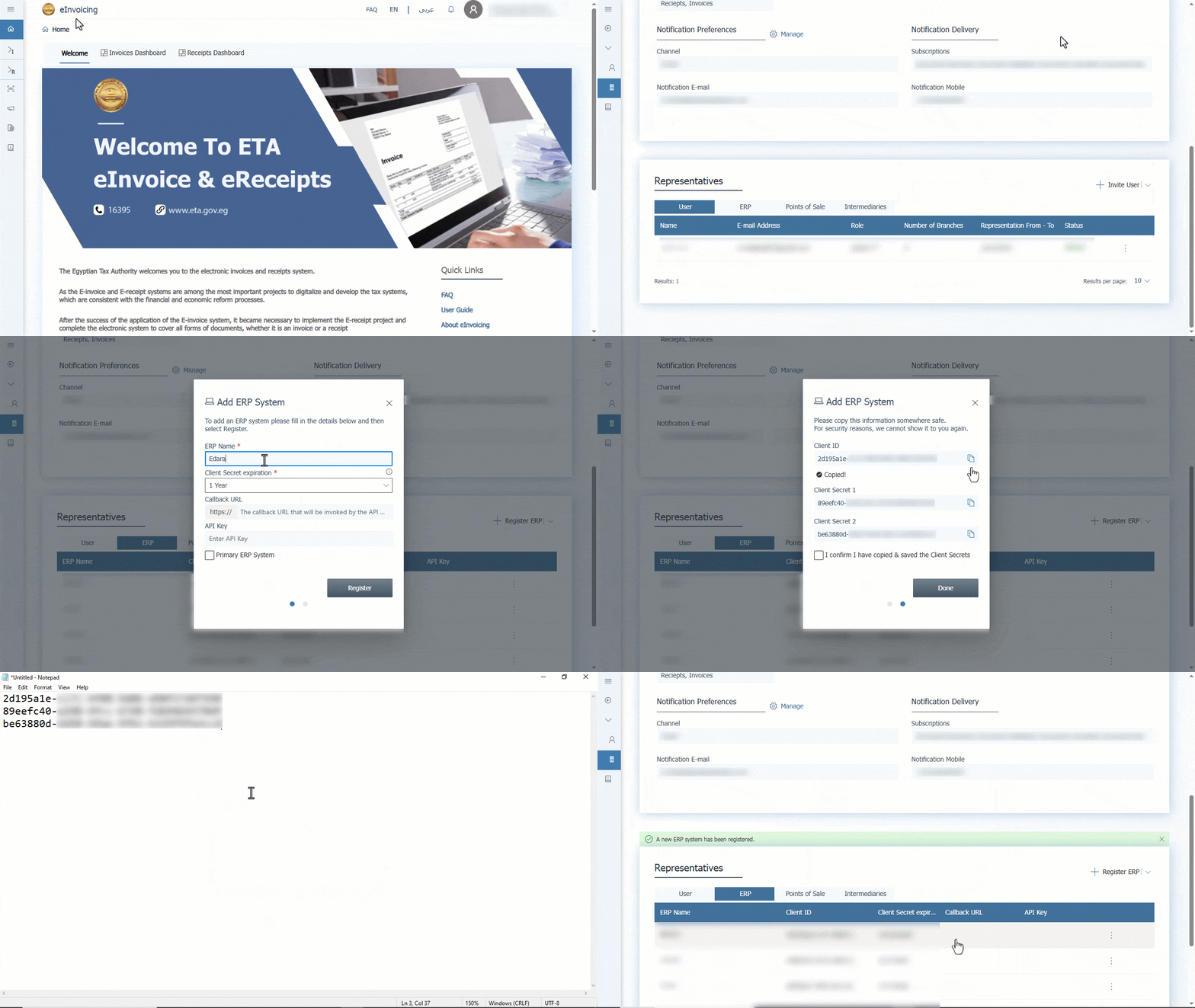
After obtaining the Client ID and Secret Keys, you can use them to complete the Integration Between "Edara" and the E-Invoice portal.
If you encounter any challenges or have questions during these processes, you can contact our technical support team, who are ready to assist you at any time.
Did this answer your question?