

Editing the Integration Settings between “Edara” and “Shopify”
Last updated:
When integrating “Edara” and “Shopify,” you may need to adjust the synchronization settings to ensure that data is transferred correctly between the two systems, whether it relates to sales orders, products, or customers. This helps you control the synchronization process and ensure that the data matches your business needs.
Editing the Integration Settings between “Edara” and “Shopify”

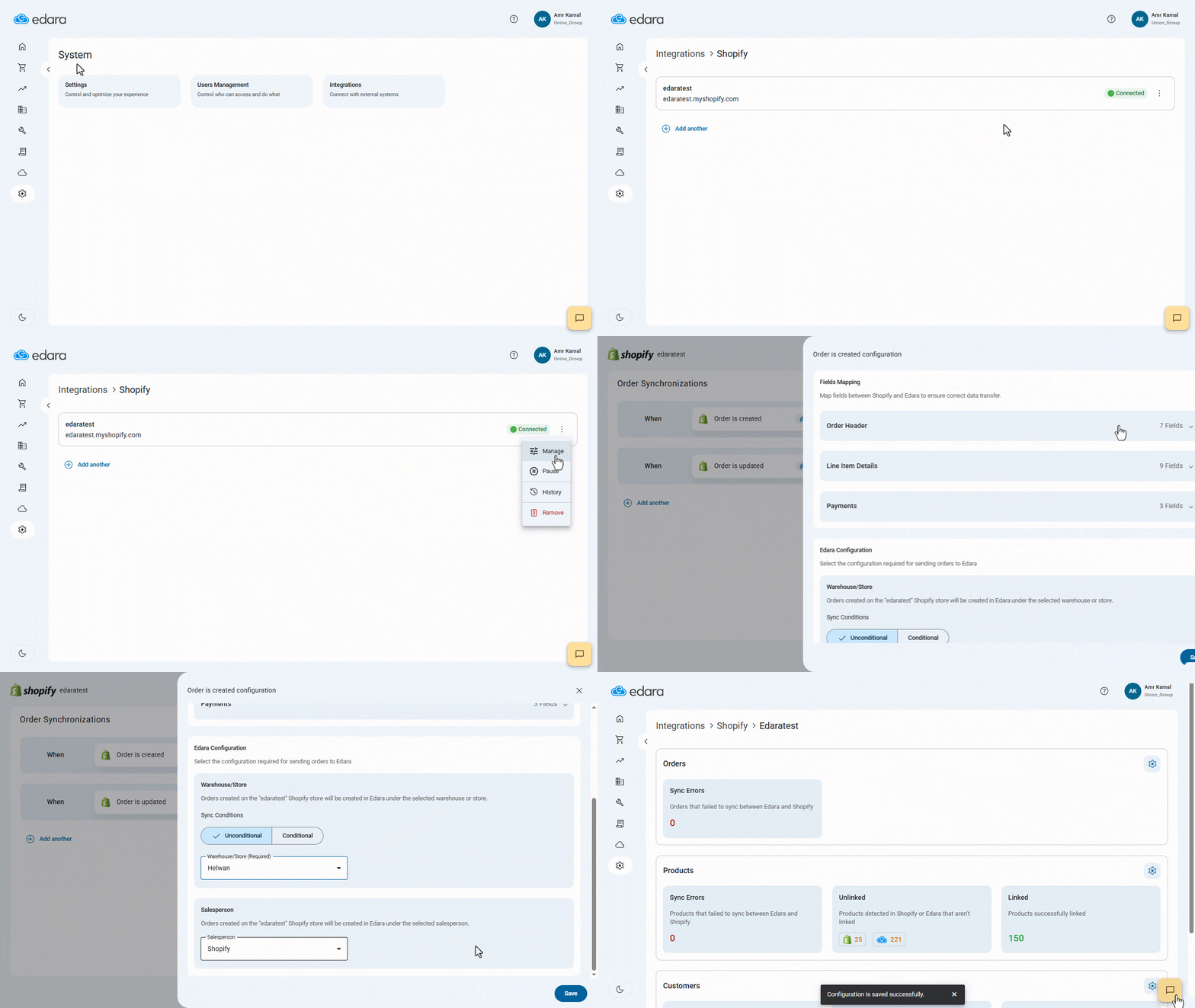
- Go to “System”.
- Open the “Integrations” page.
- Click on the “Shopify” platform.
- Click on the “⁝” icon next to the store you want to edit.
- Click on “Manage”.
The link settings page will appear, allowing you to modify settings for:
To edit the settings for any of these sections:
- Click on the "
 " icon next to the section you want to modify.
 - Click on “Save” after completing the changes.
Note: The new changes will only apply to synchronization processes carried out afterward between “Edara” and “Shopify”, while previous data will remain unchanged.
Frequently asked questions
Do the changes apply to data synced before?
The new changes will only apply to synchronization processes carried out afterward between “Edara” and “Shopify”, while previous data will remain unchanged.
If you encounter any challenges or have questions during these processes, you can contact our technical support team, who are ready to assist you at any time.