

Adding "Primary Unit" and "Ratio" Columns to the Stock Item Bulk Edit Page
Last updated:
Edara offers flexibility on the bulk item editing page by allowing you to display the main unit of the item and the ratio for units of measurement, making it easier to adjust unit prices accurately.
Learn how to display this information.
Steps to Add "Primary Unit" and "Ratio" Columns to the Stock Item Bulk Edit Page
- Go to the Warehouse Module
- Click on Stock Item Bulk Edit
- Select “Units of measures view”
- Click on Columns
- Enable “Is primary” and “Ratio” checkboxes
- Click “Generate”
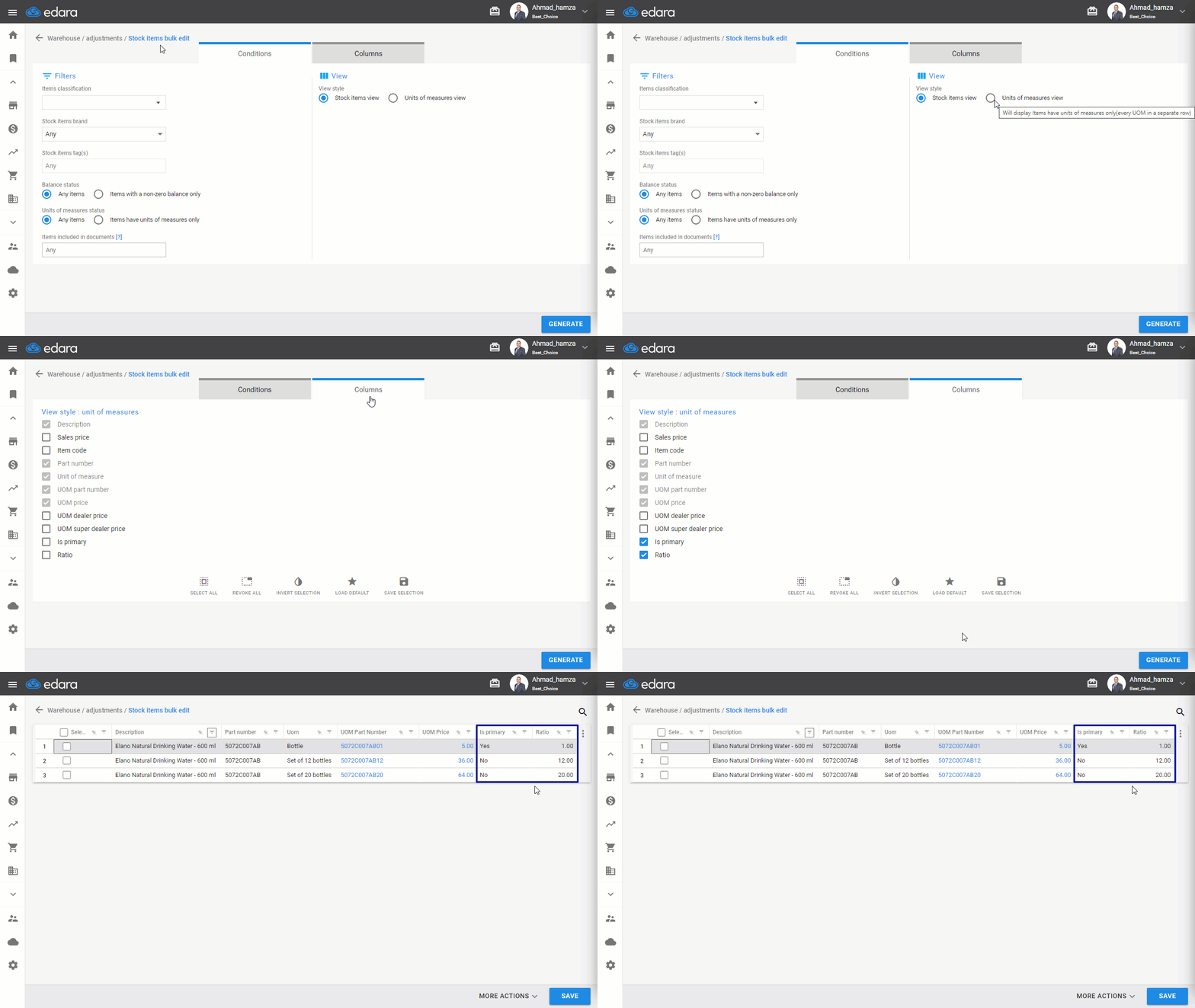
Note: The data in these two columns is read-only and cannot be edited on this page. However, displaying them is essential to ensure accurate unit pricing.
Frequently asked questions
Can I edit the "Primary Unit" and "Ratio" from this page?
The data in these two columns is read-only and cannot be edited on this page. However, displaying them is essential to ensure accurate unit pricing.
If you encounter any challenges or have questions during these processes, you can contact our technical support team, who are ready to assist you at any time.
Did this answer your question?