

Displaying the Gross Profit Report Grouped by Warehouse
Last updated:
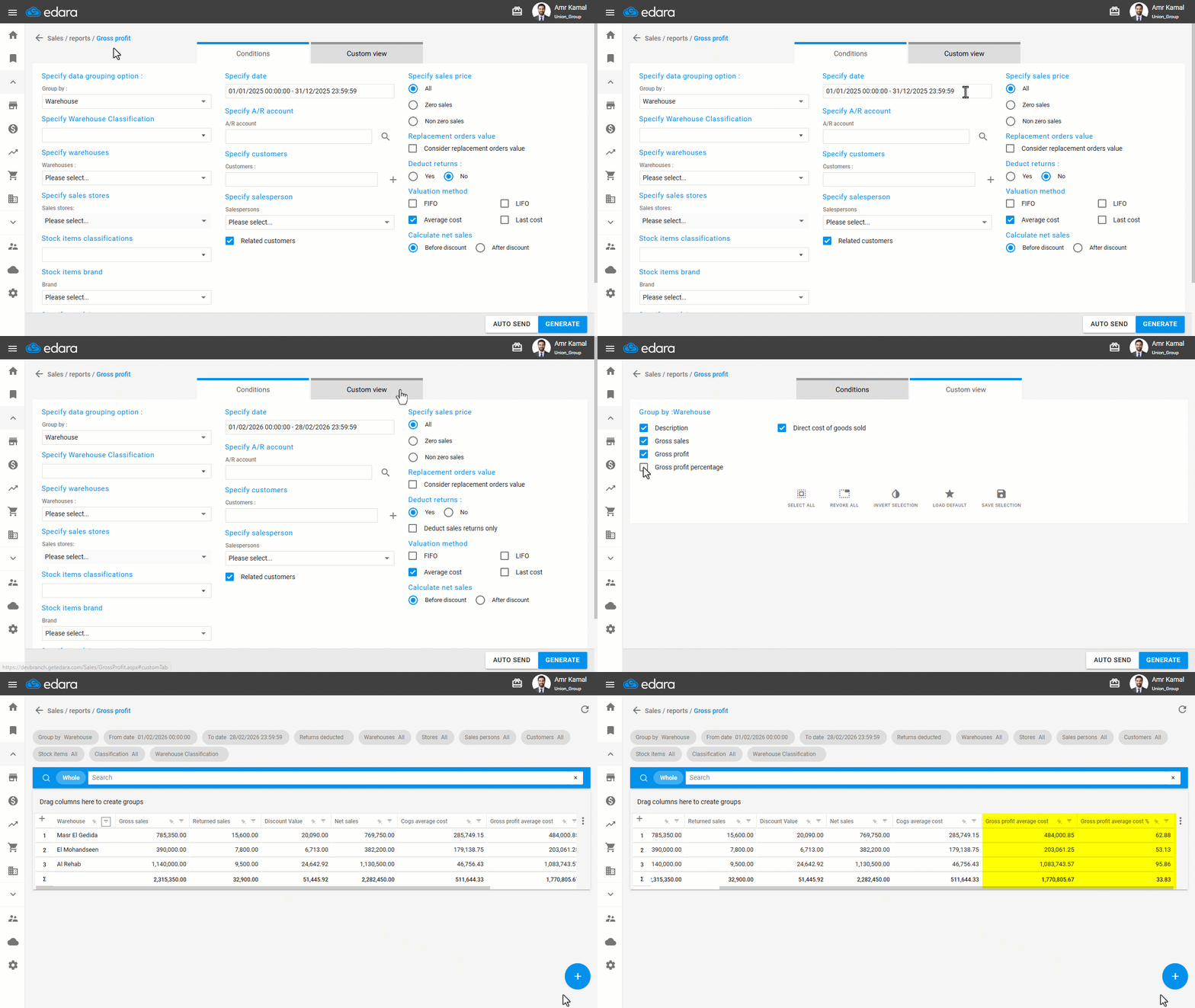
To compare warehouse performance and identify the warehouse contributing the most to profit, you can review sales and gross profit per warehouse in a consolidated view over a specific period. This makes it easier to monitor performance and make accurate operational decisions based on reliable data.
Displaying the Gross Profit Report Grouped by Warehouse

- Go to the “Sales” module.
- Open the “Gross Profit Report” page.
The default selection in Group By is the “Warehouse”.
- Specify the desired time period.
- Choose whether to deduct returns from the profit or not.
- Go to “Custom View”.
- Enable the columns you want to display in the report.
- Click on “Generate” to display the report.
Note: When the “Related Customers” option is enabled, the report displays all sales orders for customers linked to the selected salesperson, even if another salesperson created these orders. This option is used when you need to track all transactions of customers associated with a specific salesperson. If it is not enabled, the report will display only the sales orders that contain the selected salesperson.
If you encounter any challenges or have questions during these processes, you can contact our technical support team, who are ready to assist you at any time.