

Editing Salesperson Data
Last updated:
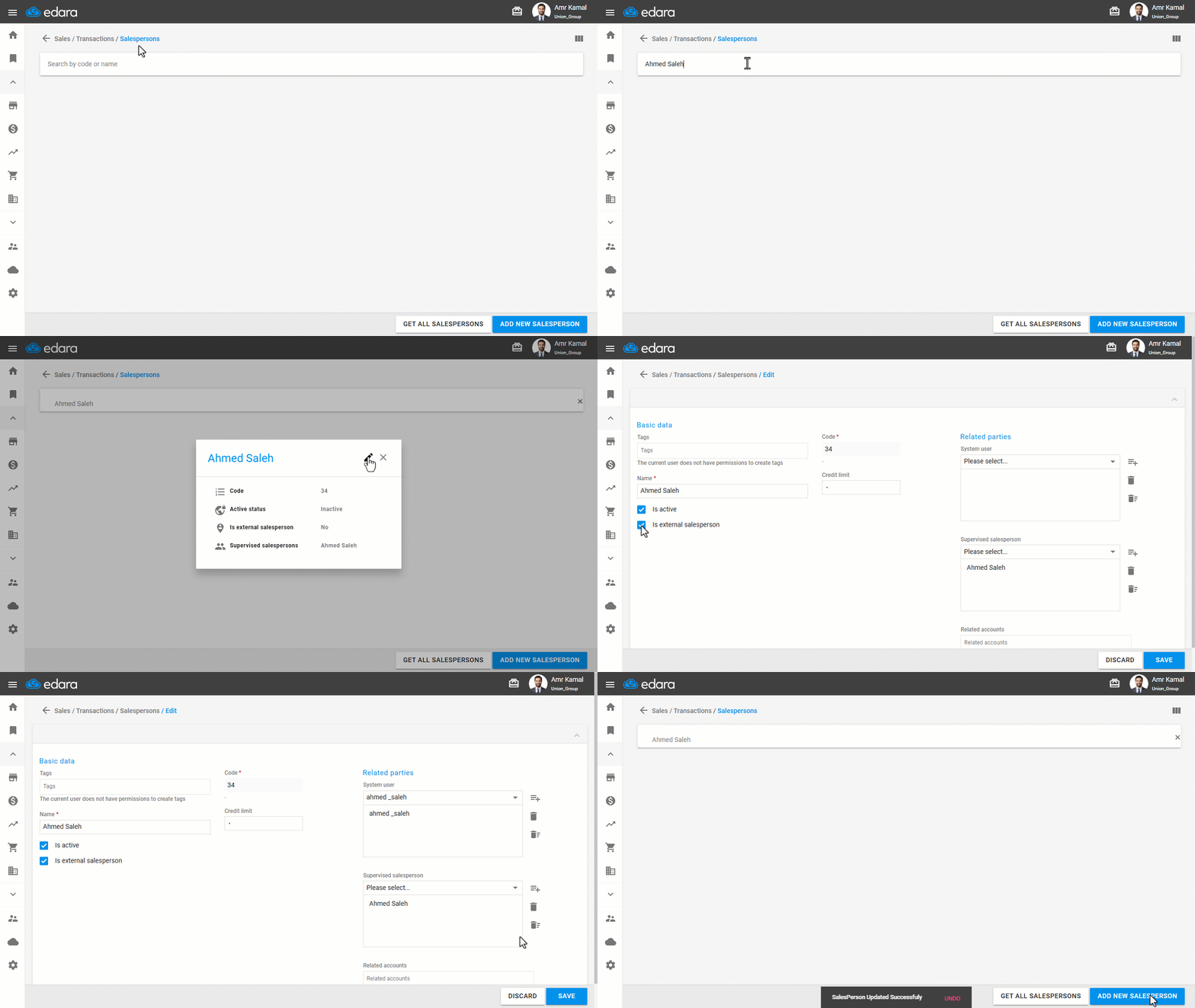
In some cases, you may need to update the Salesperson’s data, such as changing their name, linking them to a system user, or adding tags, to ensure accurate sales data and proper permission management within the system.
Editing Salesperson Data
- Go to the “Sales” module.
- Open the “Salespersons” page.
- Search for the required sales representative by code or name.
- Click on the Edit icon ”
 ”.
”. - Update the required data, which is divided into:
- Basic data: such as name, tags, credit limit, and activation options, including:
- Is active.
- Is external salesperson.
- Basic data: such as name, tags, credit limit, and activation options, including:
Note: You can enable the “External salesperson” option when dealing with non-permanent Sales persons or external parties. Once enabled, an additional list called “External salesperson” will appear in the Sales Order.
- Related parties: such as the system user, Supervised salesperson, and Related accounts.
- Click on “Save”.
Frequently asked questions
What is the “External salesperson” option for?
You can enable the “External salesperson” option when dealing with non-permanent Sales persons or external parties. Once enabled, an additional list called “External salesperson” will appear in the Sales Order.
If you encounter any challenges or have questions during these processes, you can contact our technical support team, who are ready to assist you at any time.