

Creating a Salesperson and Assigning Related Supervisors
Last updated:
Sales orders in “Edara” can be linked to specific salespersons, allowing your business to track individual performance, identify strengths and weaknesses, improve sales strategies, and ultimately achieve its targets.
Here’s how to create and assign a salesperson in the system.
Creating a Salesperson
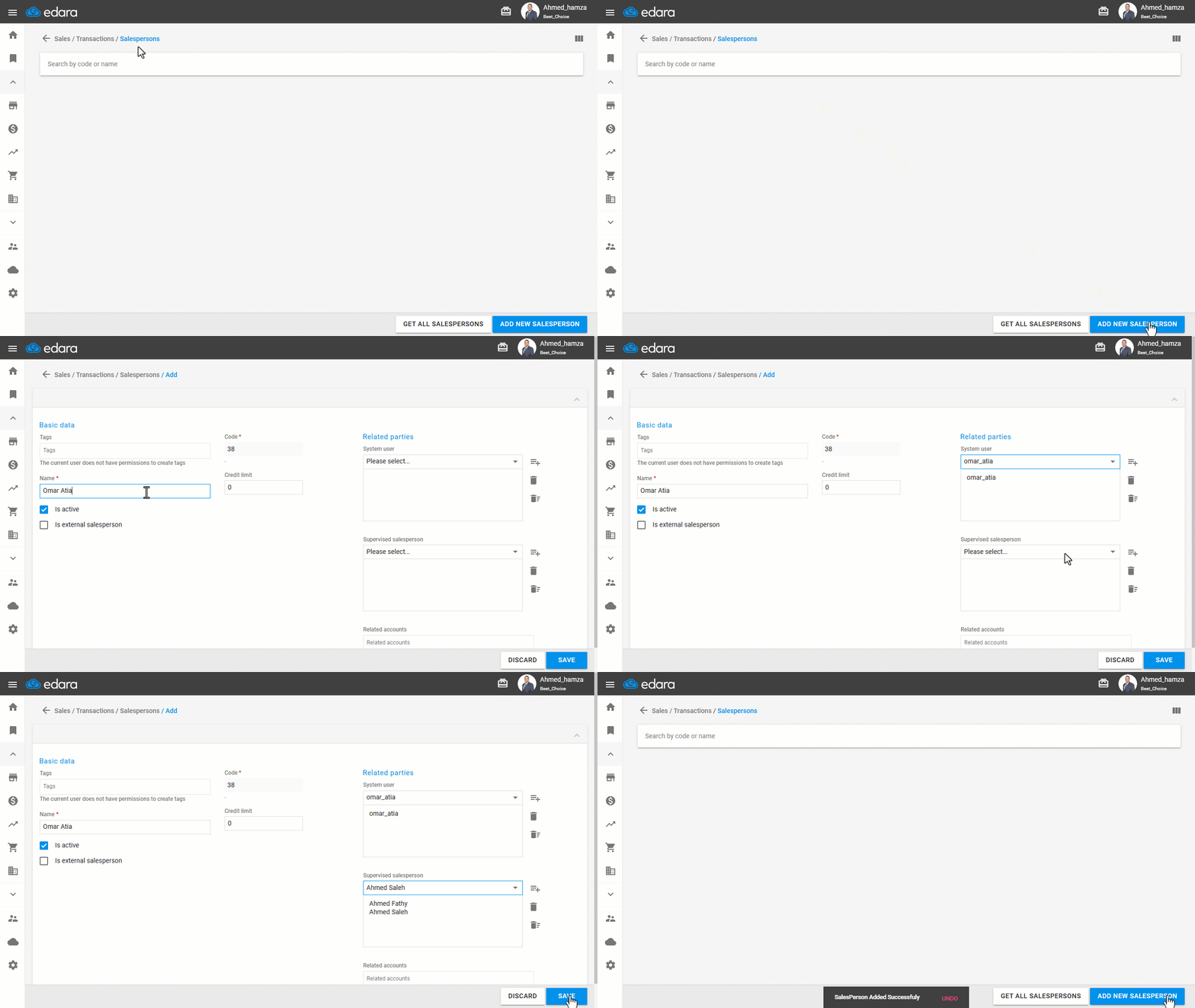
- Go to the Sales module.
- Open the “Salesperson” page.
- Click on “Add New Salesperson”.
- Enter the salesperson’s name.
Assigning Related Supervisors
- Choose the relevant user from the dropdown list.
- Assign the salesperson as a supervisor (enable this option if the salesperson manages other persons and needs to view their sales or create orders on their behalf).
- Click on “Save”.
Frequently asked questions
When should I make the salesperson a supervisor?
Assign the salesperson as a supervisor (enable this option if the salesperson manages other persons and needs to view their sales or create orders on their behalf).
If you encounter any challenges or have questions during these processes, you can contact our technical support team, who are ready to assist you at any time.
Did this answer your question?