

Linking/Unlinking a Salesperson to a User
Last updated:
“Edara” allows you to link a salesperson to a specific user. This gives the user access to all sales orders created by that responsible, making it easier to delegate permissions within the system.
Linking/Unlinking a Salesperson to a User

- Go to the Sales module.
- Open the “Salespersons” page.
- Click on “Get All Salespersons”.
- Click on the name of the salesperson.
- Click the Edit icon "
 ".
". - Choose the user or group of users you want to link to the responsible.
- Click on “Save”.
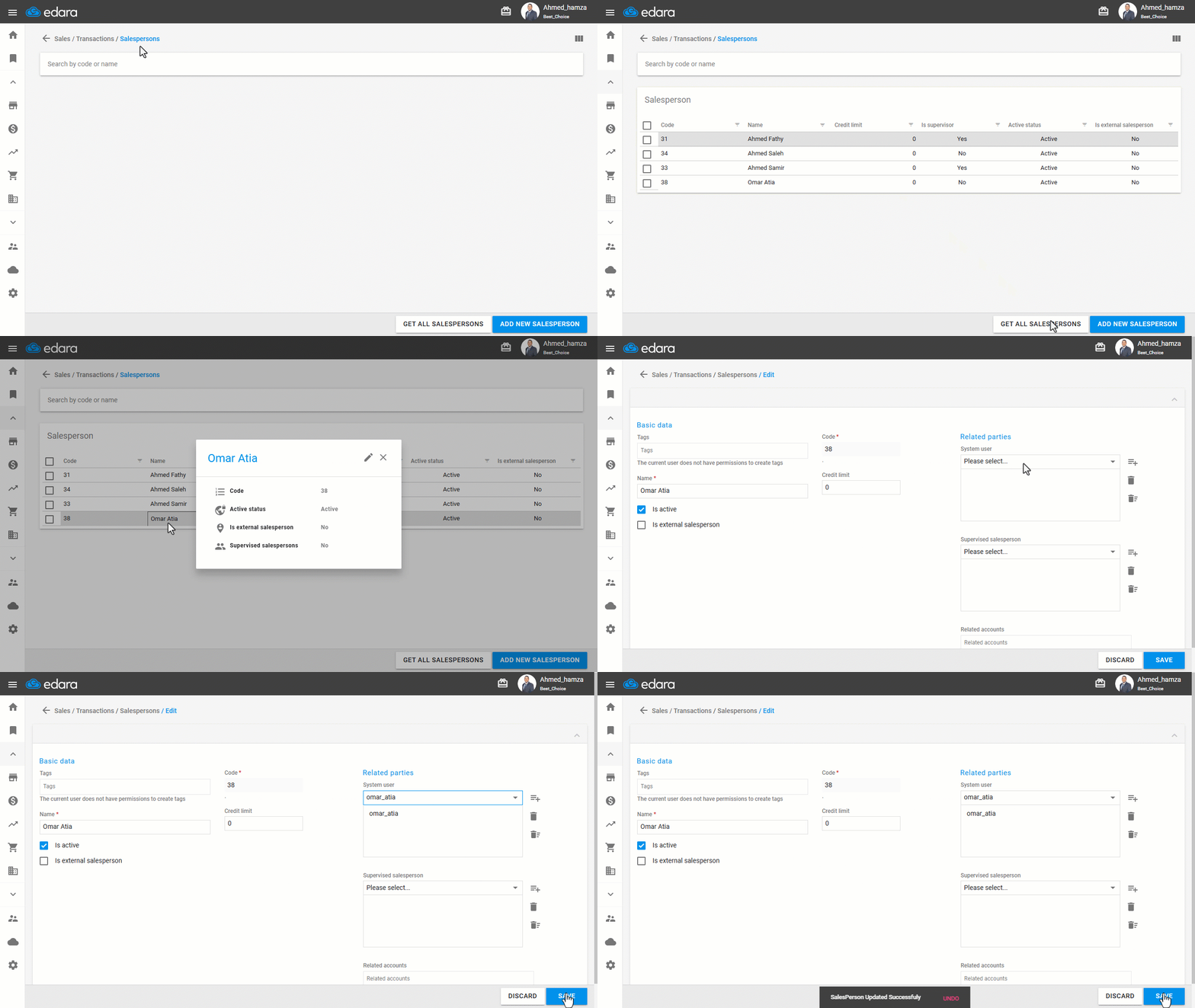
Note: To unlink a salesperson from a user, follow the same steps, select the user you want to remove, and click on " ".
".
Frequently asked questions
How do I unlink a salesperson from a user?
To unlink a salesperson from a user, follow the same steps, select the user you want to remove, and click on "".
If you encounter any challenges or have questions during these processes, you can contact our technical support team, who are ready to assist you at any time.
Did this answer your question?