

Editing Cash Documents Related to Sales Returns
Last updated:
If a customer requests to return an item and wants part of their refund in cash while the remaining amount is credited to their account, a Sales Return document will be generated, which automatically creates a related Cash-out document.
If the data is entered incorrectly, it may result in an imbalance in the treasury—either an excess or a shortage. In such cases, you need to edit the Sales Return to correct the associated Cash-out document.
Editing Cash Documents Related to Sales Returns
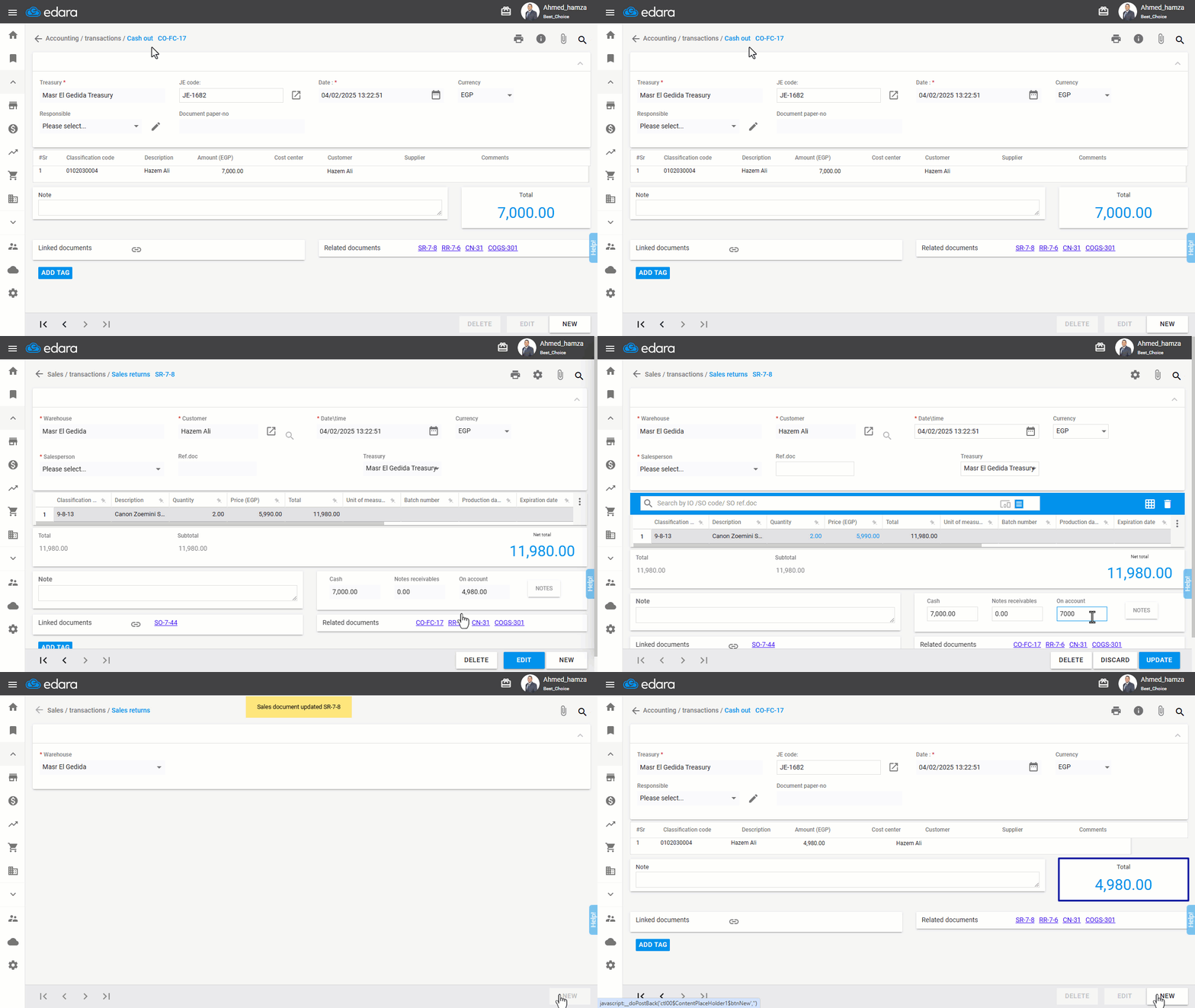
- Go to the Accounting module.
- Open the “Cash Out” page.
- Select the “Warehouse”.
- Search for the cash-out document you want to edit.
- Open the related Sales Return (SR) Document.
- Click on "Edit".
- Make the required edits.
- Click "Update".
After completing these steps, the related Cash-out document will be updated automatically, as shown in the following example:
If you encounter any challenges or have questions during these processes, you can contact our technical support team, who are ready to assist you at any time.
Did this answer your question?