

Pausing the Linking Between "Edara 2.0" and "Edara 3.0"
Last updated:
Sometimes, you may need to create or delete an item—such as a product, warehouse, or supplier—in one version of “Edara” without having that change automatically synced to the other version. To support this need, “Edara” allows you to temporarily disable the synchronization between “Edara 2.0” and “Edara 3.0”, so you can make isolated changes without affecting the other system.
Pausing the Linking Between "Edara 2.0" and "Edara 3.0"

- Go to System.
- Open the “Integration” page.
- Click on “Edara 2.0”.
- Navigate to the section you want to disconnect (Products – Locations – Suppliers).
- Click the "
 " icon.
You’ll be presented with four options for pausing synchronization—choose the one that matches your needs.
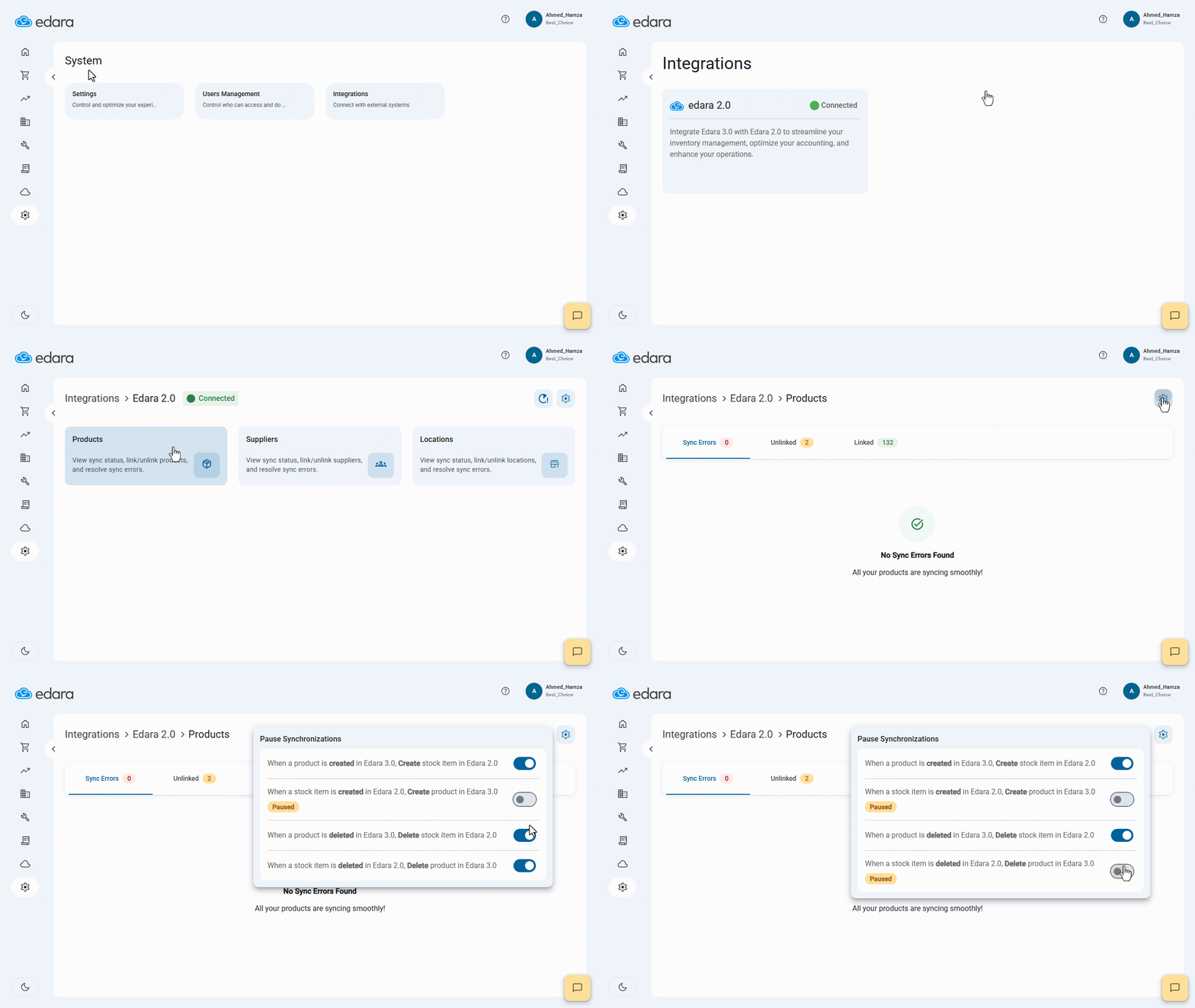
Note: The available synchronization options that can be paused include:
- When a product is created in “Edara 3.0”, a stock item is created in “Edara 2.0”.
- When a stock item is created in “Edara 2.0”, a product is created in “Edara 3.0”.
- When a product is deleted from “Edara 3.0”, the corresponding stock item is deleted from “Edara 2.0”.
- When a stock item is deleted from “Edara 2.0”, the corresponding product is deleted from “Edara 3.0”.
Frequently asked questions
Which sync options can be paused?
The available synchronization options that can be paused include: When a product is created in “Edara 3.0”, a stock item is created in “Edara 2.0”, When a stock item is created in “Edara 2.0”, a product is created in “Edara 3.0”, When a product is deleted from “Edara 3.0”, the corresponding stock item is deleted from “Edara 2.0”, When a stock item is deleted from “Edara 2.0”, the corresponding product is deleted from “Edara 3.0”.
If you encounter any challenges or have questions during these processes, you can contact our technical support team, who are ready to assist you at any time.