

Improving synchronization between "Edara 2.0" and "Edara 3.0"
Last updated:
“Edara 3.0” includes the POS and Purchase modules, while “Edara 2.0” covers the Warehouse and Accounting modules. To ensure smooth operation, both versions must be linked so all related documents—like (receive supplies/issue offerings) or cash documents—are properly recorded.
The system allows you to view successfully linked items (products, suppliers, and locations), as well as those with failed links—along with detailed reasons—so you can easily resolve issues and retry the process.
Improving synchronization between "Edara 2.0" and "Edara 3.0"

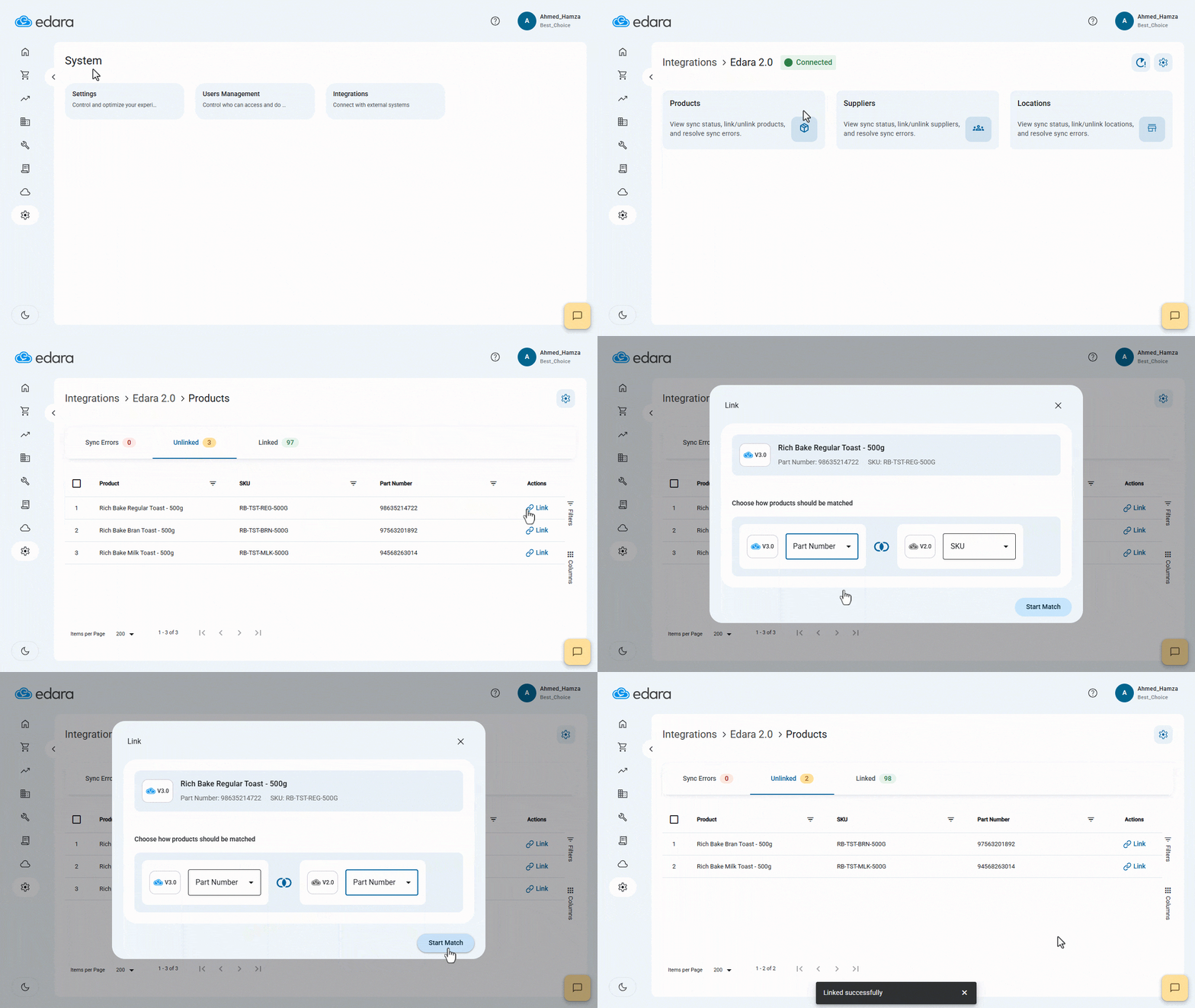
- Go to System.
- Open the “Integrations” page.
- Click on “Edara 2.0”.
- Choose the section to link: (Products, Locations, or Suppliers).
- Select the “Unlinked” tab.
- Click on “Link” next to the item.
- Choose the appropriate linking method.
- Click on “Start Match”.
- Click on “Link”.
Note: To unlink items, go to the “Linked” tab and disconnect as needed.
If you encounter any challenges or have questions during these processes, you can contact our technical support team, who are ready to assist you at any time.
Did this answer your question?