

Integration Between “Edara 2.0” and “Edara 3.0”
Last updated:
“Edara 3.0” includes the modules for Purchases, POS, Invoices, Manufacturing, and Fixed Assets, while “Edara 2.0” covers the Warehouse, Accounting, and Sales modules. Therefore, integration between the two versions is necessary to ensure that all related transactions and documents are properly recorded in the system (such as goods issue/receive documents in the Warehouse module or cash documents in the Accounting module).
Integration Between “Edara 2.0” and “Edara 3.0”
- Go to the “System”.
- Open the “Integrations” page.
- Click on “Get Started” under “Edara 2.0”.
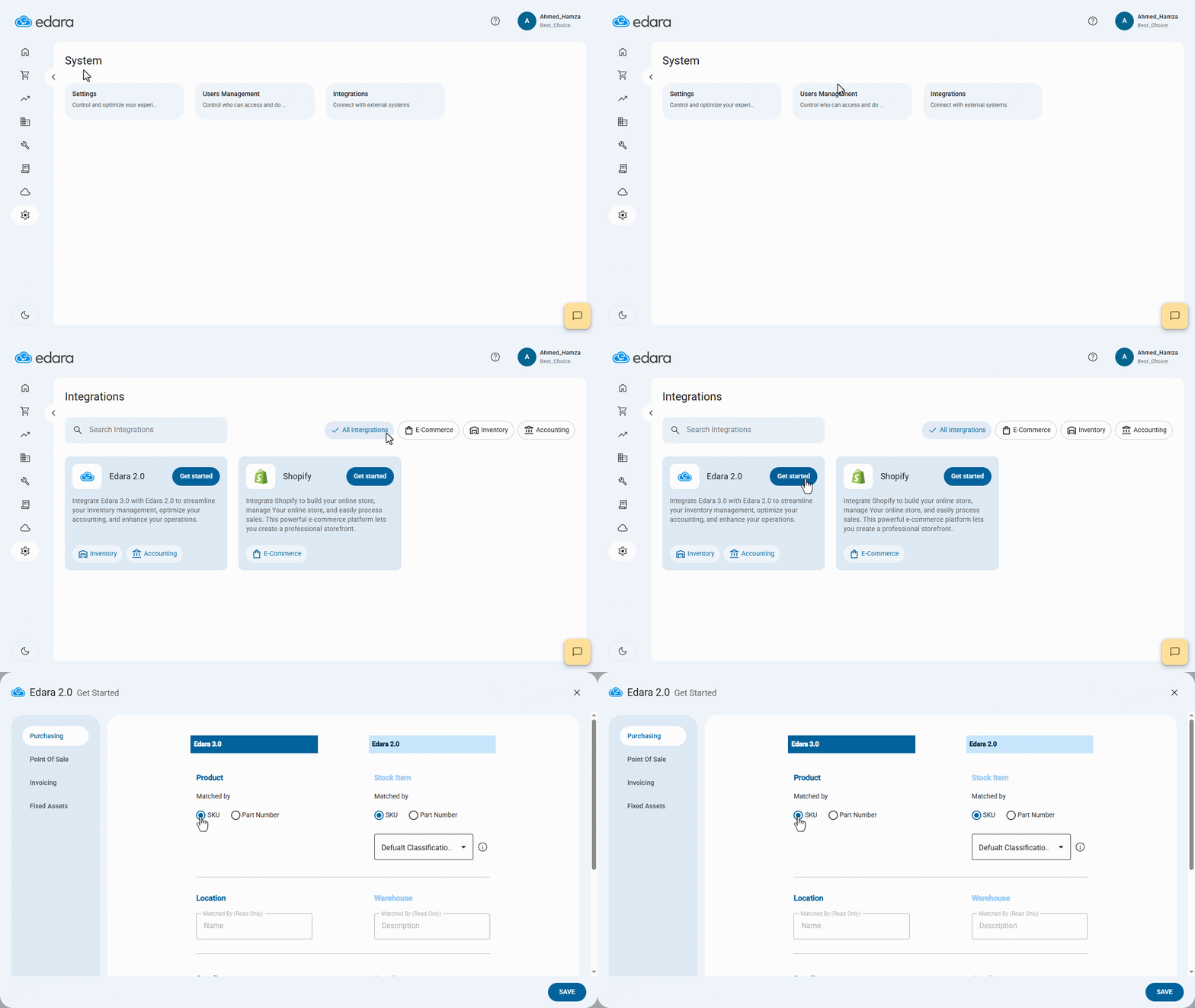
Here, you will need to adjust the settings for each of the following:
1- Purchases
See article: Configuring the Purchases Module Settings for "Edara 2.0" and "Edara 3.0" Integration.
2- POS
See article: Configuring the POS Module Settings for "Edara 2.0" and "Edara 3.0" Integration.
3- Invoices
See article: Configuring the Invoice Module Settings for "Edara 2.0" and "Edara 3.0" Integration.
If you encounter any challenges or have questions during these processes, you can contact our technical support team, who are ready to assist you at any time.