

Configuring the Invoice Module Settings for "Edara 2.0" and "Edara 3.0" Integration
Last updated:
To complete the integration process between “Edara 2.0” and “Edara 3.0”, you need to adjust the Invoices module settings.
Configuring the Invoice Module Settings for "Edara 2.0" and "Edara 3.0" Integration
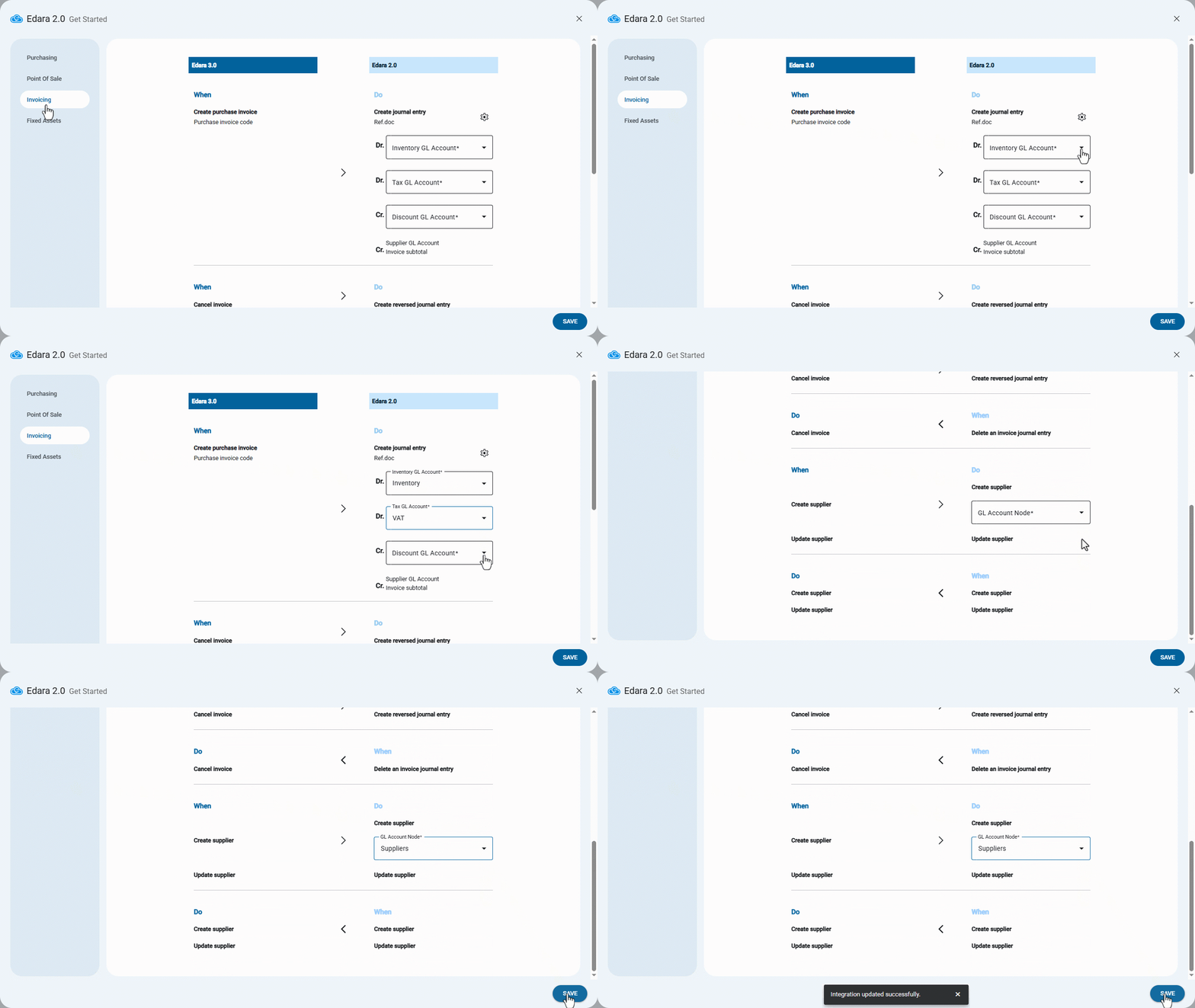
During the integration between “Edara 2.0” and “Edara 3.0”, the Invoice settings page will appear. From here:
- Select the “Inventory GL Account”.
- Select the “Tax GL Account”.
- Select the “Discount GL Account”.
Notes:
- When creating a purchase invoice on “Edara 3.0,” a corresponding journal entry is automatically created on “Edara 2.0,” matched by the purchase invoice “code” and the “journal entry” reference.
- You can enable or disable the option “Deducting Discounts from Cost of Purchase” by clicking on “
 ”, then "
 ".
".- When this feature is enabled, the discount value is deducted directly from the purchase cost, both at the warehouse level and in the accounting treatment for the Payable Journal Entry.
- When this feature is disabled, the discount will be recorded separately in the discount account, and the inventory will be recorded at its gross value.
- When canceling the invoice on “Edara 3.0,” a reversal journal entry will be created on “Edara 2.0.”
- When deleting the journal entry of the invoice on “Edara 2.0,” the invoice will be canceled on “Edara 3.0.”
- Select the “Suppliers’ account group” on “Edara 2.0.”
Note: When creating a supplier on “Edara 3.0,” it will also be created on “Edara 2.0” under the selected account group.
- Click on “Save”.
Frequently asked questions
What happens when I create a supplier on “Edara 3.0”?
When creating a supplier on “Edara 3.0,” it will also be created on “Edara 2.0” under the selected account group.
If you encounter any challenges or have questions during these processes, you can contact our technical support team, who are ready to assist you at any time.
Did this answer your question?