

Deactivating an Account
Last updated:
If any transactions have been recorded on an account, you will not be able to delete it to preserve the integrity of your financial records. However, you can deactivate the account instead.
Deactivating an Account
Note: You will only be able to deactivate accounts if the posted account balance is equal to zero.
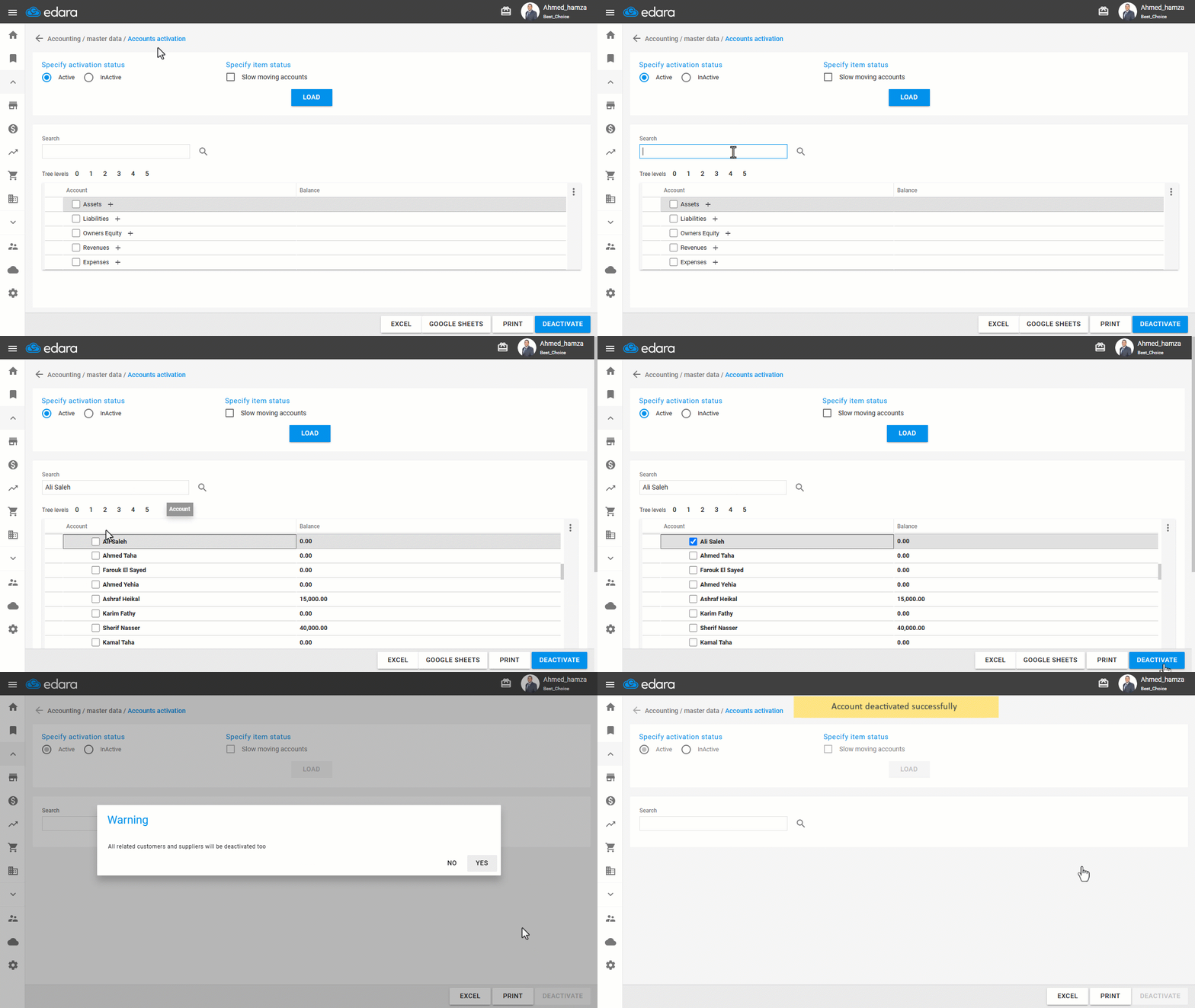
To deactivate an account, follow these steps:
- Go to the Accounting module.
- Open the “Accounts Activation” page.
- Search for the account you want to deactivate.
- Select the account or multiple accounts by ticking the 🗹 checkbox.
- Click on "Deactivate".
Once deactivated, the account will no longer appear in transactional screens but will still be visible in reports to allow for proper review and auditing.
Note: Deactivation takes effect only after posting the account's transactions.
Frequently asked questions
When can I deactivate an account?
You will only be able to deactivate accounts if the posted account balance is equal to zero.
When does the deactivation take effect?
Deactivation takes effect only after posting the account's transactions.
If you encounter any challenges or have questions during these processes, you can contact our technical support team, who are ready to assist you at any time.