

Determining Account Posting Types in the Chart of Accounts
Last updated:
To ensure accurate financial statement organization and efficient report generation, defining the posting type for accounts is essential. This process helps categorize revenues, expenses, and assets in a way that supports financial statement preparation.
Determining Account Posting Types in the Chart of Accounts
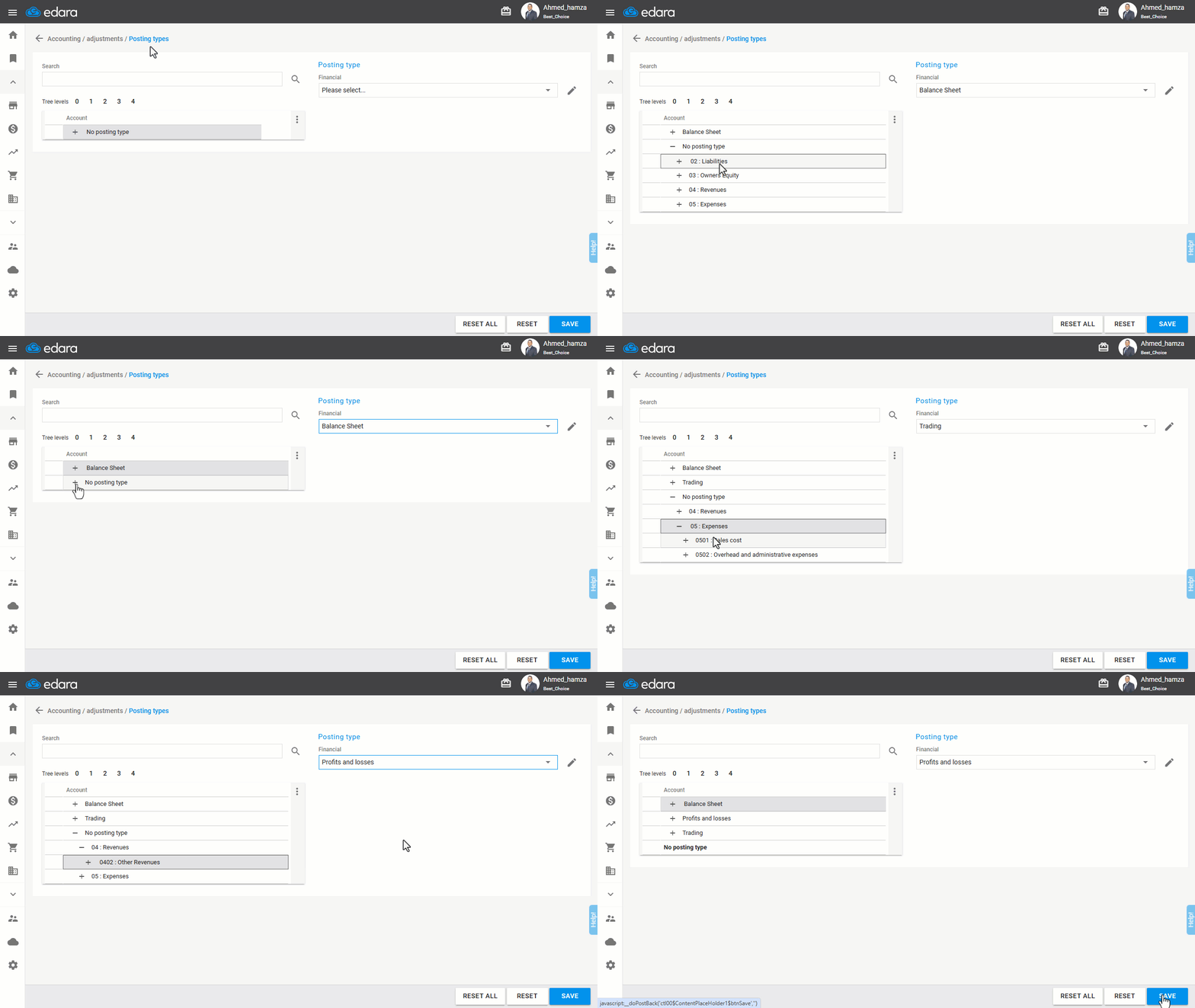
Note: At this stage, you will: 1- Identify assets, liabilities, and equity under the Balance Sheet (Budget). 2- Identify sales revenues and cost of goods sold under the Trading List. 3- Identify the rest of the revenues and expenses under the List of Profits and Losses.
And the steps are as follows:
- Go to the Accounting module.
- Open the "Posting Type" page.
- Click "+" to display all accounts under "No Posting Type".
- Select the account you want to categorize.
- Choose the appropriate posting type.
- Click on “Save”.
Note: You must define a posting type for all accounts in the Chart of Accounts to generate financial reports correctly.
Frequently asked questions
Do I need to set a posting type for every account?
You must define a posting type for all accounts in the Chart of Accounts to generate financial reports correctly.
If you encounter any challenges or have questions during these processes, you can contact our technical support team, who are ready to assist you at any time.