

Creating a Closing Entry for the Financial Year
Last updated:
“Edara” allows you to automatically create a closing entry for the current or any previous financial year, enabling you to close expenses and revenues in the designated account.
Creating a Closing Entry for the Financial Year
Ensure the following:
- There is an account of type "Retained Earnings," or define the account type if not specified.
- Post all transactions from the Posting page in the Accounts module up to the date for which the closing entry is to be created.
- Set the posting type in the Chart of Accounts.
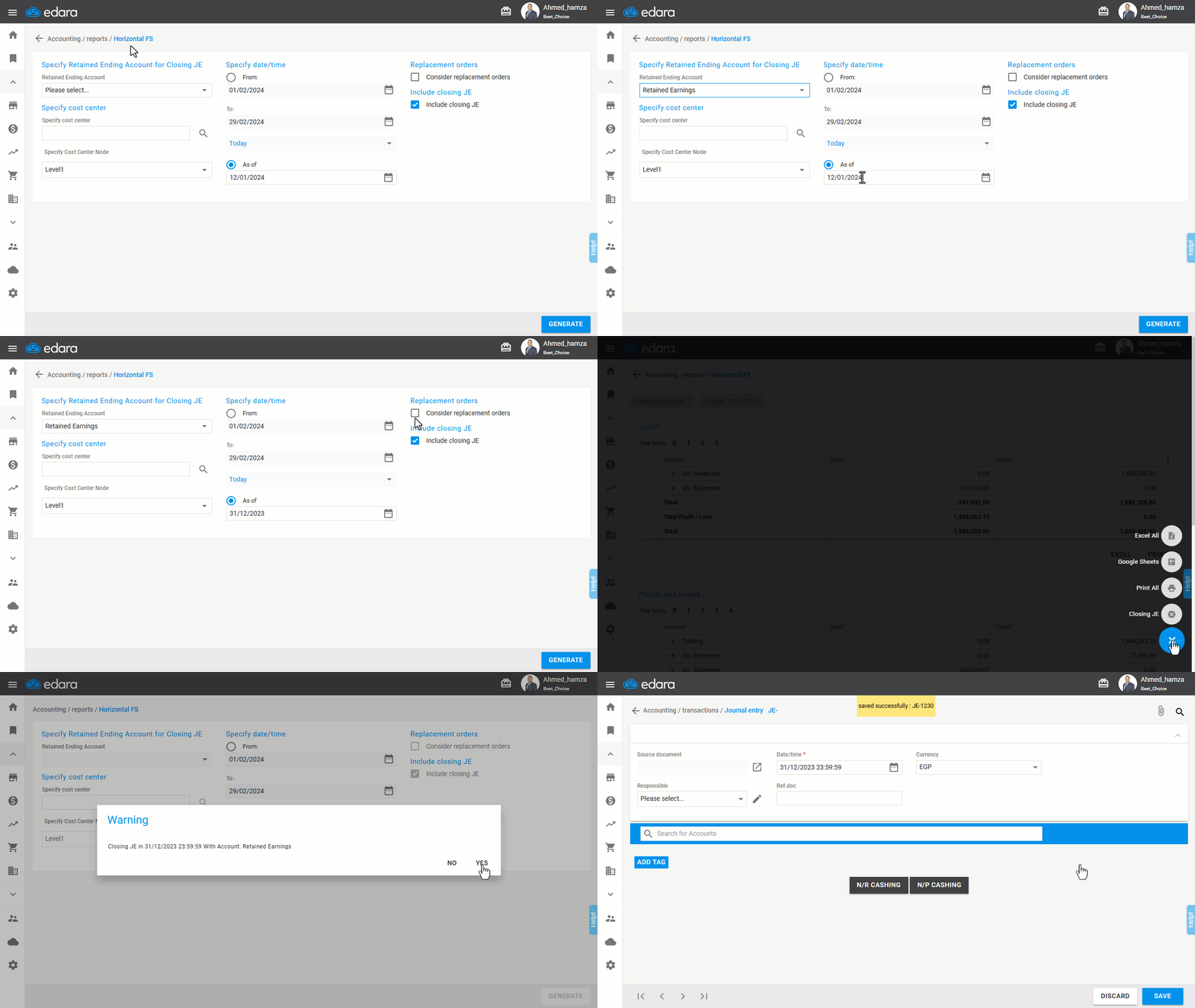
And the steps to Create a Closing Entry are:
- Go to the Accounting module.
- Select “Horizontal FS” Report.
- Specify the closing account, such as “Retained Earnings”.
Note: Avoid filtering by cost centers or their levels.
- Select the closing period date from the “As of” field, as the closing entry cannot be created when a “From – To” date range is selected.
- Enable the “Include closing JE” option.
- Ensure that “Consider replacement orders” is not enabled.
- Click “Generate”.
- Click the “+” icon.
- Select “Closing JE”.
- Confirm the action when prompted.
Frequently asked questions
Can I filter by cost centers when creating the closing entry?
Avoid filtering by cost centers or their levels.
If you encounter any challenges or have questions during these processes, you can contact our technical support team, who are ready to assist you at any time.
Did this answer your question?