

Viewing All Entries Within a Specific Period
Last updated:
"Edara" enables you to review and track all financial transactions within a specific time period, allowing you to gain a clear and accurate overview of your organization's financial status.
Viewing All Entries Within a Specific Period
- Go to the “Accounting” module.
- Click on “Posting”.
- Specify the desired date range.
- Select the entry status (Posted - Unposted).
- Choose the required columns from “Custom View”.
- Click on “Generate”.
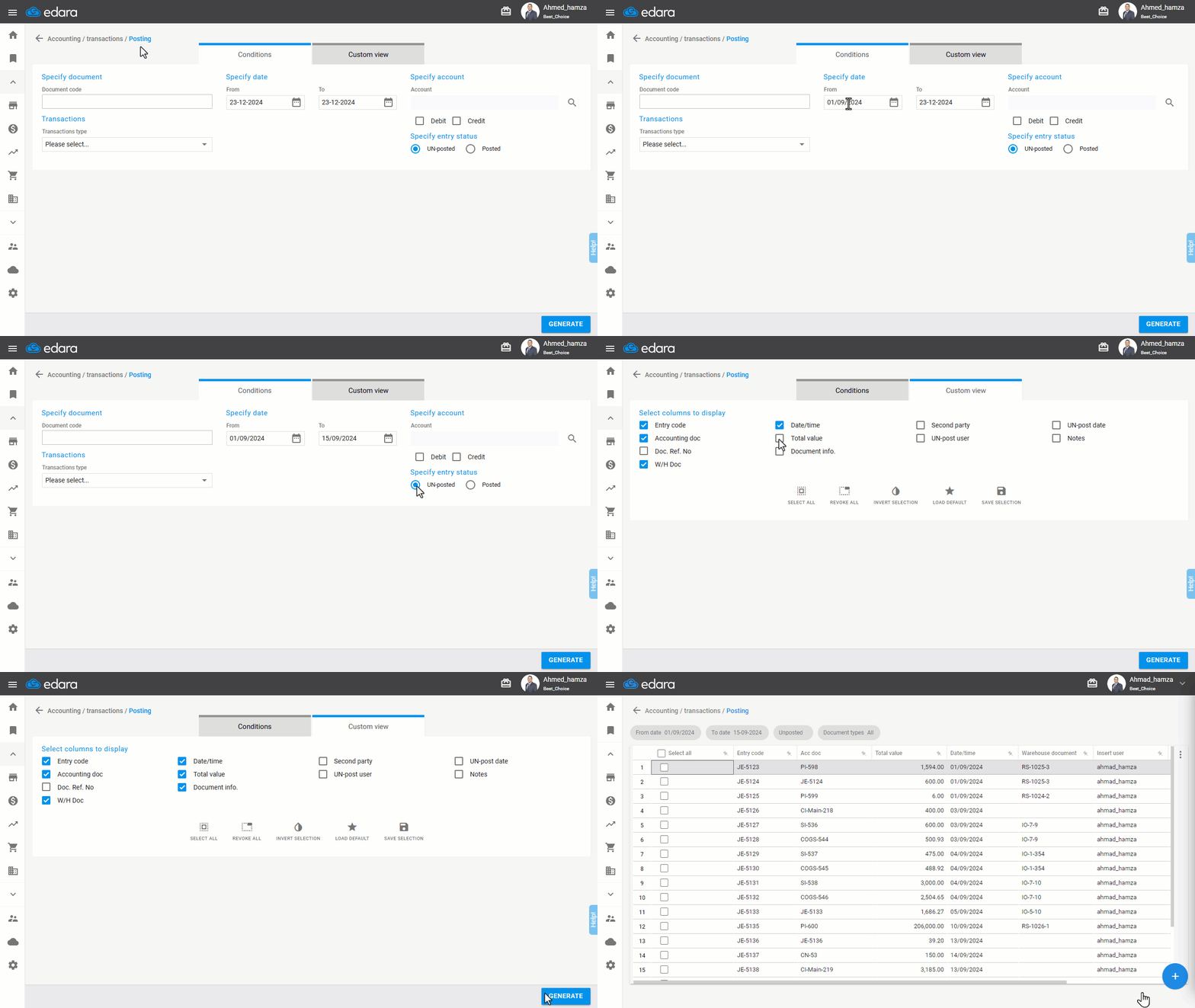
Note: You can obtain more specific results by:
- Entering the document code (to view all entries linked to a particular document).
- Specifying the transaction type (e.g., Cash Receipt, Cash Payment, Journal Entry).
- Selecting the desired account by clicking on 🔍 and entering part of the account code in the search box.
- Identifying the account type (Credit - Debit).
Frequently asked questions
How can I get more specific results?
You can obtain more specific results by: Entering the document code (to view all entries linked to a particular document), Specifying the transaction type (e.g., Cash Receipt, Cash Payment, Journal Entry), Selecting the desired account by clicking on 🔍 and entering part of the account code in the search box, Identifying the account type (Credit - Debit).
If you encounter any challenges or have questions during these processes, you can contact our technical support team, who are ready to assist you at any time.