

Sources of Inventory Cost Calculation and Physical Count Methods
Last updated:
When monitoring inventory costs, you may notice that costs are not updated immediately or that some values do not match certain transactions. This is because the system calculates inventory costs based on fixed sources, such as opening balances and received supply orders.
In contrast, the timing of cost updates depends on the physical count method used by your organization, whether Periodic Inventory or Perpetual Inventory. Understanding this mechanism helps you accurately review and analyze stock item costs.
Sources of Inventory Cost Calculation and Physical Count Methods
Sources for Calculating Inventory Costs
Inventory costs are calculated using two primary sources:
- Opening Cost: This is the cost entered when the system is used for the first time and serves as the starting point for stock item costs. To be calculated correctly, it must be linked to the stock item's opening balance, as the opening value is calculated based on both the quantity and the cost.
- Receive Supplies Movements: These include all movements that add new inventory, such as purchase orders and incoming inventory. These movements are used to update the stock item cost across all warehouses, regardless of the warehouse where the inventory was received.
Other movements, such as sales, returns, or transfers, do not create a new cost. They only affect quantities and inventory movement.
Note: If you notice a difference or need to verify the cost of a specific stock item, you can review the Stock Item Card, Opening Balance, Receive Supplies Movements, and check the Inventory Movement Log to track how the cost was calculated.
Physical Count Methods Used for Calculating Inventory Costs
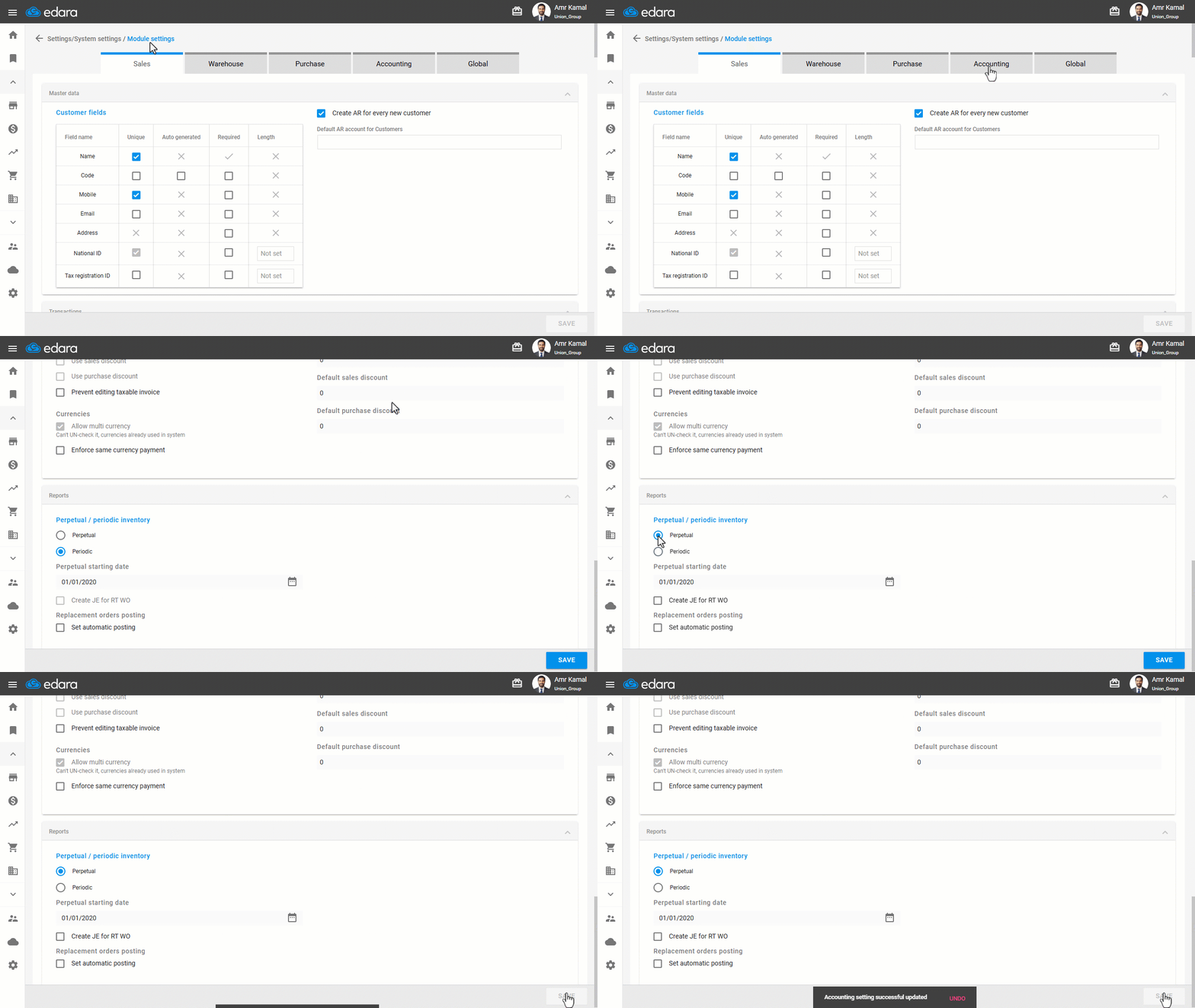
The Physical Count Methods are selected when the system is first configured by following these steps:
- Go to "Settings".
- Open the "Modules Settings" page.
- Go to "Accounting".
- Select the Physical Count Method that best suits your business operations:
- Periodic: In this method, inventory costs are not updated immediately. Instead, transactions are accumulated, and the cost is calculated at a specific time, where the costs of previous transactions are calculated in a single batch.
- Perpetual: In this method, inventory costs are updated directly with each transaction, and changes are reflected immediately after each transaction.
- Click on "Save".
Note: It is not recommended to change the Physical Count Method after you start using the system, especially after actual transactions have been recorded, as this may affect inventory and cost calculations.
Frequently asked questions
Can I change the physical count method after I start using the system?
It is not recommended to change the Physical Count Method after you start using the system, especially after actual transactions have been recorded, as this may affect inventory and cost calculations.
If you encounter any challenges or have questions during these processes, you can contact our technical support team, who are ready to assist you at any time.