

Considering the Sales Return in the Sales Order Payment Status
Last updated:
When a Sales Return is created for a sales order, its value may cover the remaining balance of the related sales order while the payment status still appears as Unpaid. Edara allows you to consider the amount of the related sales return when determining the payment status of the associated sales order.
Considering the Sales Return in the Sales Order Payment Status
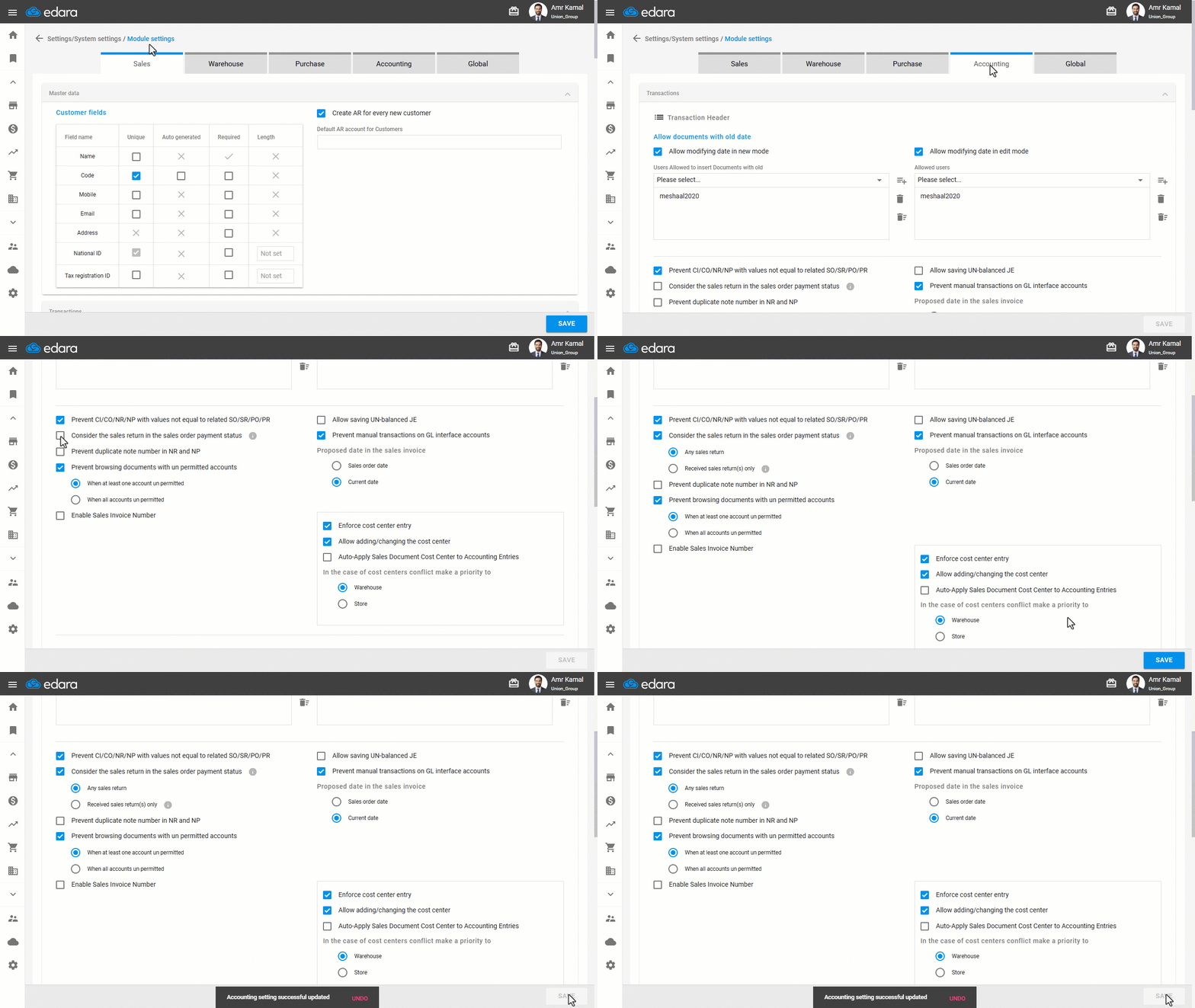
- Go to “Settings”.
- Open the “Modules Settings” page.
- Go to the “Accounting” tab.
- Enable “Consider the sales return in the sales order payment status”.
- Select how sales returns should be considered:
- Any Sales Return (default): The sales return amount is considered in the payment status of the sales order as soon as the return is created, without waiting for the returned stock items to be received into the warehouse. This option is suitable when working with shipping companies, where returns may be recorded before the returned items are received.
- Received sales return(s) only: The sales return amount is considered in the payment status of the sales order only after the returned items have been received into the warehouse.
- Click on “Save”.
Notes:
- This setting applies only when both the sales order and the related sales return have an unpaid amount, allowing the system to consider the sales return amount when determining the sales order's payment status.
- The sales order and sales return are treated independently in the following cases:
- If the sales order or the sales return has already been paid in full.
- When “Received sales return(s) only” is selected and the sales order is linked to multiple sales returns that have not all been received into the warehouse.
- Enabling this setting does not apply retroactively to existing sales orders or sales returns. It takes effect only when creating, modifying, or deleting documents related to the sales order, such as a Sales Return, Cash In, Journal Entry, Cash Out for the related sales return, Receivable Notes (when the “Allow NR/NP posting” setting is enabled), or Received Sales Returns when “Received sales return(s) only” is selected.
Frequently asked questions
When does the setting apply to a sales order?
This setting applies only when both the sales order and the related sales return have an unpaid amount, allowing the system to consider the sales return amount when determining the sales order's payment status.
Does the setting affect existing sales orders?
Enabling this setting does not apply retroactively to existing sales orders or sales returns. It takes effect only when creating, modifying, or deleting documents related to the sales order, such as a Sales Return, Cash In, Journal Entry, Cash Out for the related sales return, Receivable Notes (when the “Allow NR/NP posting” setting is enabled), or Received Sales Returns when “Received sales return(s) only” is selected.
If you encounter any challenges or have questions during these processes, you can contact our technical support team, who are ready to assist you at any time.