

Sending Document Notes to the E-Invoicing Portal
Last updated:
At times, you may need to add notes to sales invoices and have them sent along with the documents to the e-invoicing portal. “Edara” enables this by configuring the integration settings.
Sending Document Notes to the E-Invoicing Portal
- Go to Data.
- Open the “Integration” page.
- Click on “Manage” in the Egyptian Tax Authority section.
- Open the “Configuration” tab.
- Enable the setting “Send the documents notes to the portal”.
- Click on “Save”.
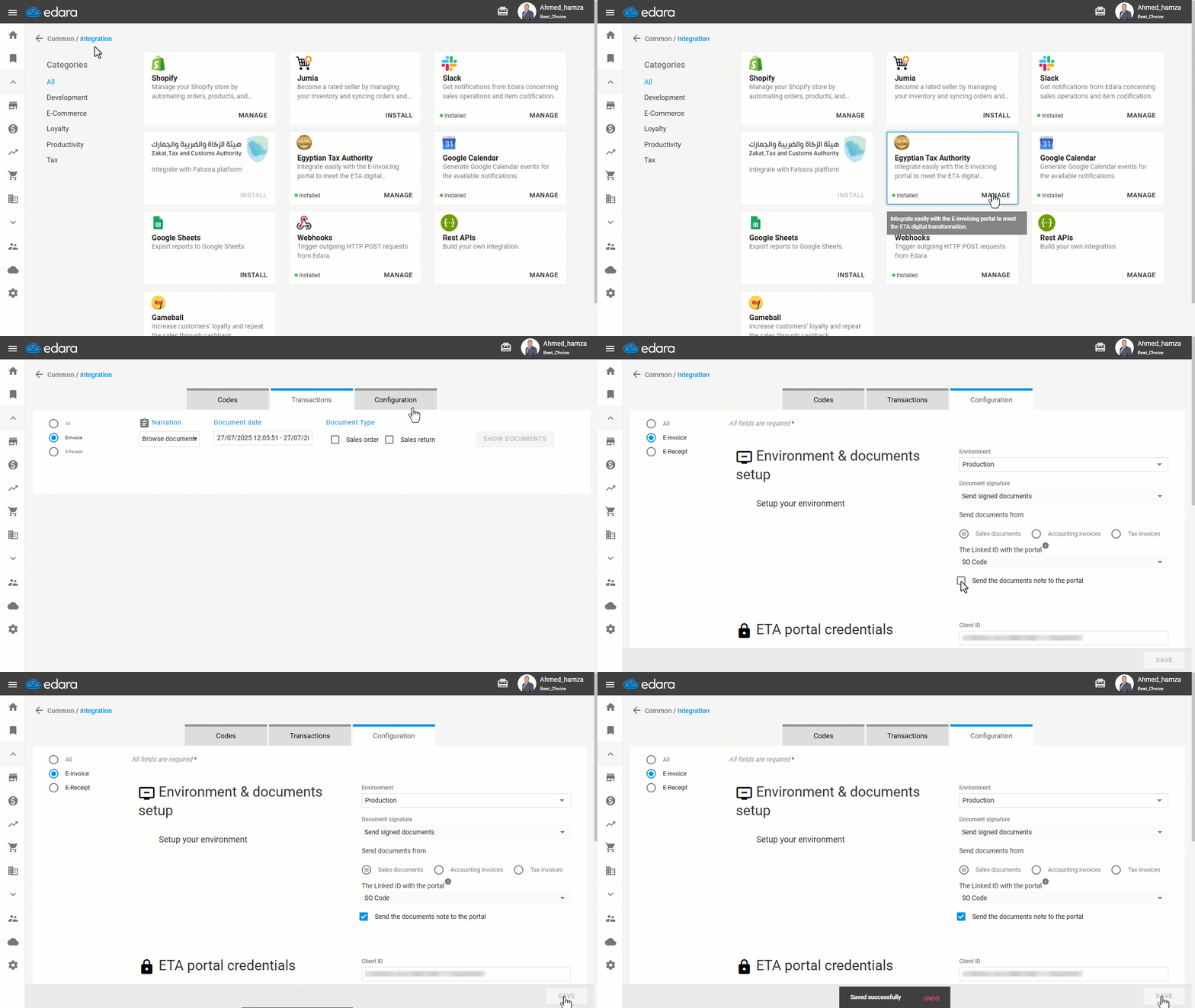
Note: The notes will appear on the portal under the “Sales Order Description” field. However, this setting does not apply retroactively to previously submitted documents.
Frequently asked questions
Does the setting affect documents that were already sent?
The notes will appear on the portal under the “Sales Order Description” field. However, this setting does not apply retroactively to previously submitted documents.
If you encounter any challenges or have questions during these processes, you can contact our technical support team, who are ready to assist you at any time.
Did this answer your question?