

Canceling Documents on the E-Invoice Portal
Last updated:
If you have sent some documents to the E-Invoice Portal and they were accepted, but you later need to cancel these documents—whether due to agreement cancellation with the client or any other reason—you will need to submit a cancellation request through the E-Invoice Portal.
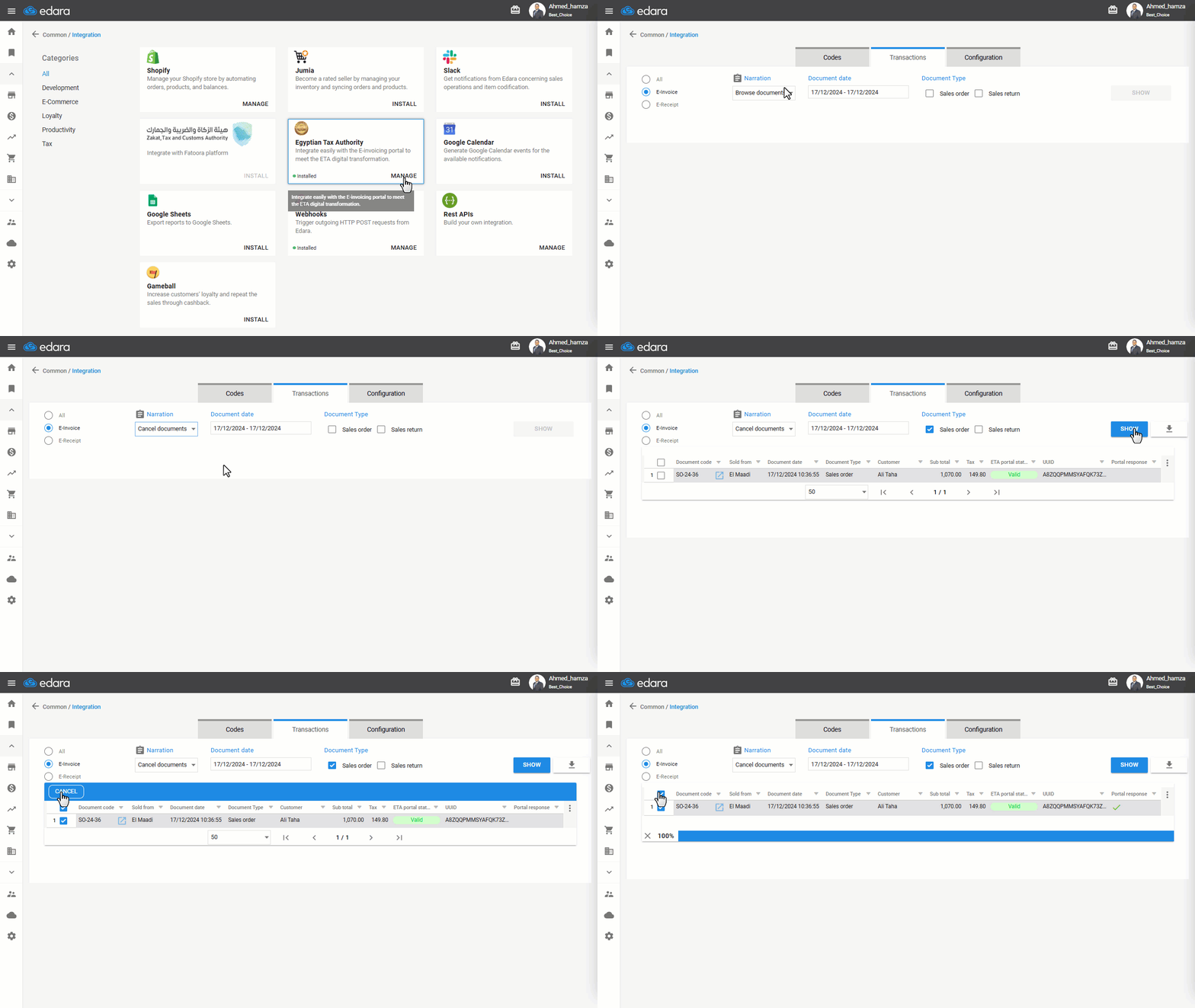
"Edara" facilitates this process with the following steps.
Canceling Documents on the E-Invoice Portal
- Go to Data Module.
- Open the Integration page.
- Click on “Manage”.
- Select the Narration as “Cancel Documents”.
- Specify the date of the documents you want to cancel.
- Choose the document type.
- Click “Show”.
Note: Only valid documents will appear at this Narration.
- Select the invoices you wish to cancel.
- Click “Cancel”.
Note: After submitting the cancellation request, you will need to wait for three days. Then, check the status of the documents to update their status in "Edara".
Note: You can download the invoices as an Excel file by clicking “ ”.
”.
If you encounter any challenges or have questions during these processes, you can contact our technical support team, who are ready to assist you at any time.