

Creating a Purchase Person
Last updated:
Managing operations and tasks in the purchasing department is crucial for the success of any organization.
One of the most important steps is creating a Purchasing Officer profile, enabling you to track and review processes.
Creating a Purchase Person
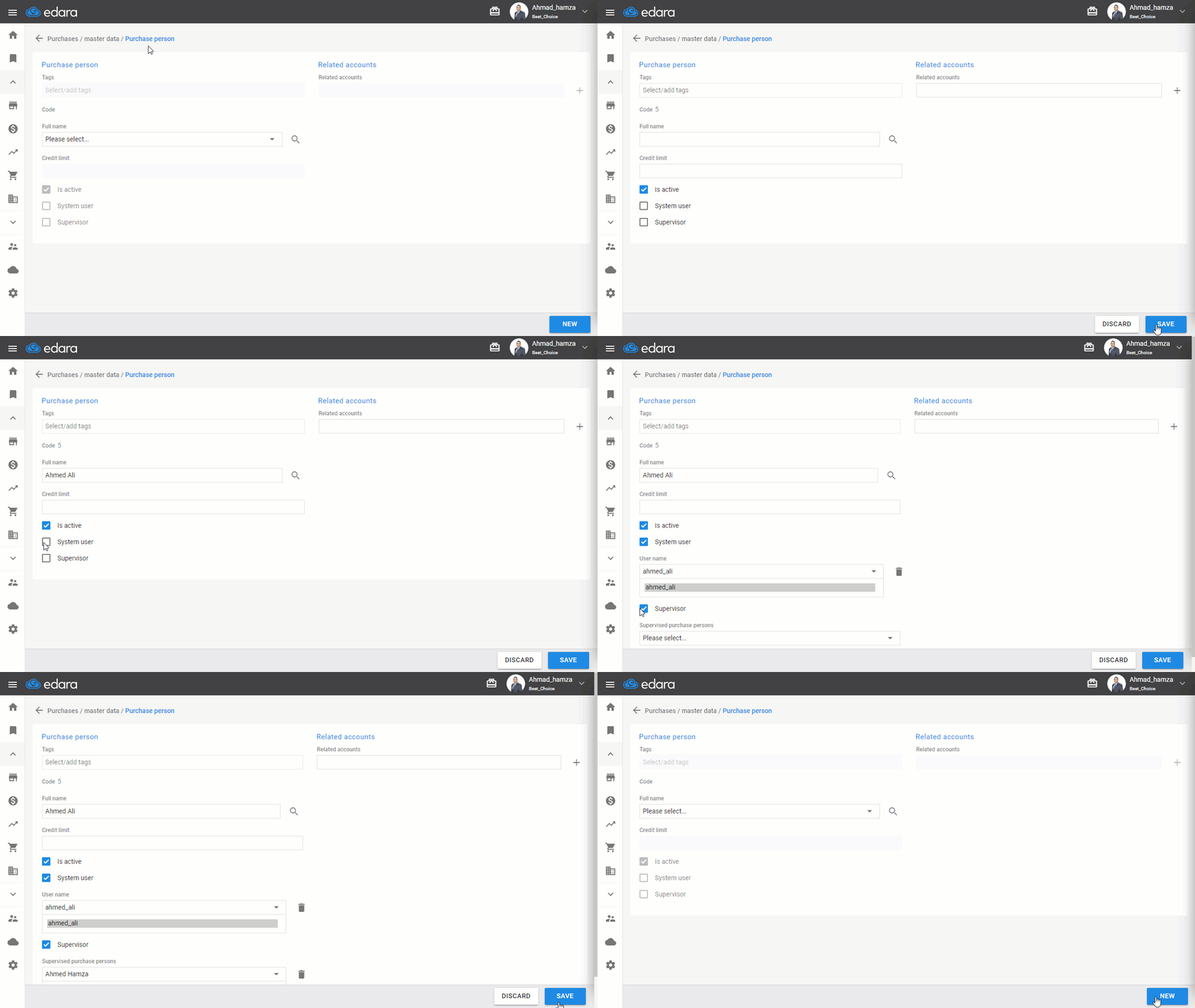
- Go to the Purchase Module.
- Open the “Purchase Person” page.
- Click on “New.”
- Enter the name of the Purchase Person.
Note: You can link the Purchasing Person to a specific user by clicking the ◻ next to User and selecting the username from the dropdown list. You can also assign the Purchasing Person as a supervisor to one or more purchasing Persons by clicking the ◻ next to Supervisor.
- Click “Save.”
Frequently asked questions
Can I link the purchase person to a user while creating them?
You can link the Purchasing Person to a specific user by clicking the ◻ next to User and selecting the username from the dropdown list. You can also assign the Purchasing Person as a supervisor to one or more purchasing Persons by clicking the ◻ next to Supervisor.
If you encounter any challenges or have questions during these processes, you can contact our technical support team, who are ready to assist you at any time.