

Granting/Revoking Supervision Permission for Purchase Persons
Last updated:
Accuracy is important, so “Edara” provides you with the ability to make a user a supervisor of purchase persons.
Granting Supervision Permission for Purchase Persons
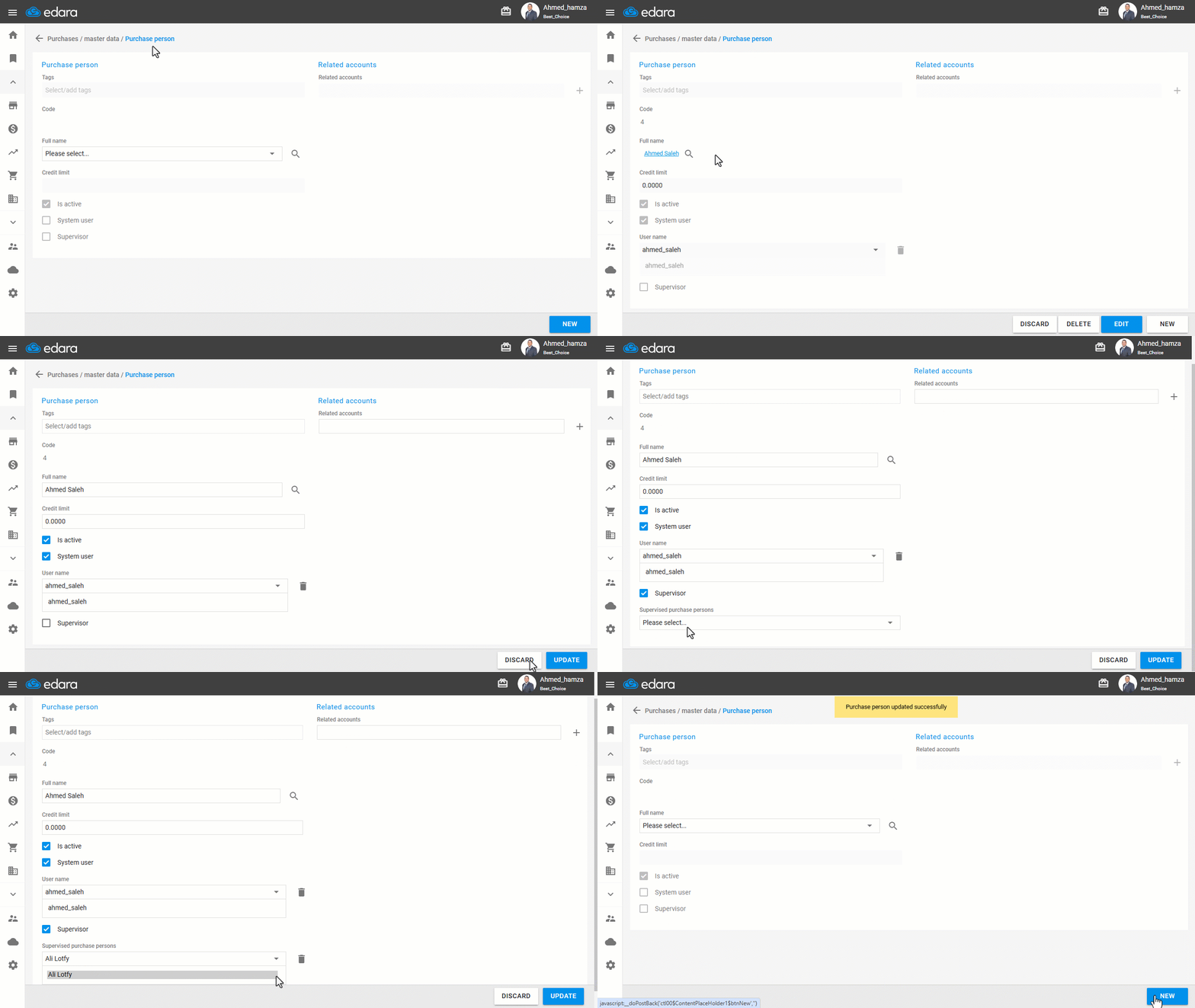
- Go to the Purchase module.
- Open the “Purchase Person” page.
- Select the purchase person by pressing 🔎.
- Click on “Edit”.
- Press the ▢ sign next to “Supervisor”.
- Select the “Supervised purchase persons”.
- Click on “Update”.
Note: If you want to revoke the authority, perform the same steps until step 4, then:
- Select the name of the purchase person to be removed.
- Click on “
 ”.
”. - Click on “Update”.
Frequently asked questions
How do I revoke supervision of a purchase person?
If you want to revoke the authority, perform the same steps until step 4, then: Select the name of the purchase person to be removed, Click on “”, Click on “Update”.
If you encounter any challenges or have questions during these processes, you can contact our technical support team, who are ready to assist you at any time.
Did this answer your question?