

Linking/Unlinking a Purchase Person to a User
Last updated:
Edara allows you to link a purchasing agent to a specific user. This enables the user to track all purchase orders handled by that agent, simplifying delegation and authority control within the system.
Linking/Unlinking a Purchase Person to a User
- Go to the Purchase module.
- Open the “Purchase Person” page.
- Select the relevant purchase person.
- Click on “Edit”.
- Check the box next to “System user”.
- Select the users you want to assign to this purchase person.
- Click on “Update”.
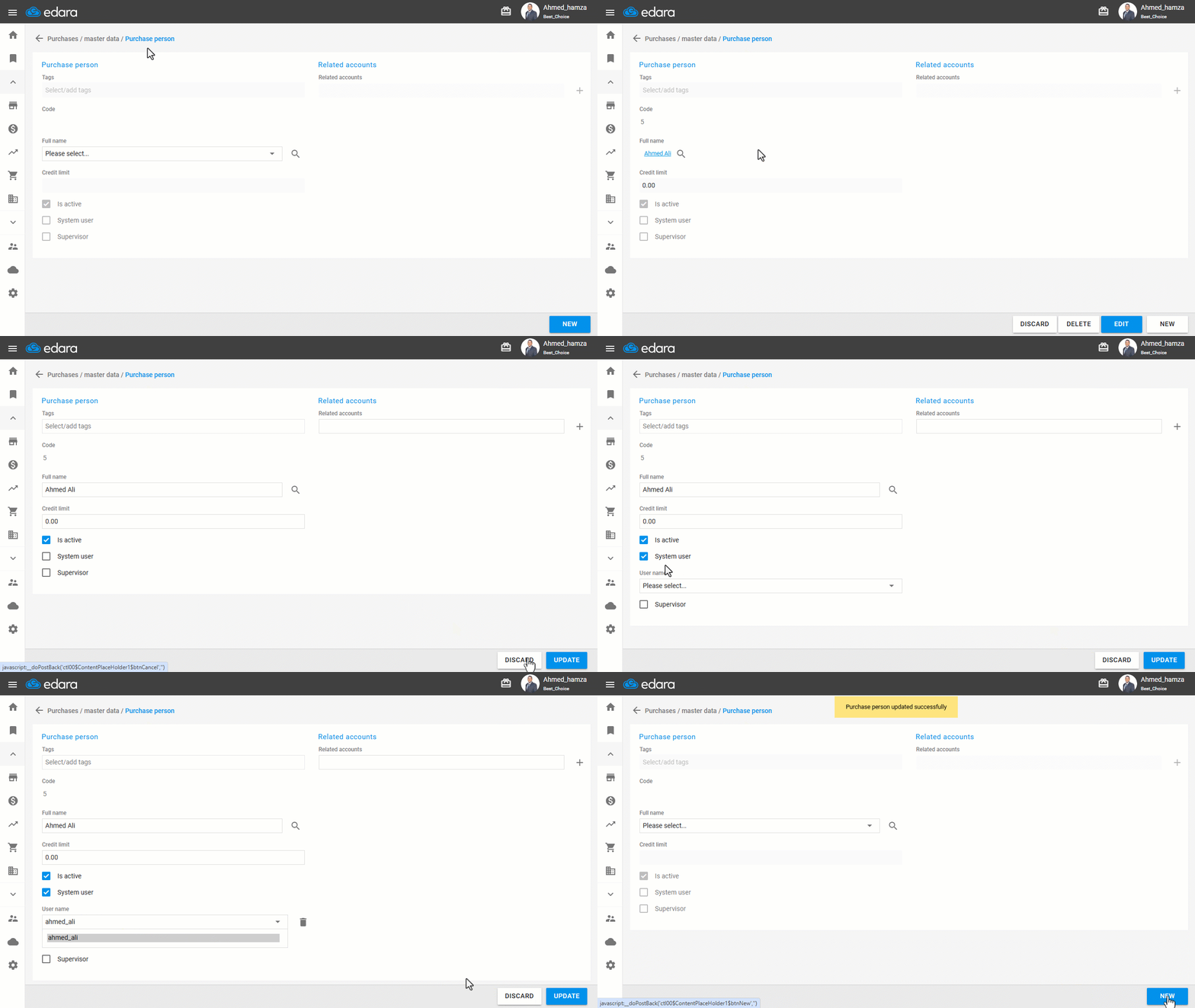
Note: To unlink a purchase person from a user, follow the same steps, then select the user you want to unlink and click on “ ”.
”.
Frequently asked questions
How do I unlink a purchase person from a user?
To unlink a purchase person from a user, follow the same steps, then select the user you want to unlink and click on “”.
If you encounter any challenges or have questions during these processes, you can contact our technical support team, who are ready to assist you at any time.
Did this answer your question?