

Creating a Purchase Order from a Purchase Request
Last updated:
For companies handling purchase requests with extensive details, converting requests into purchase orders can be time-consuming. However, with the "Create a Purchase Order from a Purchase Request" feature, you can easily convert any purchase request into an order without manually re-entering data.
This feature also allows you to modify quantities or split them into batches as needed, simplifying procurement management and improving efficiency.
Creating a Purchase Order from a Purchase Request
- Go to the Purchase module.
- Open the “Purchase Requests” page.
- Click on the "⋮" menu next to the purchase request you want to convert.
- Select "Create Purchase Order".
- Choose the location for the purchase order.
- Specify the required quantities for each product.
- Click "Save".
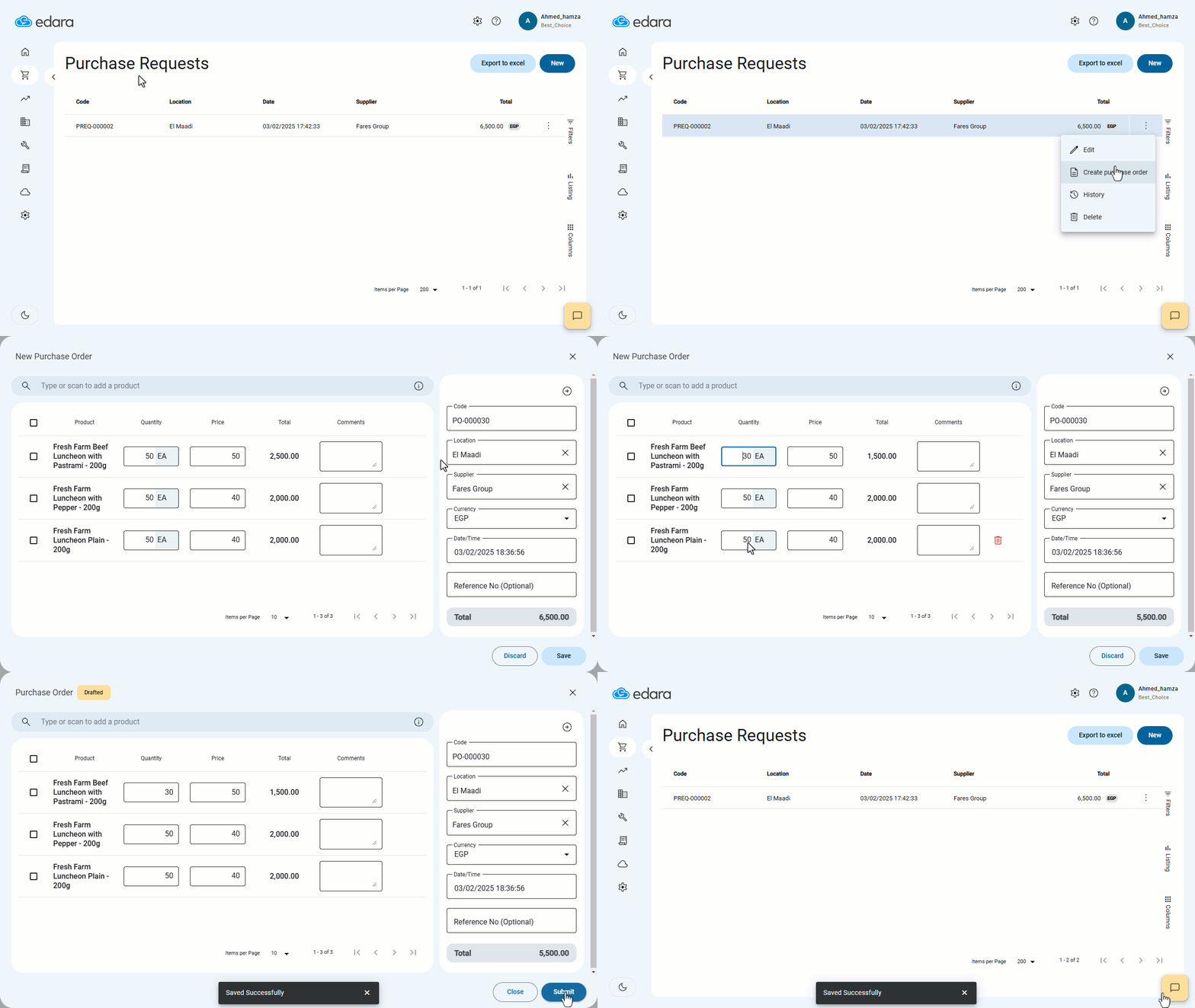
Note: If a location is already specified in the purchase request, it will be suggested automatically in the purchase order, but you can modify it if needed.
Frequently asked questions
Is the location suggested automatically in the purchase order?
If a location is already specified in the purchase request, it will be suggested automatically in the purchase order, but you can modify it if needed.
If you encounter any challenges or have questions during these processes, you can contact our technical support team, who are ready to assist you at any time.