

Viewing The Details of Purchase Requests
Last updated:
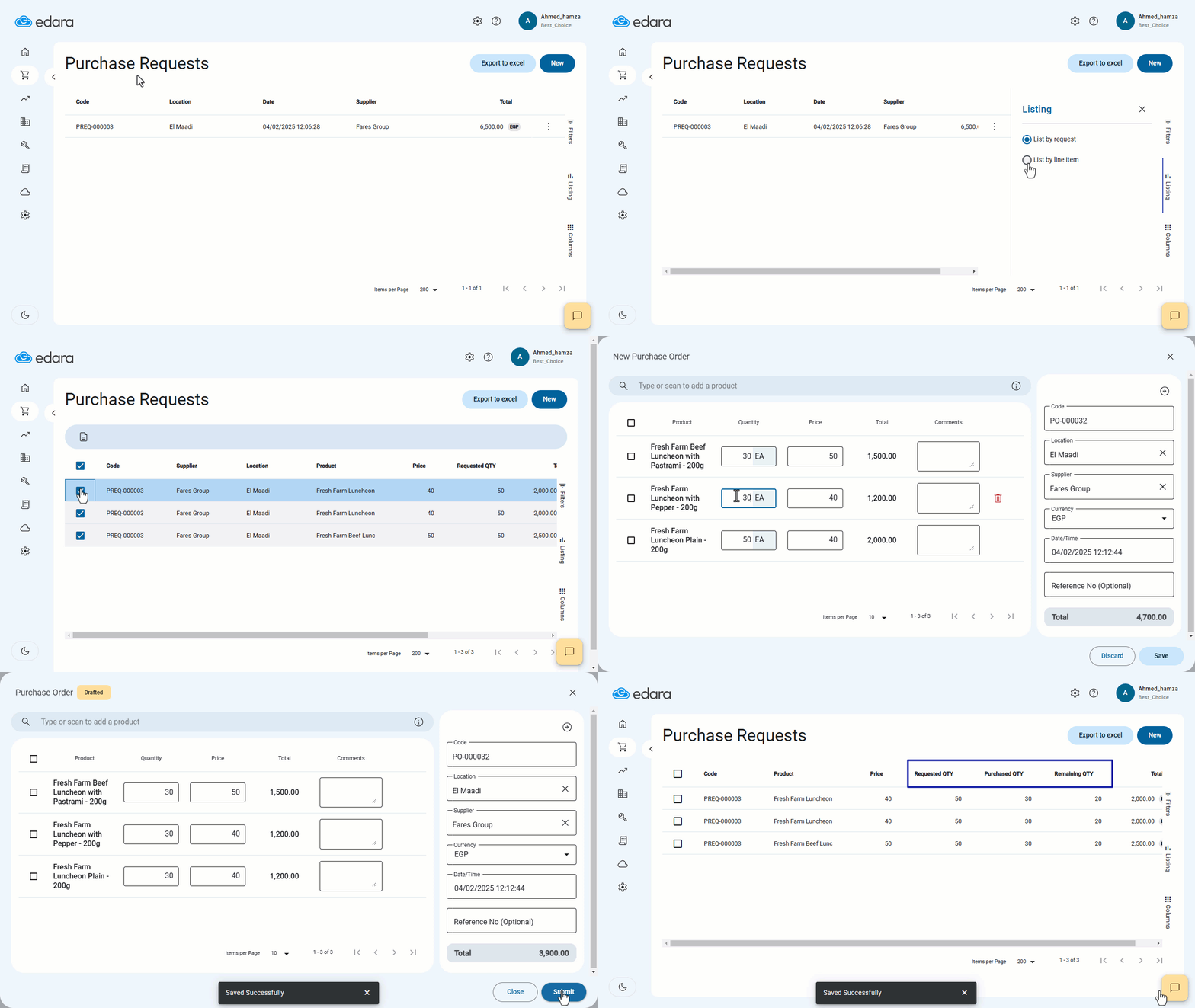
If you need to create a new purchase order based on previous purchase requests for multiple products, "Edara" allows you to track the requested, remaining, and purchased quantities easily.
You can then select the products you want to add to a new purchase order without manually re-entering data, saving you time and effort.
Viewing The Details of Purchase Requests
- Go to the Purchase module.
- Open the “Purchase Requests” page.
- Click on the "Listing" icon at the right of the screen.
- Select "List by line item".
- Check the box next to the products you want to include in the purchase order.
- Click on "Create Purchase Order" (📋).
- Specify the required quantity for each item.
- Click "Save".
If you encounter any challenges or have questions during these processes, you can contact our technical support team, who are ready to assist you at any time.
Did this answer your question?