

Displaying a Customer's Default Address Data
Last updated:
When dealing with customers, you may need to review a customer's default address data to speed up processes or ensure the accuracy of the registered address.
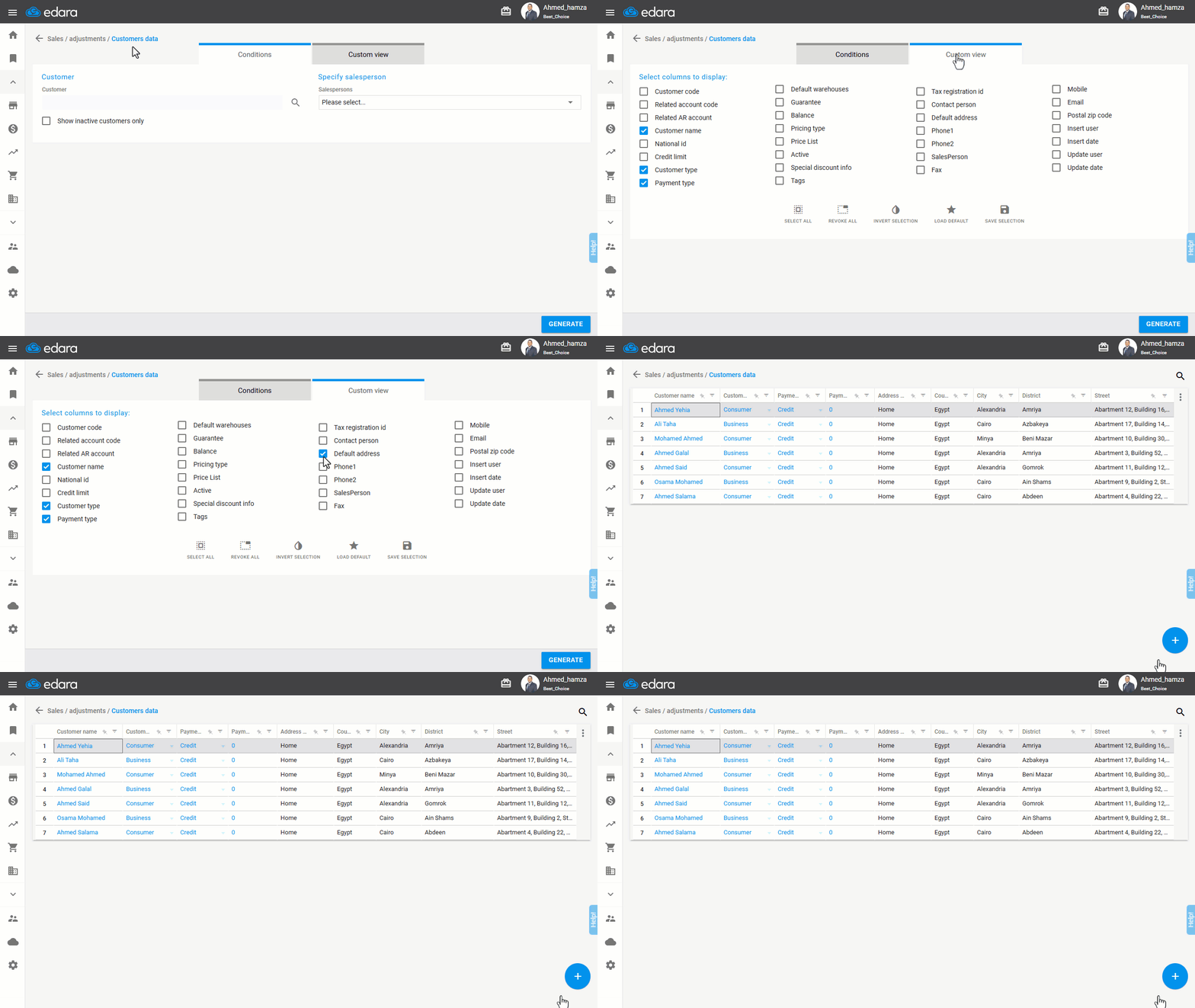
For instance, if you have many customers and want the default address to appear in the customer report for easier review, you can customize the column display to show this data directly.
Displaying a Customer's Default Address Data
- Go to the Sales module.
- Open the “Customers Data” page.
- Click on “Custom View”.
- Check the box "🔲" next to “Default Address”.
- Click “Generate”.
Note: You cannot edit a customer's address from the Customer Data page. If you need to make modifications, you can do so through the “Customers page”.
Frequently asked questions
Can I edit the customer’s address from the Customers Data page?
You cannot edit a customer's address from the Customer Data page. If you need to make modifications, you can do so through the “Customers page”.
If you encounter any challenges or have questions during these processes, you can contact our technical support team, who are ready to assist you at any time.