

Endorsing a Cheque (Converting Notes Receivables to Notes Payable)
Last updated:
Endorsing a cheque involves transferring ownership of it from the beneficiary to another party (the endorsee or second beneficiary) by writing a statement on the back of the cheque, such as "Pay to the order of...".
Endorsing a Cheque (Converting Notes Receivables to Notes Payable)
Firstly, ensure the receivable cheque is unpaid and not rejected, then:
- Go to the Accounting module.
- Open the “Cheque Management” page.
- Identify the cheque to be endorsed.
- Click on ⬇️ to open the cheque transfer window.
- Click “To Notes Payables” to access cheque transfer options.
- Choose the GI account for endorsement from the dropdown menu.
- Select the payables account.
- Click “Save”.
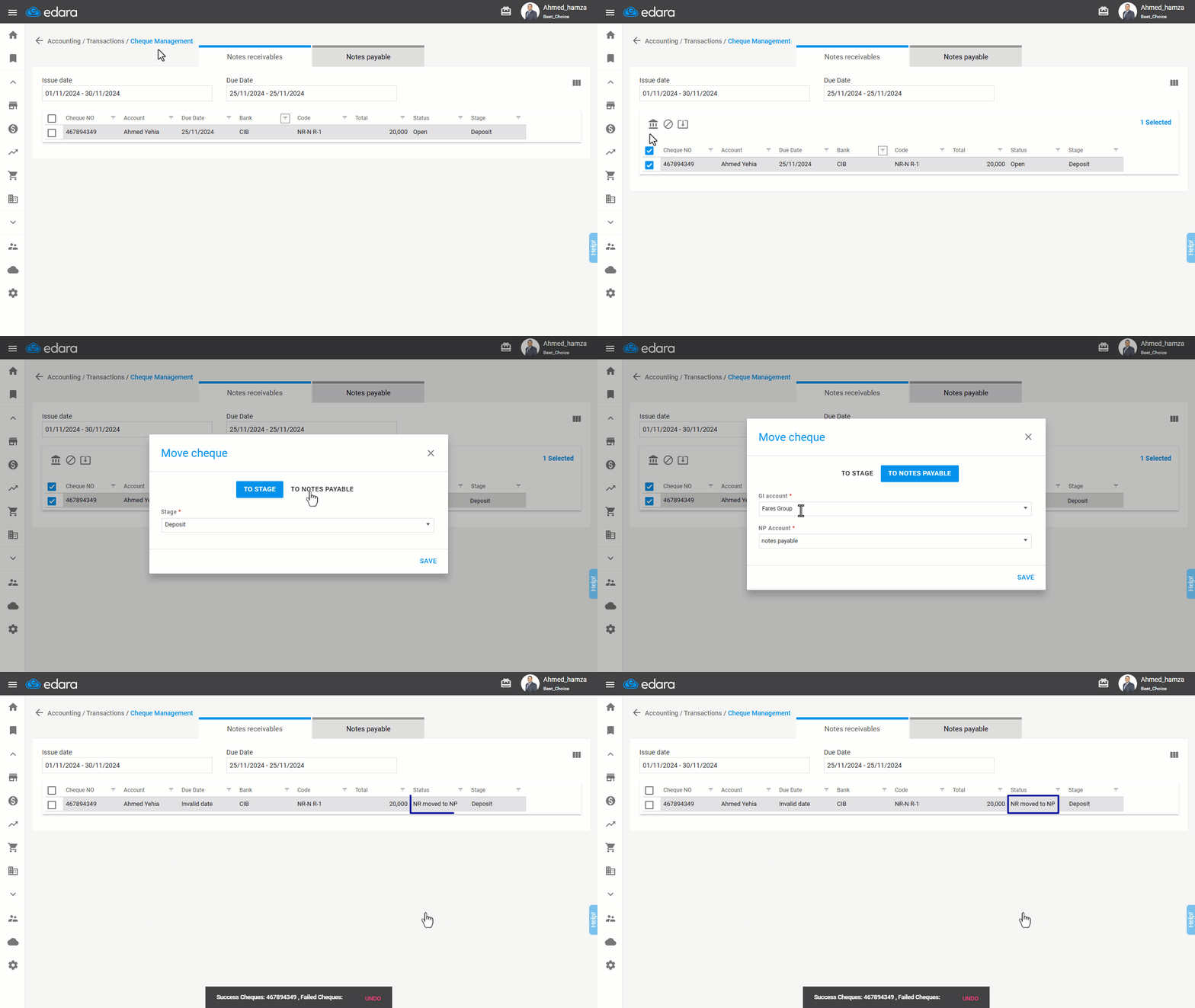
After completing the outlined steps, the status of the receivable check changes from "Unpaid" to “NR moved to NP” is created with the same cheque number, value, and bank details as the receivable cheque, but its status remains "Unpaid".
Note: Journal Entries Created for the Endorsement Process:
- Journal Entry for Closing the Notes Receivables Account (From Notes Payables Account to Notes Receivables Account).
- Journal Entry for Creating the Notes Payable Document (From Creditor Account (Supplier) to Notes Payables Account).
Frequently asked questions
Which journal entries are created when a cheque is endorsed?
Journal Entries Created for the Endorsement Process: Journal Entry for Closing the Notes Receivables Account (From Notes Payables Account to Notes Receivables Account), Journal Entry for Creating the Notes Payable Document (From Creditor Account (Supplier) to Notes Payables Account).
If you encounter any challenges or have questions during these processes, you can contact our technical support team, who are ready to assist you at any time.