

Entering Exchange Rates
Last updated:
The default exchange rate helps simplify data entry for users. For example, suppose a user is purchasing or selling a product or service from another country.
In that case, they can simply enter the amount in the foreign currency, and "Edara" will automatically convert it to the local currency using the default exchange rate.
Entering an Exchange Rate
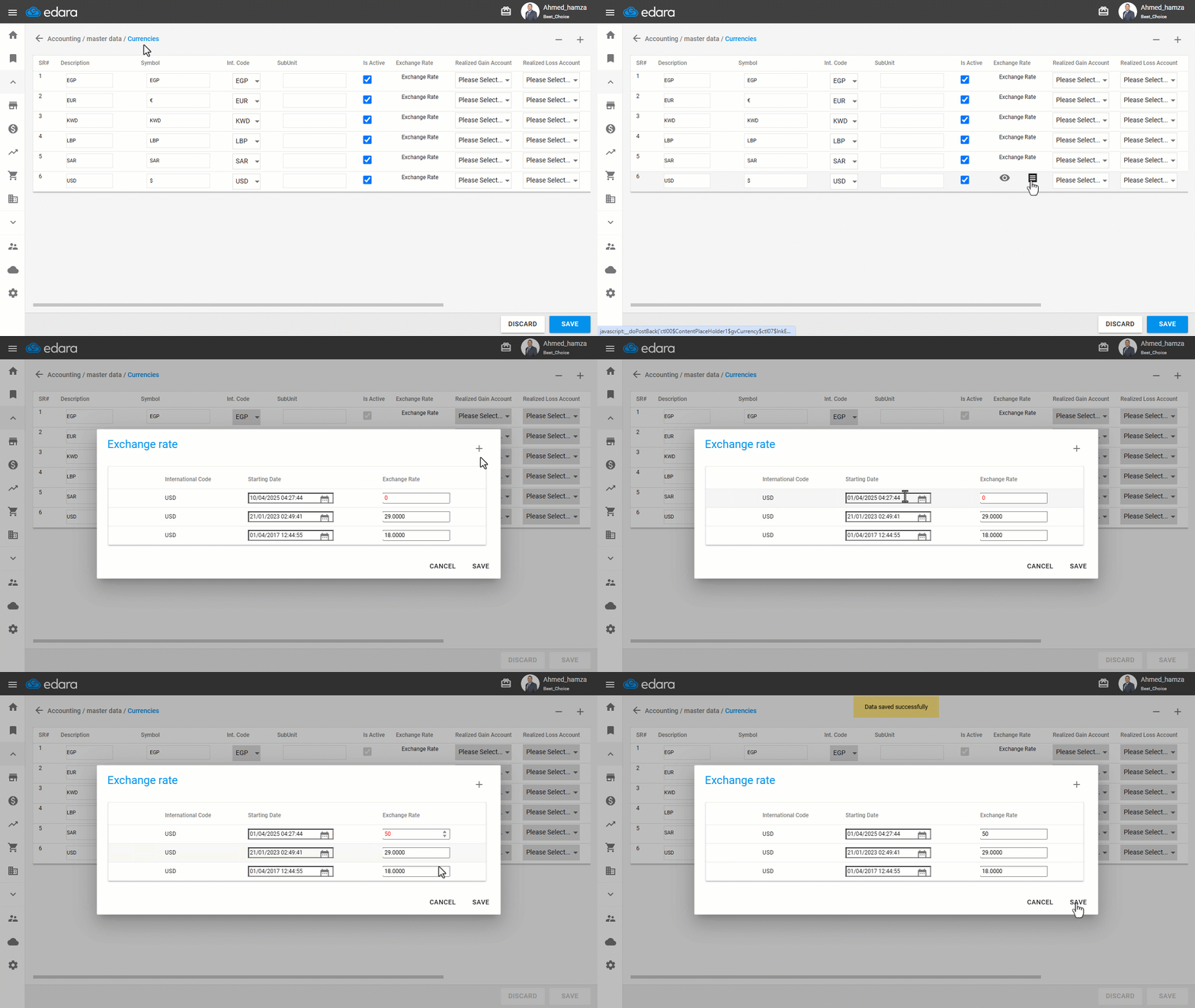
- Go to the “Accounting” module.
- Open the “Currencies”.
- Hover over Exchange Rate and click 📋.
- Click on the ➕ icon.
- Enter the exchange rate.
- Click on “Save”.
Note: The default exchange rate is an estimate and may differ from the actual rate. Users are advised to routinely review and update the default exchange rate to ensure accuracy.
Frequently asked questions
Is the default exchange rate the actual rate?
The default exchange rate is an estimate and may differ from the actual rate. Users are advised to routinely review and update the default exchange rate to ensure accuracy.
If you encounter any challenges or have questions during these processes, you can contact our technical support team, who are ready to assist you at any time.