

Checking stock Item prices
Last updated:
You can check stock item prices instantly by scanning the part number with the “Price Checker” app, even without an internet connection.
Checking stock Item prices

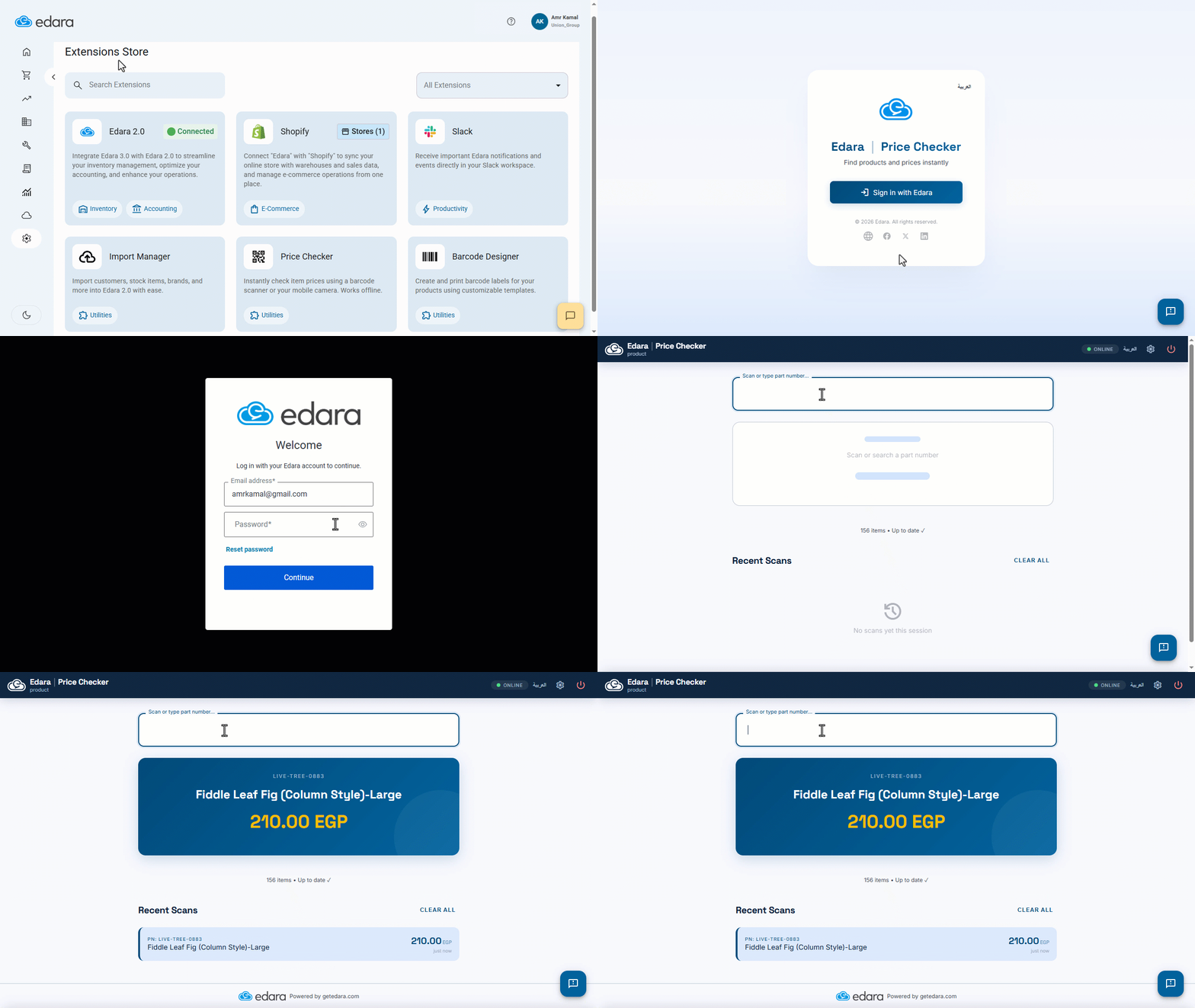
- Go to “System”.
- Open the “Extensions Store” page.
- Click on “Price Checker”.
- Click on “Sign in with Edara”.
- Enter your “Edara” account email and password.
- Scan the part number using a scanner or type it.
The stock item price will appear automatically, as shown in the following image.
Note: To use the app offline, you must log in at least once while connected to the internet so that the stock items data can be downloaded to your browser; you can then use it offline later.
Frequently asked questions
Does “Price Checker” work offline?
To use the app offline, you must log in at least once while connected to the internet so that the stock items data can be downloaded to your browser; you can then use it offline later.
If you encounter any challenges or have questions during these processes, you can contact our technical support team, who are ready to assist you at any time.