

Enabling Automatic Creation of Purchase Orders and Returns
Last updated:
Disabling the approval steps helps significantly speed up order processing times, leading to faster receipt and improved supplier satisfaction.
Enabling Automatic Creation of Purchase Orders and Returns
- Go to the Settings.
- Open the “Module Settings” page.
- Choose the “Purchase” module.
- Activate the settings: "Automatic related documents for SO" and "Automatic related documents for SR".
- Select the “Automatic related documents users” from the dropdown list.
- Click on “Save”.
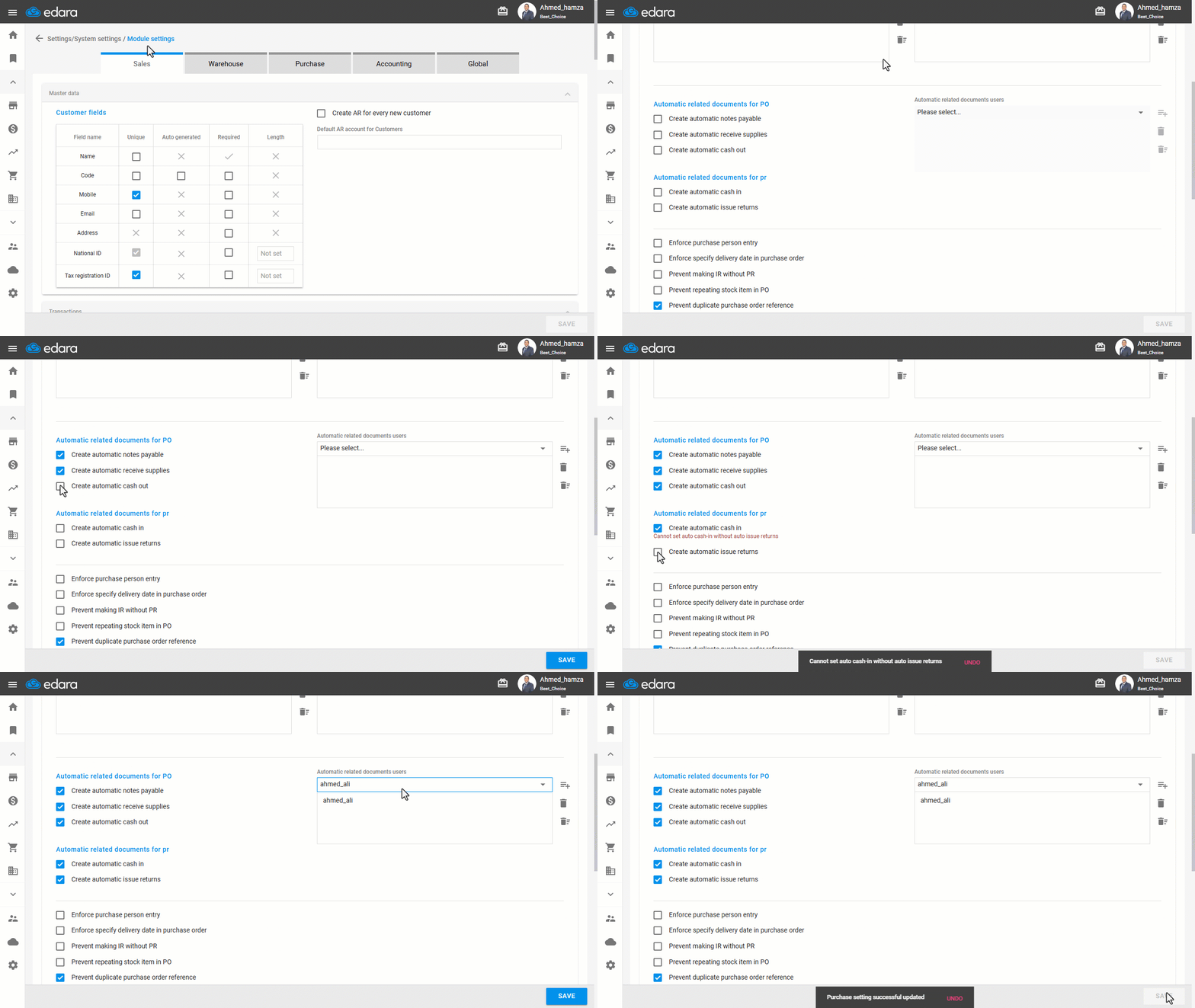
Note: If you want the cash in/out documents related to purchase or return orders to follow the approval workflow, simply leave the following options disabled: (Create automatic cash in - Create automatic cash out).
Frequently asked questions
How do I make the cash documents linked to a purchase order go through approvals?
If you want the cash in/out documents related to purchase or return orders to follow the approval workflow, simply leave the following options disabled: (Create automatic cash in - Create automatic cash out).
If you encounter any challenges or have questions during these processes, you can contact our technical support team, who are ready to assist you at any time.
Did this answer your question?