

Releasing an Issue Transfer
Last updated:
After an issue transfer order is rejected, it becomes necessary to release the order to reset warehouse balances. This ensures data consistency and accurate inventory records.
Releasing an Issue Transfer
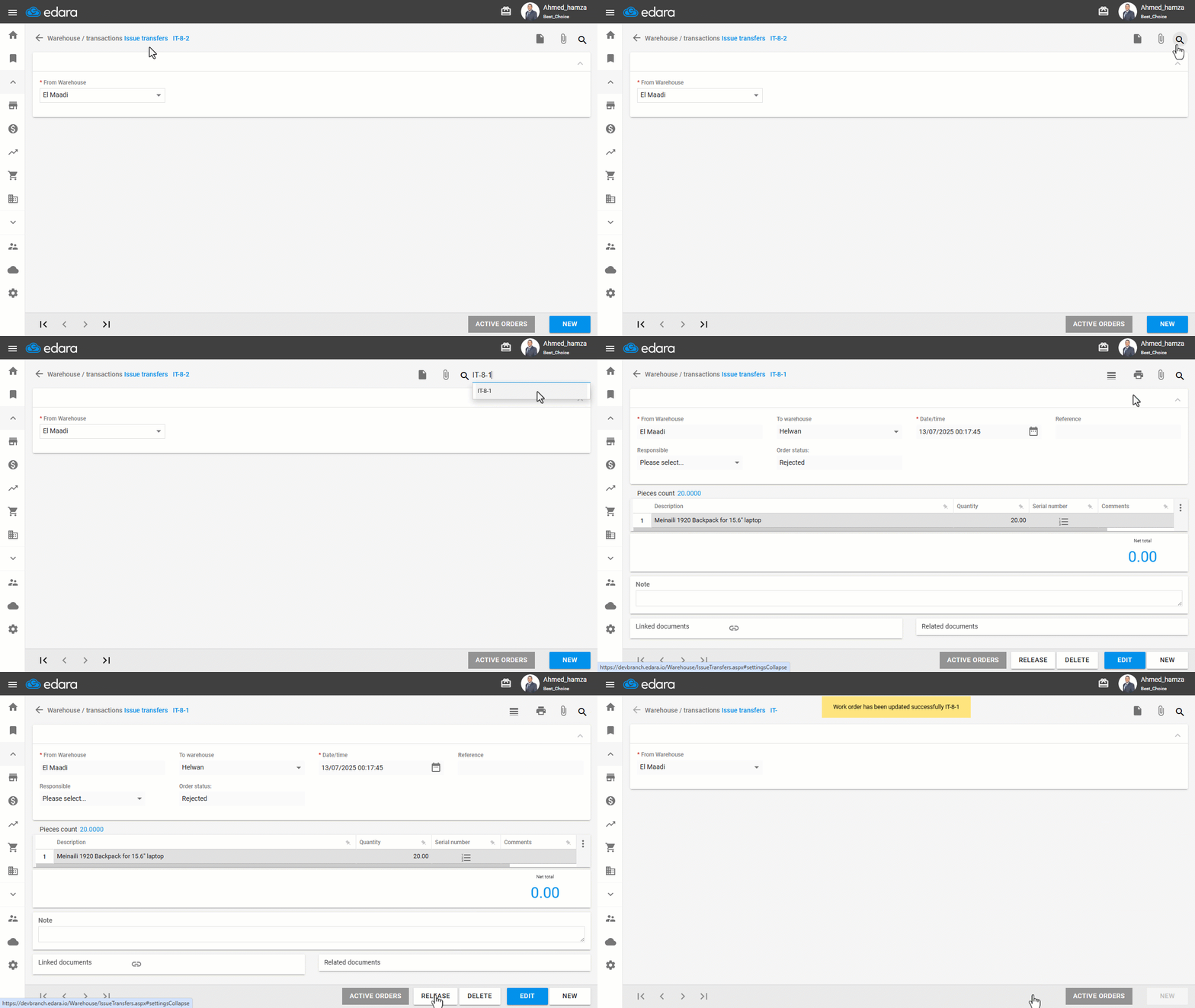
- Go to the Warehouse module.
- Open the “Issue Transfers” page.
- Use the 🔍 icon to search for the order by its code.
- Select the order.
- Click on “Release”.
Note: If the IT (Issue Transfer Order) is linked to a TR (Transfer Request) that you intend to delete, simply releasing the IT order is not enough. You must delete the IT order first, before deleting the related TR request.
Frequently asked questions
Is releasing an issue transfer enough to delete its linked transfer request?
If the IT (Issue Transfer Order) is linked to a TR (Transfer Request) that you intend to delete, simply releasing the IT order is not enough. You must delete the IT order first, before deleting the related TR request.
If you encounter any challenges or have questions during these processes, you can contact our technical support team, who are ready to assist you at any time.