

Editing an Issue Transfer
Last updated:
If an item transfer is mistakenly made to the wrong warehouse, “Edara” allows you to edit the issue transfer to redirect the stock items to the correct destination — regardless of whether the items have already been received or not.
Editing an Issue Transfer
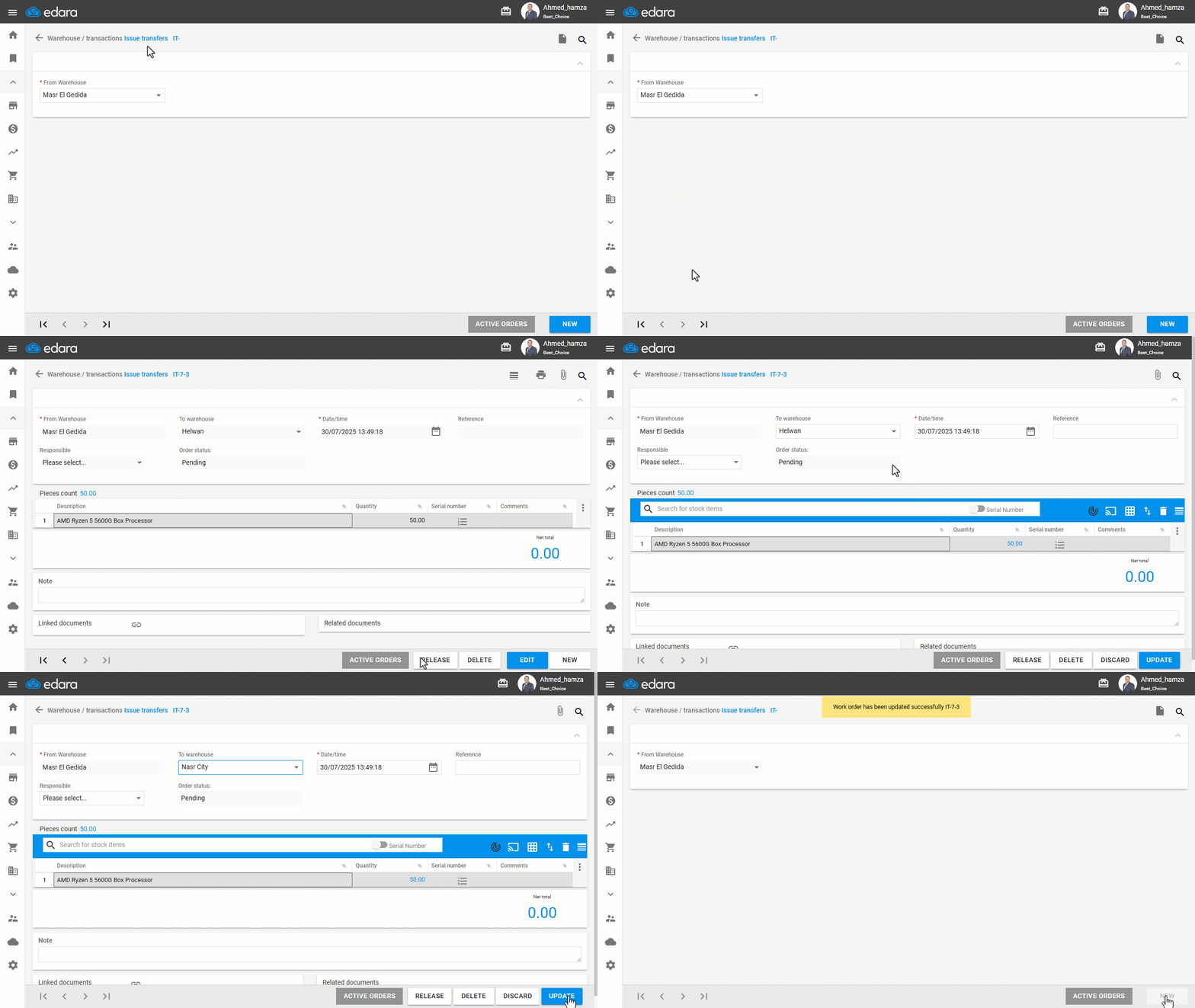
- Go to the Warehouse module.
- Open the “Issue Transfers” page.
- Search for the transfer document using the 🔍 icon, or scroll through using the navigation arrows.
- Click on “Edit”.
- Update the necessary details — such as the destination warehouse or any other relevant fields.
- Click on “Update”.
Note: If the issue transfer order has already been received, you must first delete the receive transfer document before editing the IT document using the steps above.
Frequently asked questions
Can I edit an issue transfer that was already received?
If the issue transfer order has already been received, you must first delete the receive transfer document before editing the IT document using the steps above.
If you encounter any challenges or have questions during these processes, you can contact our technical support team, who are ready to assist you at any time.
Did this answer your question?