

Filtering Sales Returns Approvals in Various Ways
Last updated:
"Edara" allows you to control which sales returns need to be displayed for approval by filtering based on date, warehouse, or both. Additionally, you can control the number of orders displayed per page, making it easier to review and make decisions quickly and accurately.
Filtering Sales Returns Approvals in Various Ways
- Go to the Sales module.
- Select “Sales Returns Approvals”.
- Choose the desired date from the dropdown menu or enter it manually.
- Select the warehouse to display returns associated with the specified warehouse.
Note: Your selections for date, warehouse, and page size are saved and will appear as defaults the next time you access this module.
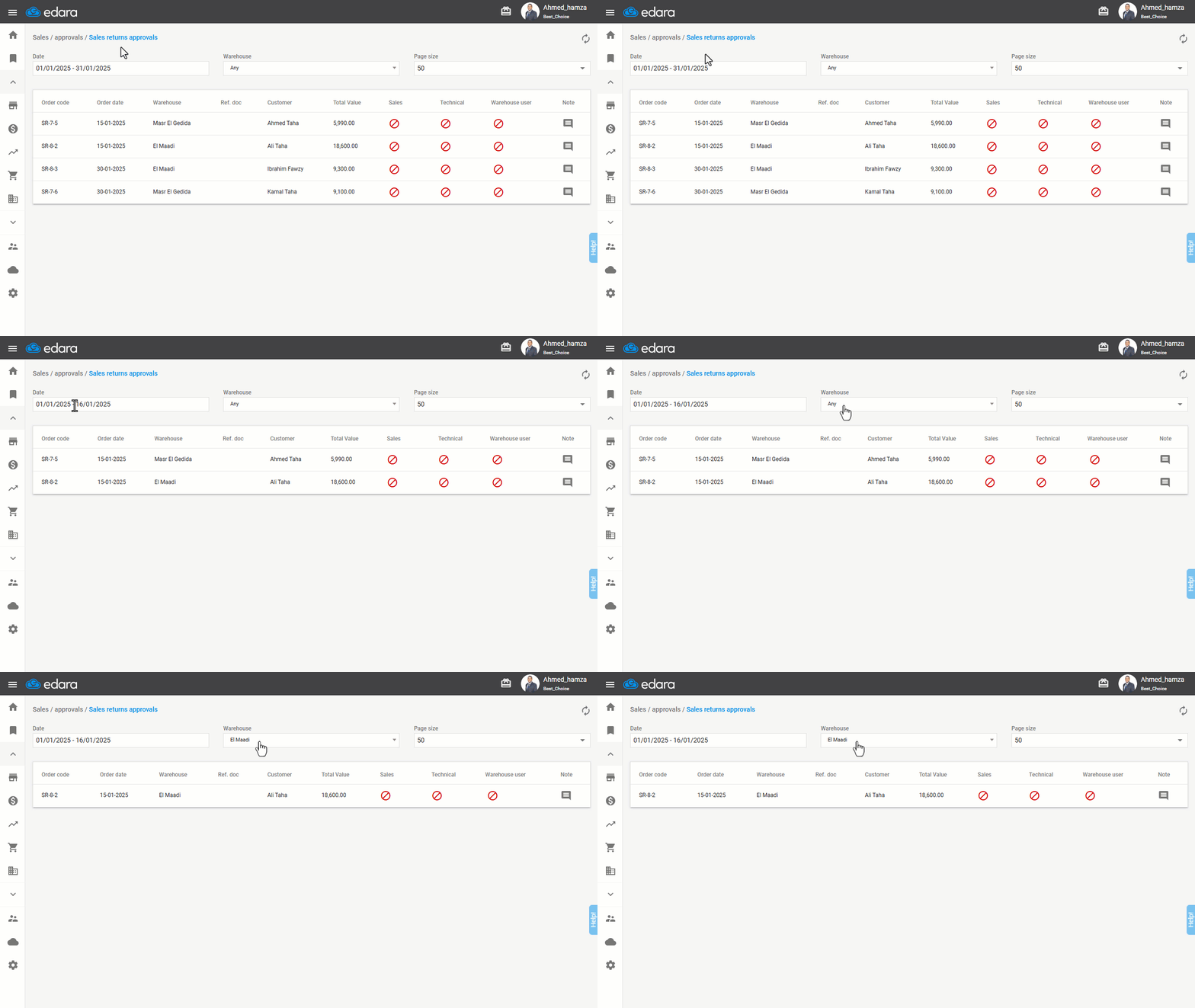
Note: You can adjust the number of orders displayed per page by modifying the page size setting.
Frequently asked questions
Does the system remember my filter selections?
Your selections for date, warehouse, and page size are saved and will appear as defaults the next time you access this module.
How do I change the number of orders per page?
You can adjust the number of orders displayed per page by modifying the page size setting.
If you encounter any challenges or have questions during these processes, you can contact our technical support team, who are ready to assist you at any time.