

Creating a Supplier
Last updated:
"Edara" allows you to register a new supplier's information to create purchase orders or perform any accounting transactions related to that supplier. Here’s how to do it.
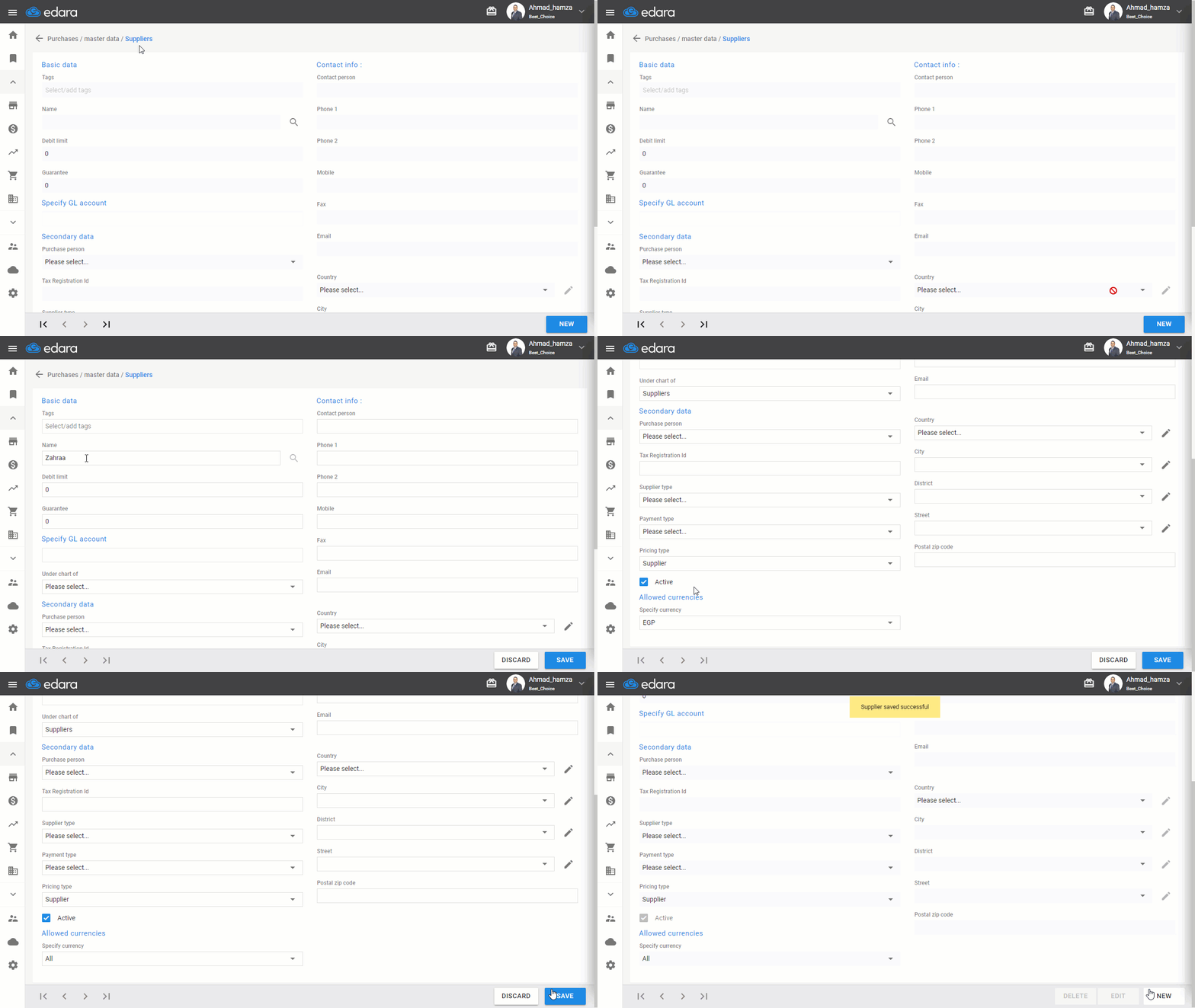
Steps to Create a Supplier
- Go to the Purchase Module.
- Select Supplier
- Click on “New”
- Enter the supplier's name
Note: If you want to create a new account for every supplier, ensure the option "Create AP for every new supplier" is enabled in the Module settings.
- Select "Suppliers" from the dropdown list “Under chart of”.
- Choose “Specify GL account” if you are linking the supplier to a previous supplier account.
Note: You can link the supplier's account to the customer account if the supplier is also a customer of the same business.
- Select the currency or leave it as All
- Complete the remaining secondary supplier data
- Click “Save”
Frequently asked questions
How do I create a new account for every supplier?
If you want to create a new account for every supplier, ensure the option "Create AP for every new supplier" is enabled in the Module settings.
If you encounter any challenges or have questions during these processes, you can contact our technical support team, who are ready to assist you at any time.