

Displaying the Material Requirements
Last updated:
By knowing the quantities of raw materials required for each production stage, you can plan and ensure uninterrupted production.
The “Material Requirements” page shows you future raw material needs, giving you a clear overview to secure stock and make informed decisions for efficient production management.
Displaying the Material Requirements
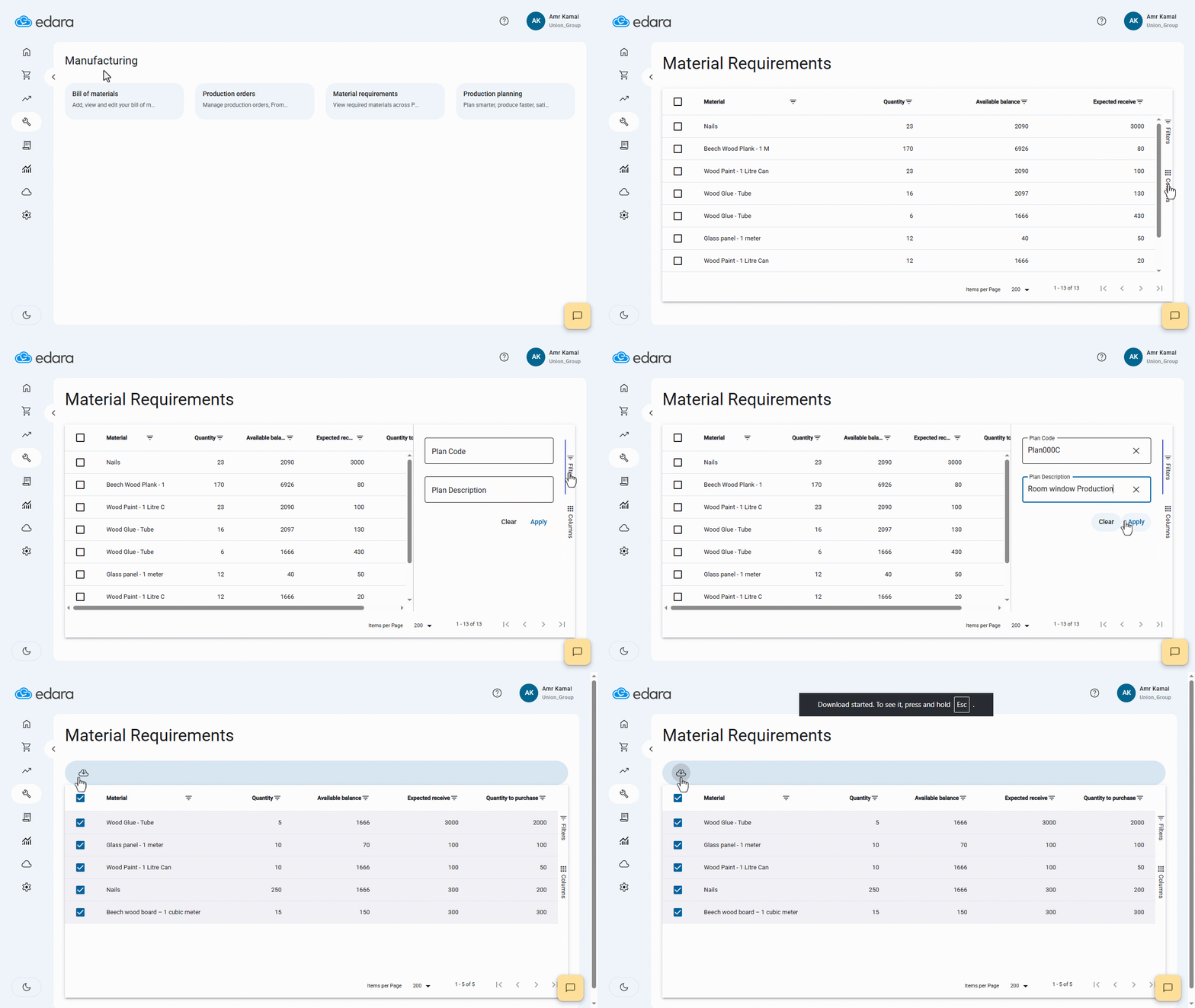
- Go to the “Manufacturing” module.
- Open the “Material Requirements” page.
- Click on “Columns”.
- Enable the columns you want to display.
- Click on “Filters”.
- Select the conditions you want to filter by.
- Click on “Apply”.
Note: You can export the Materials Requirements by selecting the required Materials and clicking on " ".
".
Frequently asked questions
Can I export the material requirements?
You can export the Materials Requirements by selecting the required Materials and clicking on " ".
".
If you encounter any challenges or have questions during these processes, you can contact our technical support team, who are ready to assist you at any time.
Did this answer your question?