

Adding Cheque Collection from a Specific Bank
Last updated:
When collecting cheques, you can specify the bank used for the collection and link it to the appropriate financial account to ensure that the collection is recorded correctly in the system.
Adding Cheque Collection from a Specific Bank

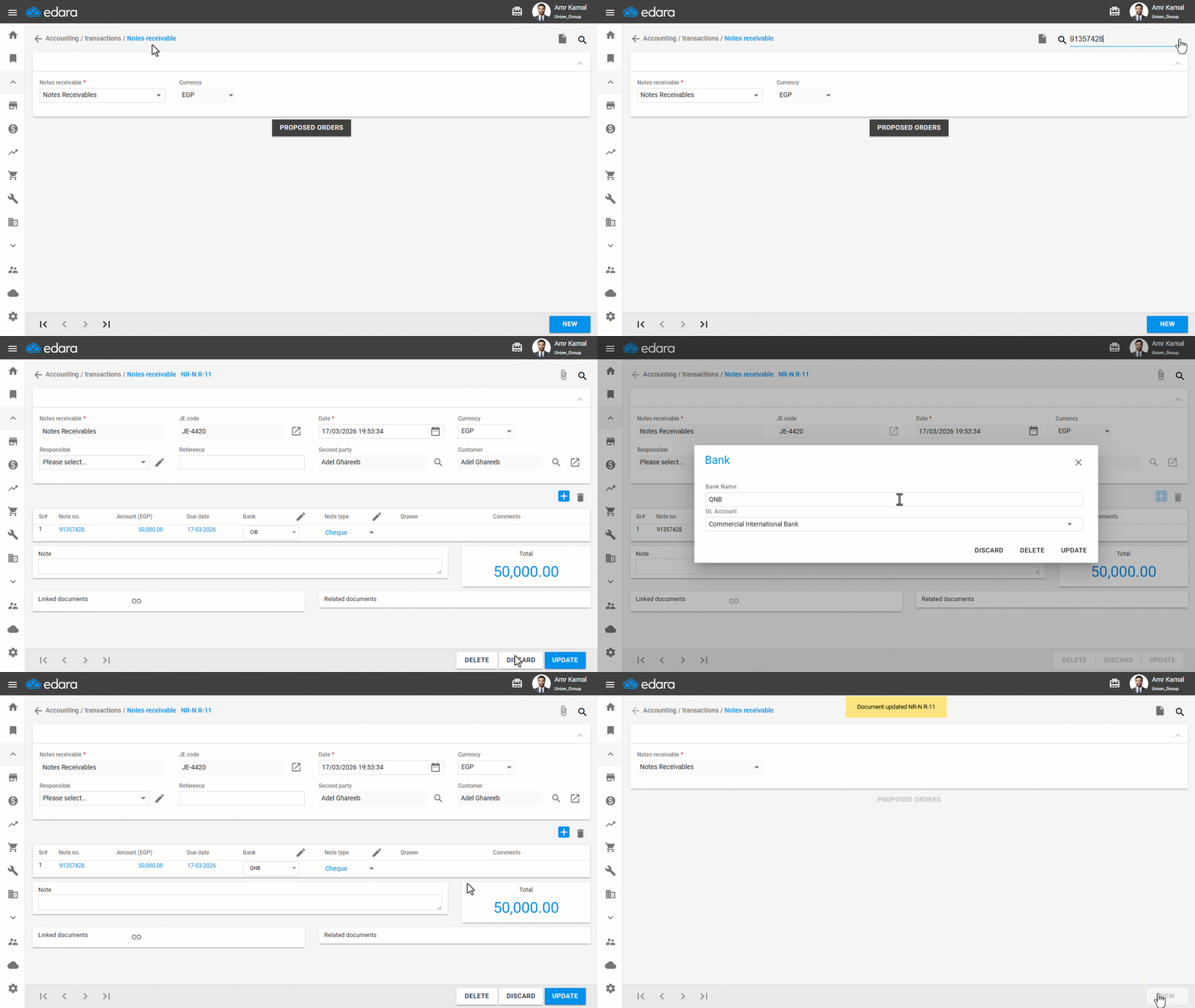
- Go to the “Accounting” module.
- Open the “Notes Receivable” page.
- Search for the note number using the “🔍” icon or the arrows at the bottom of the page.
- Click on “Edit”.
- Click on the edit icon “
 ” next to the Bank field.
 - Enter the Bank Name and the GL Account.
- Click on “Update”.
- Click on “Update”.
Note: You can also add cheque collection from a specific bank through the “Notes Payable” page.
Frequently asked questions
Can I add cheque collection from a specific bank on the Notes Payable page?
You can also add cheque collection from a specific bank through the “Notes Payable” page.
If you encounter any challenges or have questions during these processes, you can contact our technical support team, who are ready to assist you at any time.
Did this answer your question?